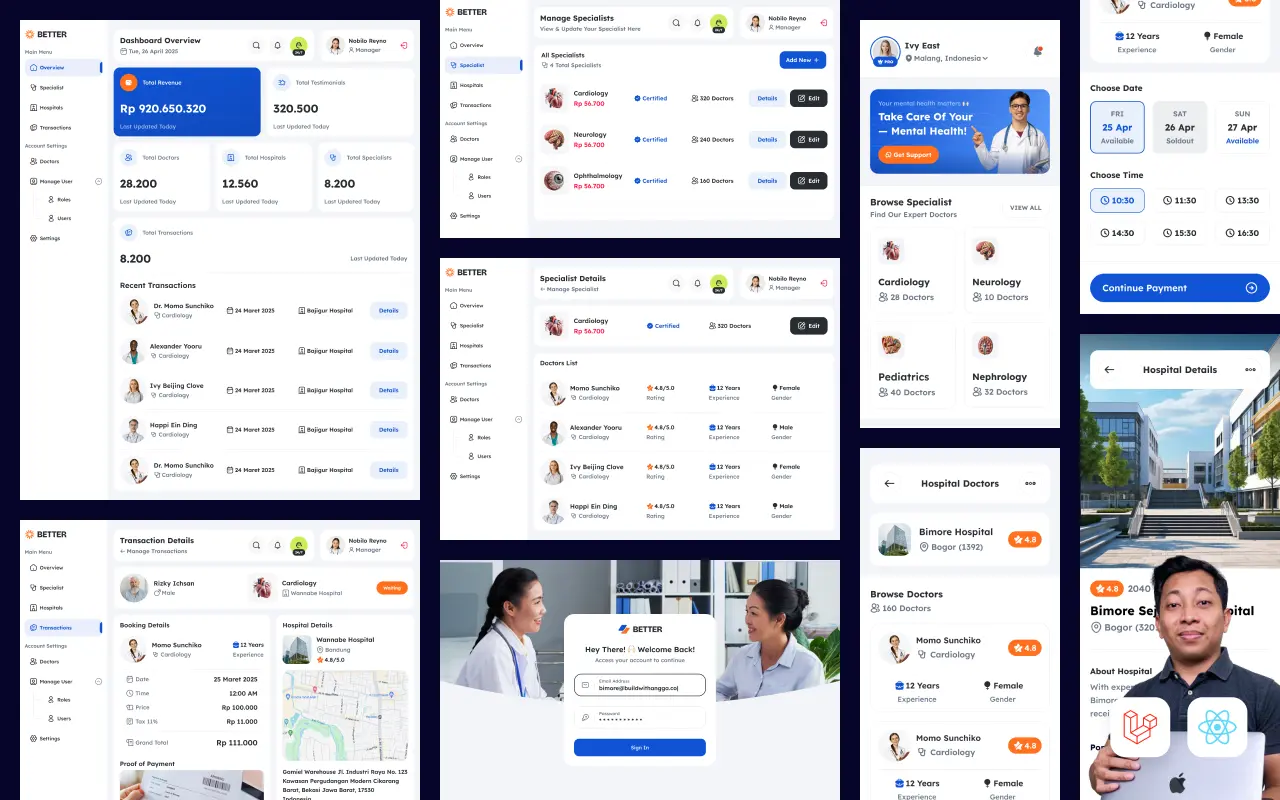
Tenang. Di tutorial ini, kita akan build sistem rumah sakit digital dari nol — mulai dari install Composer, setup Laravel 12, sampai pasien bisa booking jadwal dokter dan upload bukti pembayaran.
Yang bikin tutorial ini beda: kita pakai Service Repository Pattern. Pattern ini yang dipake di project-project enterprise. Kode jadi clean, testable, dan gampang di-maintain. Sekali paham pattern ini, level coding kamu naik drastis.
Kenapa Laravel 12 + Inertia React?
LARAVEL 12 (Released Feb 2025):

What's New:
├── PHP 8.2 - 8.4 support
├── Inertia 2 integration (official!)
├── React 19 starter kit
├── TypeScript by default
├── Tailwind CSS 4
├── shadcn/ui components
└── Zero breaking changes dari Laravel 11

The Best of Both Worlds:
├── Backend power of Laravel
├── Frontend experience of React
├── No need to build separate API
├── Single codebase, full-stack
└── SPA experience, server-side routing
Laravel officially adopt Inertia di 2025. Ini bukan lagi "experimental" — ini jadi cara recommended untuk build modern Laravel apps.
Apa yang Akan Kita Build
RUMAH SAKIT DIGITAL — USER FLOW:

┌─────────────────────────────────────────────────────────┐
│  1. PASIEN REGISTER/LOGIN                               │
│     └── Buat akun atau masuk                           │
└─────────────────────────────────────────────────────────┘
                          ▼
┌─────────────────────────────────────────────────────────┐
│  2. LIHAT DAFTAR DOKTER                                 │
│     └── Browse dokter by specialization                │
└─────────────────────────────────────────────────────────┘
                          ▼
┌─────────────────────────────────────────────────────────┐
│  3. PILIH JADWAL DOKTER                                 │
│     └── Pilih tanggal dan jam yang tersedia            │
└─────────────────────────────────────────────────────────┘
                          ▼
┌─────────────────────────────────────────────────────────┐
│  4. BOOKING APPOINTMENT                                 │
│     └── Isi keluhan, submit booking                    │
└─────────────────────────────────────────────────────────┘
                          ▼
┌─────────────────────────────────────────────────────────┐
│  5. UPLOAD BUKTI BAYAR                                  │
│     └── Transfer manual, upload bukti                  │
└─────────────────────────────────────────────────────────┘
                          ▼
┌─────────────────────────────────────────────────────────┐
│  6. ADMIN VERIFIKASI                                    │
│     └── Admin cek bukti, approve/reject                │
└─────────────────────────────────────────────────────────┘
                          ▼
┌─────────────────────────────────────────────────────────┐
│  7. APPOINTMENT CONFIRMED!                              │
│     └── Pasien dapat konfirmasi, siap berobat          │
└─────────────────────────────────────────────────────────┘
Simple flow, tapi covers konsep-konsep penting: authentication, CRUD, file upload, role-based access, dan state management.
Kenapa Service Repository Pattern?
Sebelum kita mulai, penting untuk paham kenapa kita pakai pattern ini.
TANPA PATTERN (Fat Controller):

Controller
├── Handle request
├── Validate data
├── Query database
├── Business logic
├── More queries
├── Format response
└── Return view

Masalah:
├── Controller jadi GEDE banget
├── Susah di-test
├── Code duplication
├── Susah di-maintain
└── Nightmare untuk tim besar
DENGAN SERVICE REPOSITORY PATTERN:

┌─────────────┐
│ Controller  │ ← Handle request & response SAJA
└──────┬──────┘
       │
       ▼
┌─────────────┐
│   Service   │ ← Business logic & validation
└──────┬──────┘
       │
       ▼
┌─────────────┐
│ Repository  │ ← Database queries
└──────┬──────┘
       │
       ▼
┌─────────────┐
│    Model    │ ← Data structure & relationships
└─────────────┘

Benefits:
├── Each layer punya 1 job (Single Responsibility)
├── Gampang di-test (mock repository)
├── Reusable (service bisa dipake di mana aja)
├── Clean & readable
└── Scalable untuk project besar
Trust me, begitu kamu terbiasa dengan pattern ini, kamu gak akan mau balik ke fat controller.
Prerequisites — Yang Perlu Disiapkan
Sebelum mulai, pastikan sudah install:
CHECKLIST:

□ PHP 8.2 atau lebih baru
  └── Cek: php -v
  └── Expected: PHP 8.2.x atau 8.3.x atau 8.4.x

□ Composer (PHP package manager)
  └── Cek: composer -V
  └── Expected: Composer version 2.x.x

□ Node.js 18 atau lebih baru
  └── Cek: node -v
  └── Expected: v18.x.x atau lebih

□ NPM (biasanya ikut Node.js)
  └── Cek: npm -v

□ MySQL atau PostgreSQL
  └── Bisa pakai XAMPP, Laragon, atau install standalone
  └── Atau pakai DBngin/TablePlus untuk Mac

□ Code Editor
  └── VS Code (recommended)
  └── Install extensions: PHP Intelephense, Laravel Extra Intellisense

□ Terminal/Command Line
  └── Windows: Command Prompt, PowerShell, atau Git Bash
  └── Mac/Linux: Terminal
Install Composer (Jika Belum Ada)
Composer adalah package manager untuk PHP — mirip npm untuk Node.js.
Windows:
# Download installer dari <https://getcomposer.org/download/>
# Jalankan Composer-Setup.exe
# Follow wizard, otomatis add ke PATH
Mac (dengan Homebrew):
brew install composer
Linux (Ubuntu/Debian):
# Download installer
curl -sS <https://getcomposer.org/installer> -o composer-setup.php

# Install globally
sudo php composer-setup.php --install-dir=/usr/local/bin --filename=composer

# Verify
composer -V
Install Laravel Installer
Dengan Laravel Installer, kita bisa create project dengan command laravel new.
composer global require laravel/installer
Pastikan Composer global bin ada di PATH:
# Mac/Linux - tambahkan ke ~/.bashrc atau ~/.zshrc
export PATH="$HOME/.composer/vendor/bin:$PATH"

# Windows - biasanya otomatis, tapi kalau tidak:
# Add C:\\Users\\{username}\\AppData\\Roaming\\Composer\\vendor\\bin ke System PATH
Verify installation:
laravel --version
# Expected: Laravel Installer x.x.x
Setup Complete Checklist
FINAL CHECKLIST:

□ php -v                    → PHP 8.2+
□ composer -V               → Composer 2.x
□ node -v                   → Node 18+
□ npm -v                    → NPM 9+
□ laravel --version         → Laravel Installer
□ MySQL/PostgreSQL running
□ Code editor ready

All checked? Let's build! 🚀
Bagian 2: Install Laravel 12 & Setup Project
Sekarang kita create project Laravel 12 dengan React starter kit.
Create Project
Buka terminal, navigate ke folder dimana kamu mau simpan project:
# Contoh: ke folder Projects
cd ~/Projects

# Create Laravel project
laravel new rumah-sakit-digital
Saat installer jalan, kamu akan ditanya beberapa pilihan:
INSTALLATION PROMPTS:

┌ Would you like to install a starter kit?
│ ● React with Inertia    ← PILIH INI
│ ○ Vue with Inertia
│ ○ Livewire
│ ○ None
└

┌ Which testing framework do you prefer?
│ ● Pest    ← PILIH INI (modern, lebih clean)
│ ○ PHPUnit
└

┌ Which database will your application use?
│ ○ SQLite
│ ● MySQL    ← PILIH INI (atau PostgreSQL)
│ ○ MariaDB
│ ○ PostgreSQL
└

┌ Would you like to run the default database migrations?
│ ● Yes    ← PILIH YES
│ ○ No
└
Installer akan:
- Create Laravel project
- Install Inertia + React
- Setup TypeScript
- Install Tailwind CSS
- Install shadcn/ui
- Run npm install
- Run initial migrations
Tunggu sampai selesai (bisa 2-5 menit tergantung koneksi).
Masuk ke Project
cd rumah-sakit-digital
Setup Database
Buka file .env dan update database configuration:
DB_CONNECTION=mysql
DB_HOST=127.0.0.1
DB_PORT=3306
DB_DATABASE=rumah_sakit_db
DB_USERNAME=root
DB_PASSWORD=
Buat database di MySQL:
CREATE DATABASE rumah_sakit_db;
Atau pakai command line:
mysql -u root -p -e "CREATE DATABASE rumah_sakit_db"
Jalankan Aplikasi
Kita butuh 2 terminal:
Terminal 1 — Vite (Frontend):
npm run dev
Terminal 2 — Laravel (Backend):
php artisan serve
Buka browser: http://localhost:8000
Kamu harusnya lihat Laravel welcome page dengan tombol Login/Register.
Test Authentication
- Click Register
- Isi form (name, email, password)
- Submit
- Kamu akan di-redirect ke Dashboard
Authentication sudah working out of the box! 🎉
Folder Structure Explained
Mari kita pahami struktur folder yang ter-generate:
rumah-sakit-digital/
│
├── app/                        # Backend Laravel
│   ├── Http/
│   │   ├── Controllers/        # Request handlers
│   │   └── Middleware/         # Request filters
│   ├── Models/                 # Eloquent models
│   └── Providers/              # Service providers
│
├── resources/
│   ├── js/                     # Frontend React
│   │   ├── components/         # Reusable components
│   │   │   └── ui/             # shadcn/ui components
│   │   ├── hooks/              # Custom React hooks
│   │   ├── layouts/            # Layout components
│   │   ├── lib/                # Utilities
│   │   ├── pages/              # Page components (Inertia)
│   │   │   ├── Auth/           # Login, Register, etc.
│   │   │   ├── Dashboard.tsx   # Dashboard page
│   │   │   └── Welcome.tsx     # Homepage
│   │   └── types/              # TypeScript definitions
│   │
│   └── views/
│       └── app.blade.php       # Single Blade template (Inertia root)
│
├── routes/
│   ├── web.php                 # Web routes (Inertia)
│   └── auth.php                # Auth routes
│
├── database/
│   ├── migrations/             # Database migrations
│   └── seeders/                # Data seeders
│
├── .env                        # Environment config
├── vite.config.ts              # Vite configuration
├── tailwind.config.js          # Tailwind configuration
└── tsconfig.json               # TypeScript configuration
Inertia — How It Works
Inertia adalah "glue" antara Laravel dan React. Begini cara kerjanya:
TRADITIONAL SPA:
┌──────────┐    API calls    ┌──────────┐
│  React   │ ◄────────────► │  Laravel │
│(separate)│    JSON         │  (API)   │
└──────────┘                 └──────────┘

INERTIA:
┌─────────────────────────────────────────┐
│           SINGLE PROJECT                │
│  ┌──────────┐         ┌──────────────┐ │
│  │  React   │ ◄─────► │   Laravel    │ │
│  │  (View)  │ Inertia │ (Controller) │ │
│  └──────────┘         └──────────────┘ │
└─────────────────────────────────────────┘
Di Laravel controller, instead of returning Blade view:
// Traditional Blade
return view('users.show', ['user' => $user]);

// Inertia + React
return Inertia::render('Users/Show', ['user' => $user]);
React component menerima data sebagai props:
// resources/js/pages/Users/Show.tsx
interface Props {
    user: {
        id: number;
        name: string;
        email: string;
    };
}

export default function Show({ user }: Props) {
    return (
        <div>
            <h1>{user.name}</h1>
            <p>{user.email}</p>
        </div>
    );
}
Simple, kan? Backend tetap Laravel-style, frontend tetap React-style. Best of both worlds.
Verify Setup
Cek beberapa hal untuk memastikan setup benar:
VERIFICATION CHECKLIST:

□ <http://localhost:8000> tampil homepage
□ Register new user works
□ Login works
□ Dashboard accessible after login
□ Logout works
□ No errors di terminal

All good? Lanjut ke database design! 🚀
Bagian 3: Review ERD & Buat Migrations
Sebelum coding fitur, kita perlu design database dengan benar. Di bagian ini kita akan:
- Review ERD (Entity Relationship Diagram)
- Buat semua migrations
- Understand table relationships
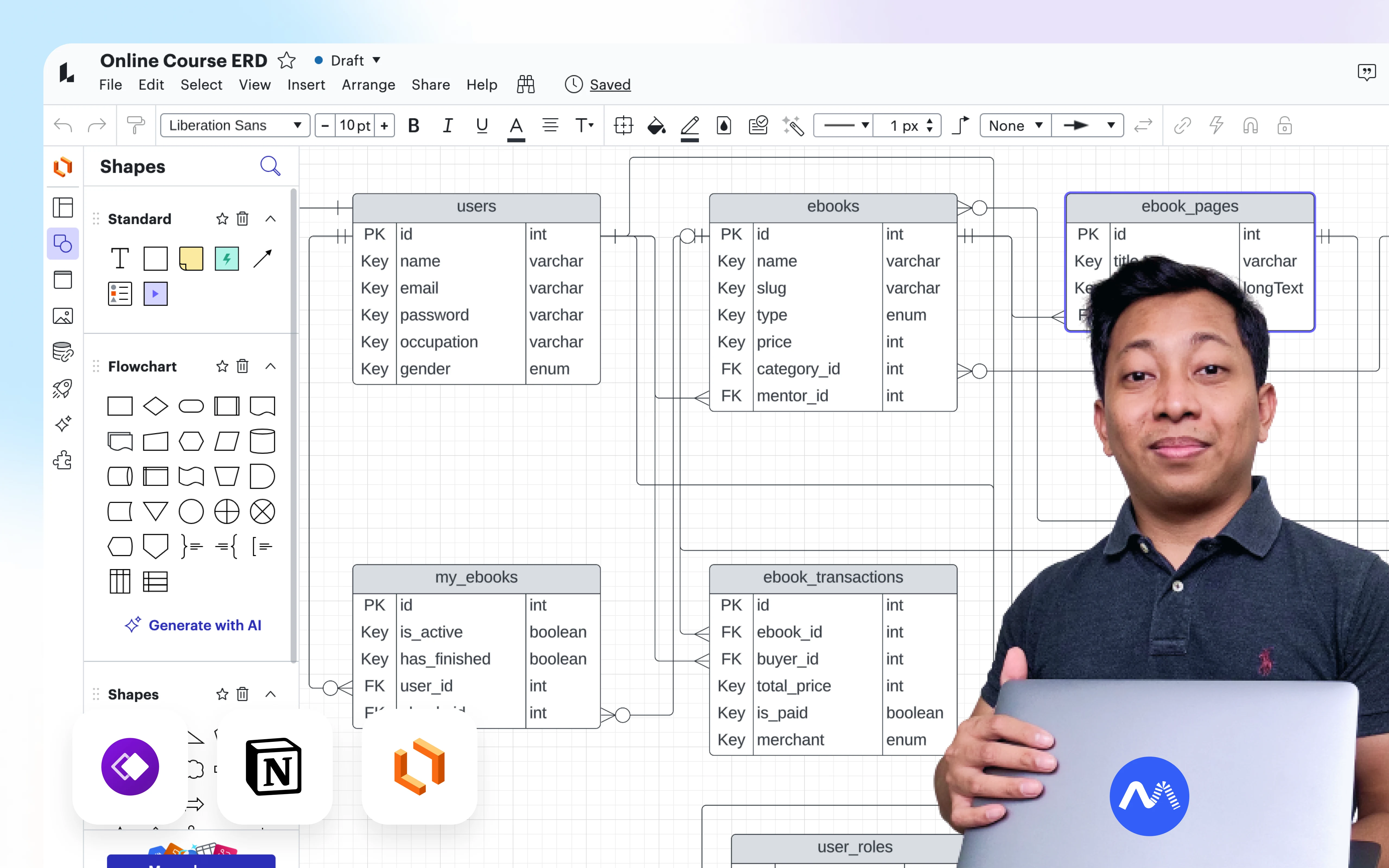
ERD — Database Design
┌─────────────────┐
│     USERS       │
├─────────────────┤
│ id              │
│ name            │
│ email           │
│ password        │
│ role ────────────────┐
└────────┬────────┘    │
         │             │
    ┌────┴────┐        │
    │         │        │
    ▼         ▼        │
┌────────┐ ┌────────┐  │
│PATIENTS│ │DOCTORS │  │
├────────┤ ├────────┤  │   role = 'admin' | 'doctor' | 'patient'
│user_id │ │user_id │  │
│medical#│ │special.│◄─┘
│phone   │ │license │
│birth   │ │fee     │
│gender  │ │photo   │
│address │ │active  │
└───┬────┘ └───┬────┘
    │          │
    │          │ 1:N
    │          ▼
    │     ┌──────────┐
    │     │SCHEDULES │
    │     ├──────────┤
    │     │doctor_id │
    │     │day_of_wk │
    │     │start_time│
    │     │end_time  │
    │     │quota     │
    │     │room      │
    │     └────┬─────┘
    │          │
    │    1:N   │   1:N
    │          │
    ▼          ▼
┌─────────────────────────┐
│      APPOINTMENTS       │
├─────────────────────────┤
│ patient_id (FK)         │
│ doctor_id (FK)          │
│ schedule_id (FK)        │
│ appointment_date        │
│ queue_number            │
│ status                  │
│ complaint               │
└───────────┬─────────────┘
            │
            │ 1:1
            ▼
┌─────────────────────────┐
│       PAYMENTS          │
├─────────────────────────┤
│ appointment_id (FK)     │
│ amount                  │
│ proof_image             │
│ status                  │
│ verified_by             │
│ notes                   │
└─────────────────────────┘
Relationships Explained
RELATIONSHIPS:

User ──1:1──► Patient    (User bisa jadi Patient)
User ──1:1──► Doctor     (User bisa jadi Doctor)
Doctor ──1:N──► Schedule (Doctor punya banyak Schedule)
Patient ──1:N──► Appointment (Patient punya banyak Appointment)
Doctor ──1:N──► Appointment (Doctor punya banyak Appointment)
Schedule ──1:N──► Appointment (Schedule punya banyak Appointment)
Appointment ──1:1──► Payment (Appointment punya 1 Payment)
Create Migrations
1. Update Users Table — Add Role
php artisan make:migration add_role_to_users_table
Edit file database/migrations/xxxx_add_role_to_users_table.php:
<?php

use Illuminate\\Database\\Migrations\\Migration;
use Illuminate\\Database\\Schema\\Blueprint;
use Illuminate\\Support\\Facades\\Schema;

return new class extends Migration
{
    public function up(): void
    {
        Schema::table('users', function (Blueprint $table) {
            $table->enum('role', ['admin', 'doctor', 'patient'])
                  ->default('patient')
                  ->after('password');
        });
    }

    public function down(): void
    {
        Schema::table('users', function (Blueprint $table) {
            $table->dropColumn('role');
        });
    }
};
2. Create Patients Table
php artisan make:migration create_patients_table
Edit migration:
<?php

use Illuminate\\Database\\Migrations\\Migration;
use Illuminate\\Database\\Schema\\Blueprint;
use Illuminate\\Support\\Facades\\Schema;

return new class extends Migration
{
    public function up(): void
    {
        Schema::create('patients', function (Blueprint $table) {
            $table->id();
            $table->foreignId('user_id')->constrained()->onDelete('cascade');
            $table->string('medical_record_number')->unique();
            $table->string('phone', 20);
            $table->date('birth_date');
            $table->enum('gender', ['male', 'female']);
            $table->text('address');
            $table->timestamps();

            // Indexes
            $table->index('medical_record_number');
            $table->index('phone');
        });
    }

    public function down(): void
    {
        Schema::dropIfExists('patients');
    }
};
3. Create Doctors Table
php artisan make:migration create_doctors_table
<?php

use Illuminate\\Database\\Migrations\\Migration;
use Illuminate\\Database\\Schema\\Blueprint;
use Illuminate\\Support\\Facades\\Schema;

return new class extends Migration
{
    public function up(): void
    {
        Schema::create('doctors', function (Blueprint $table) {
            $table->id();
            $table->foreignId('user_id')->constrained()->onDelete('cascade');
            $table->string('specialization');
            $table->string('license_number')->nullable(); // Nomor STR
            $table->decimal('consultation_fee', 12, 2)->default(0);
            $table->string('photo')->nullable();
            $table->text('bio')->nullable();
            $table->boolean('is_active')->default(true);
            $table->timestamps();

            // Indexes
            $table->index('specialization');
            $table->index('is_active');
        });
    }

    public function down(): void
    {
        Schema::dropIfExists('doctors');
    }
};
4. Create Schedules Table
php artisan make:migration create_schedules_table
<?php

use Illuminate\\Database\\Migrations\\Migration;
use Illuminate\\Database\\Schema\\Blueprint;
use Illuminate\\Support\\Facades\\Schema;

return new class extends Migration
{
    public function up(): void
    {
        Schema::create('schedules', function (Blueprint $table) {
            $table->id();
            $table->foreignId('doctor_id')->constrained()->onDelete('cascade');
            $table->tinyInteger('day_of_week'); // 0=Sunday, 1=Monday, ..., 6=Saturday
            $table->time('start_time');
            $table->time('end_time');
            $table->integer('quota')->default(20);
            $table->string('room')->nullable();
            $table->boolean('is_active')->default(true);
            $table->timestamps();

            // Indexes
            $table->index(['doctor_id', 'day_of_week']);
            $table->index('is_active');
        });
    }

    public function down(): void
    {
        Schema::dropIfExists('schedules');
    }
};
5. Create Appointments Table
php artisan make:migration create_appointments_table
<?php

use Illuminate\\Database\\Migrations\\Migration;
use Illuminate\\Database\\Schema\\Blueprint;
use Illuminate\\Support\\Facades\\Schema;

return new class extends Migration
{
    public function up(): void
    {
        Schema::create('appointments', function (Blueprint $table) {
            $table->id();
            $table->foreignId('patient_id')->constrained()->onDelete('cascade');
            $table->foreignId('doctor_id')->constrained()->onDelete('cascade');
            $table->foreignId('schedule_id')->constrained()->onDelete('cascade');
            $table->date('appointment_date');
            $table->integer('queue_number');
            $table->enum('status', ['pending', 'confirmed', 'completed', 'cancelled'])
                  ->default('pending');
            $table->text('complaint')->nullable();
            $table->timestamps();

            // Indexes
            $table->index(['doctor_id', 'appointment_date']);
            $table->index(['patient_id', 'status']);
            $table->index('status');
        });
    }

    public function down(): void
    {
        Schema::dropIfExists('appointments');
    }
};
6. Create Payments Table
php artisan make:migration create_payments_table
<?php

use Illuminate\\Database\\Migrations\\Migration;
use Illuminate\\Database\\Schema\\Blueprint;
use Illuminate\\Support\\Facades\\Schema;

return new class extends Migration
{
    public function up(): void
    {
        Schema::create('payments', function (Blueprint $table) {
            $table->id();
            $table->foreignId('appointment_id')->constrained()->onDelete('cascade');
            $table->decimal('amount', 12, 2);
            $table->string('payment_method')->default('manual_transfer');
            $table->string('proof_image')->nullable();
            $table->enum('status', ['pending', 'verified', 'rejected'])
                  ->default('pending');
            $table->timestamp('verified_at')->nullable();
            $table->foreignId('verified_by')->nullable()->constrained('users')->nullOnDelete();
            $table->text('notes')->nullable();
            $table->timestamps();

            // Indexes
            $table->index('status');
            $table->index('appointment_id');
        });
    }

    public function down(): void
    {
        Schema::dropIfExists('payments');
    }
};
Run Migrations
Setelah semua migration files dibuat:
php artisan migrate
Expected output:
INFO  Running migrations.

2025_01_28_000001_add_role_to_users_table .......... 15.45ms DONE
2025_01_28_000002_create_patients_table ............ 22.31ms DONE
2025_01_28_000003_create_doctors_table ............. 18.72ms DONE
2025_01_28_000004_create_schedules_table ........... 16.89ms DONE
2025_01_28_000005_create_appointments_table ........ 24.15ms DONE
2025_01_28_000006_create_payments_table ............ 19.43ms DONE
Verify Database
Cek database kamu, harusnya ada tables:
TABLES IN rumah_sakit_db:

├── users (updated with role column)
├── patients
├── doctors
├── schedules
├── appointments
├── payments
├── ... (other Laravel default tables)
Migration Tips
TIPS MIGRATION:

1. Rollback jika ada error:
   php artisan migrate:rollback

2. Fresh migrate (drop all, re-migrate):
   php artisan migrate:fresh

3. Check migration status:
   php artisan migrate:status

4. Create migration dengan model:
   php artisan make:model Doctor -m
   (otomatis buat model + migration)
Database Design Principles
YANG KITA TERAPKAN:

✓ Foreign Keys
  └── Menjaga data integrity
  └── onDelete('cascade') untuk auto-delete related records

✓ Indexes
  └── Speed up queries yang sering dipakai
  └── Index columns yang sering di-WHERE atau di-JOIN

✓ Proper Data Types
  └── enum untuk values yang terbatas
  └── decimal untuk money (bukan float!)
  └── text untuk string panjang

✓ Nullable dengan Purpose
  └── nullable() hanya untuk field yang memang optional
  └── Default values untuk yang wajib

✓ Timestamps
  └── created_at, updated_at otomatis
Bagian 3 Checkpoint
DATABASE SETUP COMPLETE:

□ ERD reviewed dan dipahami
□ 6 migration files created:
  ├── add_role_to_users_table
  ├── create_patients_table
  ├── create_doctors_table
  ├── create_schedules_table
  ├── create_appointments_table
  └── create_payments_table
□ php artisan migrate SUCCESS
□ Tables verified di database

Ready for Models & Seeders! 🚀
Di bagian selanjutnya, kita akan buat Eloquent Models dengan relationships dan Seeders untuk data dummy. Let's go! 🏥
Bagian 4: Models & Seeders
Database sudah siap. Sekarang kita buat Eloquent Models dengan relationships, lalu isi dengan data dummy menggunakan Seeders.
Create Models
Kita akan buat models untuk setiap table. Laravel sudah punya User model, jadi kita tinggal update dan buat yang lain.
1. Update User Model
Edit app/Models/User.php:
<?php

namespace App\\Models;

use Illuminate\\Database\\Eloquent\\Factories\\HasFactory;
use Illuminate\\Database\\Eloquent\\Relations\\HasOne;
use Illuminate\\Foundation\\Auth\\User as Authenticatable;
use Illuminate\\Notifications\\Notifiable;

class User extends Authenticatable
{
    use HasFactory, Notifiable;

    protected $fillable = [
        'name',
        'email',
        'password',
        'role',
    ];

    protected $hidden = [
        'password',
        'remember_token',
    ];

    protected function casts(): array
    {
        return [
            'email_verified_at' => 'datetime',
            'password' => 'hashed',
        ];
    }

    // ===== RELATIONSHIPS =====

    public function patient(): HasOne
    {
        return $this->hasOne(Patient::class);
    }

    public function doctor(): HasOne
    {
        return $this->hasOne(Doctor::class);
    }

    // ===== HELPER METHODS =====

    public function isAdmin(): bool
    {
        return $this->role === 'admin';
    }

    public function isDoctor(): bool
    {
        return $this->role === 'doctor';
    }

    public function isPatient(): bool
    {
        return $this->role === 'patient';
    }
}
2. Create Patient Model
php artisan make:model Patient
Edit app/Models/Patient.php:
<?php

namespace App\\Models;

use Illuminate\\Database\\Eloquent\\Factories\\HasFactory;
use Illuminate\\Database\\Eloquent\\Model;
use Illuminate\\Database\\Eloquent\\Relations\\BelongsTo;
use Illuminate\\Database\\Eloquent\\Relations\\HasMany;

class Patient extends Model
{
    use HasFactory;

    protected $fillable = [
        'user_id',
        'medical_record_number',
        'phone',
        'birth_date',
        'gender',
        'address',
    ];

    protected function casts(): array
    {
        return [
            'birth_date' => 'date',
        ];
    }

    // ===== RELATIONSHIPS =====

    public function user(): BelongsTo
    {
        return $this->belongsTo(User::class);
    }

    public function appointments(): HasMany
    {
        return $this->hasMany(Appointment::class);
    }

    // ===== ACCESSORS =====

    public function getNameAttribute(): string
    {
        return $this->user->name;
    }

    public function getEmailAttribute(): string
    {
        return $this->user->email;
    }

    public function getAgeAttribute(): int
    {
        return $this->birth_date->age;
    }

    // ===== HELPER METHODS =====

    public static function generateMedicalRecordNumber(): string
    {
        $prefix = 'RM-' . date('Ym') . '-';
        $lastPatient = self::where('medical_record_number', 'like', $prefix . '%')
            ->orderBy('medical_record_number', 'desc')
            ->first();

        if ($lastPatient) {
            $lastNumber = (int) substr($lastPatient->medical_record_number, -5);
            $newNumber = $lastNumber + 1;
        } else {
            $newNumber = 1;
        }

        return $prefix . str_pad($newNumber, 5, '0', STR_PAD_LEFT);
    }
}
3. Create Doctor Model
php artisan make:model Doctor
Edit app/Models/Doctor.php:
<?php

namespace App\\Models;

use Illuminate\\Database\\Eloquent\\Builder;
use Illuminate\\Database\\Eloquent\\Factories\\HasFactory;
use Illuminate\\Database\\Eloquent\\Model;
use Illuminate\\Database\\Eloquent\\Relations\\BelongsTo;
use Illuminate\\Database\\Eloquent\\Relations\\HasMany;

class Doctor extends Model
{
    use HasFactory;

    protected $fillable = [
        'user_id',
        'specialization',
        'license_number',
        'consultation_fee',
        'photo',
        'bio',
        'is_active',
    ];

    protected function casts(): array
    {
        return [
            'consultation_fee' => 'decimal:2',
            'is_active' => 'boolean',
        ];
    }

    // ===== RELATIONSHIPS =====

    public function user(): BelongsTo
    {
        return $this->belongsTo(User::class);
    }

    public function schedules(): HasMany
    {
        return $this->hasMany(Schedule::class);
    }

    public function appointments(): HasMany
    {
        return $this->hasMany(Appointment::class);
    }

    // ===== SCOPES =====

    public function scopeActive(Builder $query): Builder
    {
        return $query->where('is_active', true);
    }

    public function scopeBySpecialization(Builder $query, string $specialization): Builder
    {
        return $query->where('specialization', $specialization);
    }

    // ===== ACCESSORS =====

    public function getNameAttribute(): string
    {
        return $this->user->name;
    }

    public function getFullNameAttribute(): string
    {
        return 'Dr. ' . $this->user->name;
    }

    public function getPhotoUrlAttribute(): ?string
    {
        if ($this->photo) {
            return asset('storage/' . $this->photo);
        }
        return null;
    }

    public function getFormattedFeeAttribute(): string
    {
        return 'Rp ' . number_format($this->consultation_fee, 0, ',', '.');
    }
}
4. Create Schedule Model
php artisan make:model Schedule
Edit app/Models/Schedule.php:
<?php

namespace App\\Models;

use Illuminate\\Database\\Eloquent\\Builder;
use Illuminate\\Database\\Eloquent\\Factories\\HasFactory;
use Illuminate\\Database\\Eloquent\\Model;
use Illuminate\\Database\\Eloquent\\Relations\\BelongsTo;
use Illuminate\\Database\\Eloquent\\Relations\\HasMany;
use Carbon\\Carbon;

class Schedule extends Model
{
    use HasFactory;

    protected $fillable = [
        'doctor_id',
        'day_of_week',
        'start_time',
        'end_time',
        'quota',
        'room',
        'is_active',
    ];

    protected function casts(): array
    {
        return [
            'is_active' => 'boolean',
        ];
    }

    // Day names in Indonesian
    public const DAY_NAMES = [
        0 => 'Minggu',
        1 => 'Senin',
        2 => 'Selasa',
        3 => 'Rabu',
        4 => 'Kamis',
        5 => 'Jumat',
        6 => 'Sabtu',
    ];

    // ===== RELATIONSHIPS =====

    public function doctor(): BelongsTo
    {
        return $this->belongsTo(Doctor::class);
    }

    public function appointments(): HasMany
    {
        return $this->hasMany(Appointment::class);
    }

    // ===== SCOPES =====

    public function scopeActive(Builder $query): Builder
    {
        return $query->where('is_active', true);
    }

    public function scopeForDay(Builder $query, int $dayOfWeek): Builder
    {
        return $query->where('day_of_week', $dayOfWeek);
    }

    // ===== ACCESSORS =====

    public function getDayNameAttribute(): string
    {
        return self::DAY_NAMES[$this->day_of_week] ?? '';
    }

    public function getTimeRangeAttribute(): string
    {
        $start = Carbon::parse($this->start_time)->format('H:i');
        $end = Carbon::parse($this->end_time)->format('H:i');
        return "{$start} - {$end}";
    }

    // ===== HELPER METHODS =====

    public function getAvailableQuota(string $date): int
    {
        $bookedCount = $this->appointments()
            ->where('appointment_date', $date)
            ->whereNotIn('status', ['cancelled'])
            ->count();

        return max(0, $this->quota - $bookedCount);
    }

    public function isAvailableOn(string $date): bool
    {
        return $this->getAvailableQuota($date) > 0;
    }
}
5. Create Appointment Model
php artisan make:model Appointment
Edit app/Models/Appointment.php:
<?php

namespace App\\Models;

use Illuminate\\Database\\Eloquent\\Builder;
use Illuminate\\Database\\Eloquent\\Factories\\HasFactory;
use Illuminate\\Database\\Eloquent\\Model;
use Illuminate\\Database\\Eloquent\\Relations\\BelongsTo;
use Illuminate\\Database\\Eloquent\\Relations\\HasOne;

class Appointment extends Model
{
    use HasFactory;

    protected $fillable = [
        'patient_id',
        'doctor_id',
        'schedule_id',
        'appointment_date',
        'queue_number',
        'status',
        'complaint',
    ];

    protected function casts(): array
    {
        return [
            'appointment_date' => 'date',
        ];
    }

    // Status constants
    public const STATUS_PENDING = 'pending';
    public const STATUS_CONFIRMED = 'confirmed';
    public const STATUS_COMPLETED = 'completed';
    public const STATUS_CANCELLED = 'cancelled';

    public const STATUSES = [
        self::STATUS_PENDING => 'Menunggu Pembayaran',
        self::STATUS_CONFIRMED => 'Dikonfirmasi',
        self::STATUS_COMPLETED => 'Selesai',
        self::STATUS_CANCELLED => 'Dibatalkan',
    ];

    // ===== RELATIONSHIPS =====

    public function patient(): BelongsTo
    {
        return $this->belongsTo(Patient::class);
    }

    public function doctor(): BelongsTo
    {
        return $this->belongsTo(Doctor::class);
    }

    public function schedule(): BelongsTo
    {
        return $this->belongsTo(Schedule::class);
    }

    public function payment(): HasOne
    {
        return $this->hasOne(Payment::class);
    }

    // ===== SCOPES =====

    public function scopeForDate(Builder $query, string $date): Builder
    {
        return $query->where('appointment_date', $date);
    }

    public function scopeForPatient(Builder $query, int $patientId): Builder
    {
        return $query->where('patient_id', $patientId);
    }

    public function scopePending(Builder $query): Builder
    {
        return $query->where('status', self::STATUS_PENDING);
    }

    public function scopeConfirmed(Builder $query): Builder
    {
        return $query->where('status', self::STATUS_CONFIRMED);
    }

    // ===== ACCESSORS =====

    public function getStatusLabelAttribute(): string
    {
        return self::STATUSES[$this->status] ?? $this->status;
    }

    public function getQueueDisplayAttribute(): string
    {
        return 'A-' . str_pad($this->queue_number, 3, '0', STR_PAD_LEFT);
    }

    // ===== HELPER METHODS =====

    public static function generateQueueNumber(int $doctorId, string $date): int
    {
        $lastAppointment = self::where('doctor_id', $doctorId)
            ->where('appointment_date', $date)
            ->orderBy('queue_number', 'desc')
            ->first();

        return $lastAppointment ? $lastAppointment->queue_number + 1 : 1;
    }

    public function isPending(): bool
    {
        return $this->status === self::STATUS_PENDING;
    }

    public function isConfirmed(): bool
    {
        return $this->status === self::STATUS_CONFIRMED;
    }

    public function canBeCancelled(): bool
    {
        return in_array($this->status, [self::STATUS_PENDING, self::STATUS_CONFIRMED]);
    }
}
6. Create Payment Model
php artisan make:model Payment
Edit app/Models/Payment.php:
<?php

namespace App\\Models;

use Illuminate\\Database\\Eloquent\\Builder;
use Illuminate\\Database\\Eloquent\\Factories\\HasFactory;
use Illuminate\\Database\\Eloquent\\Model;
use Illuminate\\Database\\Eloquent\\Relations\\BelongsTo;

class Payment extends Model
{
    use HasFactory;

    protected $fillable = [
        'appointment_id',
        'amount',
        'payment_method',
        'proof_image',
        'status',
        'verified_at',
        'verified_by',
        'notes',
    ];

    protected function casts(): array
    {
        return [
            'amount' => 'decimal:2',
            'verified_at' => 'datetime',
        ];
    }

    // Status constants
    public const STATUS_PENDING = 'pending';
    public const STATUS_VERIFIED = 'verified';
    public const STATUS_REJECTED = 'rejected';

    public const STATUSES = [
        self::STATUS_PENDING => 'Menunggu Verifikasi',
        self::STATUS_VERIFIED => 'Terverifikasi',
        self::STATUS_REJECTED => 'Ditolak',
    ];

    // ===== RELATIONSHIPS =====

    public function appointment(): BelongsTo
    {
        return $this->belongsTo(Appointment::class);
    }

    public function verifiedByUser(): BelongsTo
    {
        return $this->belongsTo(User::class, 'verified_by');
    }

    // ===== SCOPES =====

    public function scopePending(Builder $query): Builder
    {
        return $query->where('status', self::STATUS_PENDING);
    }

    public function scopeVerified(Builder $query): Builder
    {
        return $query->where('status', self::STATUS_VERIFIED);
    }

    // ===== ACCESSORS =====

    public function getStatusLabelAttribute(): string
    {
        return self::STATUSES[$this->status] ?? $this->status;
    }

    public function getFormattedAmountAttribute(): string
    {
        return 'Rp ' . number_format($this->amount, 0, ',', '.');
    }

    public function getProofImageUrlAttribute(): ?string
    {
        if ($this->proof_image) {
            return asset('storage/' . $this->proof_image);
        }
        return null;
    }

    // ===== HELPER METHODS =====

    public function isPending(): bool
    {
        return $this->status === self::STATUS_PENDING;
    }

    public function isVerified(): bool
    {
        return $this->status === self::STATUS_VERIFIED;
    }

    public function isRejected(): bool
    {
        return $this->status === self::STATUS_REJECTED;
    }
}
Create Seeders
Sekarang kita buat data dummy untuk testing.
1. UserSeeder
php artisan make:seeder UserSeeder
Edit database/seeders/UserSeeder.php:
<?php

namespace Database\\Seeders;

use App\\Models\\User;
use Illuminate\\Database\\Seeder;
use Illuminate\\Support\\Facades\\Hash;

class UserSeeder extends Seeder
{
    public function run(): void
    {
        // Admin
        User::create([
            'name' => 'Administrator',
            'email' => '[email protected]',
            'password' => Hash::make('password'),
            'role' => 'admin',
        ]);

        // Doctors
        $doctors = [
            ['name' => 'Dr. Sari Dewi', 'email' => '[email protected]'],
            ['name' => 'Dr. Budi Santoso', 'email' => '[email protected]'],
            ['name' => 'Dr. Ani Wijaya', 'email' => '[email protected]'],
            ['name' => 'Dr. Rudi Hermawan', 'email' => '[email protected]'],
            ['name' => 'Dr. Maya Putri', 'email' => '[email protected]'],
        ];

        foreach ($doctors as $doctor) {
            User::create([
                'name' => $doctor['name'],
                'email' => $doctor['email'],
                'password' => Hash::make('password'),
                'role' => 'doctor',
            ]);
        }

        // Patients
        $patients = [
            ['name' => 'Ahmad Suryanto', 'email' => '[email protected]'],
            ['name' => 'Siti Rahayu', 'email' => '[email protected]'],
            ['name' => 'Bambang Prakoso', 'email' => '[email protected]'],
            ['name' => 'Dewi Lestari', 'email' => '[email protected]'],
            ['name' => 'Eko Prasetyo', 'email' => '[email protected]'],
            ['name' => 'Fitri Handayani', 'email' => '[email protected]'],
            ['name' => 'Gunawan Wibowo', 'email' => '[email protected]'],
            ['name' => 'Hendra Kusuma', 'email' => '[email protected]'],
            ['name' => 'Indah Permata', 'email' => '[email protected]'],
            ['name' => 'Joko Widodo', 'email' => '[email protected]'],
        ];

        foreach ($patients as $patient) {
            User::create([
                'name' => $patient['name'],
                'email' => $patient['email'],
                'password' => Hash::make('password'),
                'role' => 'patient',
            ]);
        }
    }
}
2. DoctorSeeder
php artisan make:seeder DoctorSeeder
Edit database/seeders/DoctorSeeder.php:
<?php

namespace Database\\Seeders;

use App\\Models\\Doctor;
use App\\Models\\User;
use Illuminate\\Database\\Seeder;

class DoctorSeeder extends Seeder
{
    public function run(): void
    {
        $doctorUsers = User::where('role', 'doctor')->get();

        $specializations = [
            [
                'specialization' => 'Umum',
                'fee' => 150000,
                'bio' => 'Dokter umum dengan pengalaman lebih dari 10 tahun dalam menangani berbagai keluhan kesehatan.',
            ],
            [
                'specialization' => 'Anak',
                'fee' => 200000,
                'bio' => 'Spesialis kesehatan anak, berpengalaman menangani tumbuh kembang dan penyakit anak.',
            ],
            [
                'specialization' => 'Kandungan',
                'fee' => 250000,
                'bio' => 'Spesialis obstetri dan ginekologi untuk kesehatan reproduksi wanita.',
            ],
            [
                'specialization' => 'Penyakit Dalam',
                'fee' => 200000,
                'bio' => 'Spesialis penyakit dalam dengan fokus pada diagnosis dan pengobatan penyakit dewasa.',
            ],
            [
                'specialization' => 'THT',
                'fee' => 180000,
                'bio' => 'Spesialis telinga, hidung, dan tenggorokan untuk berbagai keluhan THT.',
            ],
        ];

        foreach ($doctorUsers as $index => $user) {
            $spec = $specializations[$index] ?? $specializations[0];

            Doctor::create([
                'user_id' => $user->id,
                'specialization' => $spec['specialization'],
                'license_number' => 'STR-' . rand(100000, 999999),
                'consultation_fee' => $spec['fee'],
                'bio' => $spec['bio'],
                'is_active' => true,
            ]);
        }
    }
}
3. ScheduleSeeder
php artisan make:seeder ScheduleSeeder
Edit database/seeders/ScheduleSeeder.php:
<?php

namespace Database\\Seeders;

use App\\Models\\Doctor;
use App\\Models\\Schedule;
use Illuminate\\Database\\Seeder;

class ScheduleSeeder extends Seeder
{
    public function run(): void
    {
        $doctors = Doctor::all();

        // Schedule templates
        $scheduleTemplates = [
            // Doctor 1: Senin, Rabu, Jumat pagi
            [
                ['day' => 1, 'start' => '08:00', 'end' => '12:00', 'room' => 'Poli A'],
                ['day' => 3, 'start' => '08:00', 'end' => '12:00', 'room' => 'Poli A'],
                ['day' => 5, 'start' => '08:00', 'end' => '12:00', 'room' => 'Poli A'],
            ],
            // Doctor 2: Selasa, Kamis pagi + Sabtu
            [
                ['day' => 2, 'start' => '08:00', 'end' => '12:00', 'room' => 'Poli B'],
                ['day' => 4, 'start' => '08:00', 'end' => '12:00', 'room' => 'Poli B'],
                ['day' => 6, 'start' => '09:00', 'end' => '13:00', 'room' => 'Poli B'],
            ],
            // Doctor 3: Senin, Selasa, Rabu sore
            [
                ['day' => 1, 'start' => '14:00', 'end' => '18:00', 'room' => 'Poli C'],
                ['day' => 2, 'start' => '14:00', 'end' => '18:00', 'room' => 'Poli C'],
                ['day' => 3, 'start' => '14:00', 'end' => '18:00', 'room' => 'Poli C'],
            ],
            // Doctor 4: Kamis, Jumat, Sabtu
            [
                ['day' => 4, 'start' => '14:00', 'end' => '18:00', 'room' => 'Poli D'],
                ['day' => 5, 'start' => '14:00', 'end' => '18:00', 'room' => 'Poli D'],
                ['day' => 6, 'start' => '08:00', 'end' => '12:00', 'room' => 'Poli D'],
            ],
            // Doctor 5: Senin-Jumat pagi
            [
                ['day' => 1, 'start' => '09:00', 'end' => '13:00', 'room' => 'Poli E'],
                ['day' => 2, 'start' => '09:00', 'end' => '13:00', 'room' => 'Poli E'],
                ['day' => 3, 'start' => '09:00', 'end' => '13:00', 'room' => 'Poli E'],
                ['day' => 4, 'start' => '09:00', 'end' => '13:00', 'room' => 'Poli E'],
                ['day' => 5, 'start' => '09:00', 'end' => '13:00', 'room' => 'Poli E'],
            ],
        ];

        foreach ($doctors as $index => $doctor) {
            $template = $scheduleTemplates[$index] ?? $scheduleTemplates[0];

            foreach ($template as $schedule) {
                Schedule::create([
                    'doctor_id' => $doctor->id,
                    'day_of_week' => $schedule['day'],
                    'start_time' => $schedule['start'],
                    'end_time' => $schedule['end'],
                    'quota' => rand(15, 25),
                    'room' => $schedule['room'],
                    'is_active' => true,
                ]);
            }
        }
    }
}
4. PatientSeeder
php artisan make:seeder PatientSeeder
Edit database/seeders/PatientSeeder.php:
<?php

namespace Database\\Seeders;

use App\\Models\\Patient;
use App\\Models\\User;
use Illuminate\\Database\\Seeder;

class PatientSeeder extends Seeder
{
    public function run(): void
    {
        $patientUsers = User::where('role', 'patient')->get();

        $patientData = [
            ['phone' => '081234567890', 'gender' => 'male', 'birth' => '1985-03-15'],
            ['phone' => '081234567891', 'gender' => 'female', 'birth' => '1990-07-22'],
            ['phone' => '081234567892', 'gender' => 'male', 'birth' => '1978-11-08'],
            ['phone' => '081234567893', 'gender' => 'female', 'birth' => '1995-01-30'],
            ['phone' => '081234567894', 'gender' => 'male', 'birth' => '1982-06-12'],
            ['phone' => '081234567895', 'gender' => 'female', 'birth' => '1988-09-25'],
            ['phone' => '081234567896', 'gender' => 'male', 'birth' => '1975-12-03'],
            ['phone' => '081234567897', 'gender' => 'male', 'birth' => '1992-04-18'],
            ['phone' => '081234567898', 'gender' => 'female', 'birth' => '1998-08-07'],
            ['phone' => '081234567899', 'gender' => 'male', 'birth' => '1980-02-14'],
        ];

        foreach ($patientUsers as $index => $user) {
            $data = $patientData[$index] ?? $patientData[0];

            Patient::create([
                'user_id' => $user->id,
                'medical_record_number' => Patient::generateMedicalRecordNumber(),
                'phone' => $data['phone'],
                'birth_date' => $data['birth'],
                'gender' => $data['gender'],
                'address' => 'Jl. Contoh No. ' . ($index + 1) . ', Jakarta',
            ]);
        }
    }
}
5. Update DatabaseSeeder
Edit database/seeders/DatabaseSeeder.php:
<?php

namespace Database\\Seeders;

use Illuminate\\Database\\Seeder;

class DatabaseSeeder extends Seeder
{
    public function run(): void
    {
        $this->call([
            UserSeeder::class,
            DoctorSeeder::class,
            PatientSeeder::class,
            ScheduleSeeder::class,
        ]);
    }
}
Run Seeders
# Fresh migrate + seed
php artisan migrate:fresh --seed
Expected output:
Dropping all tables .................. 45.12ms DONE
Running migrations ...................
...
Seeding database.
Database\\Seeders\\UserSeeder .......... DONE
Database\\Seeders\\DoctorSeeder ........ DONE
Database\\Seeders\\PatientSeeder ....... DONE
Database\\Seeders\\ScheduleSeeder ...... DONE
Test Accounts
TEST CREDENTIALS (password: "password"):

Admin:
└── [email protected]

Doctors:
├── [email protected]
├── [email protected]
├── [email protected]
├── [email protected]
└── [email protected]

Patients:
├── [email protected]
├── [email protected]
├── [email protected]
└── ... (7 more)
Bagian 4 Checkpoint
MODELS & SEEDERS COMPLETE:

Models Created:
├── User (updated with role helpers)
├── Patient (with medical record generator)
├── Doctor (with scopes & accessors)
├── Schedule (with day names & availability)
├── Appointment (with status management)
└── Payment (with verification status)

Seeders Created:
├── UserSeeder (1 admin, 5 doctors, 10 patients)
├── DoctorSeeder (5 specializations)
├── PatientSeeder (linked to users)
└── ScheduleSeeder (various schedules per doctor)

Database seeded with test data! ✓
Bagian 5: Service Repository Pattern Setup
Ini bagian paling penting untuk architecture. Kita akan setup Service Repository Pattern yang proper.
Folder Structure
Pertama, buat folder structure:
# Create folders
mkdir -p app/Repositories/Interfaces
mkdir -p app/Services
Struktur yang akan kita buat:
app/
├── Repositories/
│   ├── Interfaces/
│   │   ├── BaseRepositoryInterface.php
│   │   ├── DoctorRepositoryInterface.php
│   │   ├── ScheduleRepositoryInterface.php
│   │   ├── AppointmentRepositoryInterface.php
│   │   └── PaymentRepositoryInterface.php
│   ├── BaseRepository.php
│   ├── DoctorRepository.php
│   ├── ScheduleRepository.php
│   ├── AppointmentRepository.php
│   └── PaymentRepository.php
├── Services/
│   ├── DoctorService.php
│   ├── AppointmentService.php
│   └── PaymentService.php
└── Providers/
    └── RepositoryServiceProvider.php
1. Base Repository Interface
Buat file app/Repositories/Interfaces/BaseRepositoryInterface.php:
<?php

namespace App\\Repositories\\Interfaces;

use Illuminate\\Database\\Eloquent\\Collection;
use Illuminate\\Database\\Eloquent\\Model;
use Illuminate\\Pagination\\LengthAwarePaginator;

interface BaseRepositoryInterface
{
    public function all(array $columns = ['*']): Collection;

    public function find(int $id, array $columns = ['*']): ?Model;

    public function findOrFail(int $id, array $columns = ['*']): Model;

    public function create(array $data): Model;

    public function update(int $id, array $data): bool;

    public function delete(int $id): bool;

    public function paginate(int $perPage = 15, array $columns = ['*']): LengthAwarePaginator;

    public function findWhere(array $conditions, array $columns = ['*']): Collection;

    public function findWhereFirst(array $conditions, array $columns = ['*']): ?Model;
}
2. Base Repository Implementation
Buat file app/Repositories/BaseRepository.php:
<?php

namespace App\\Repositories;

use App\\Repositories\\Interfaces\\BaseRepositoryInterface;
use Illuminate\\Database\\Eloquent\\Collection;
use Illuminate\\Database\\Eloquent\\Model;
use Illuminate\\Pagination\\LengthAwarePaginator;

abstract class BaseRepository implements BaseRepositoryInterface
{
    protected Model $model;

    public function __construct(Model $model)
    {
        $this->model = $model;
    }

    public function all(array $columns = ['*']): Collection
    {
        return $this->model->all($columns);
    }

    public function find(int $id, array $columns = ['*']): ?Model
    {
        return $this->model->select($columns)->find($id);
    }

    public function findOrFail(int $id, array $columns = ['*']): Model
    {
        return $this->model->select($columns)->findOrFail($id);
    }

    public function create(array $data): Model
    {
        return $this->model->create($data);
    }

    public function update(int $id, array $data): bool
    {
        $record = $this->model->findOrFail($id);
        return $record->update($data);
    }

    public function delete(int $id): bool
    {
        $record = $this->model->findOrFail($id);
        return $record->delete();
    }

    public function paginate(int $perPage = 15, array $columns = ['*']): LengthAwarePaginator
    {
        return $this->model->select($columns)->paginate($perPage);
    }

    public function findWhere(array $conditions, array $columns = ['*']): Collection
    {
        return $this->model->select($columns)->where($conditions)->get();
    }

    public function findWhereFirst(array $conditions, array $columns = ['*']): ?Model
    {
        return $this->model->select($columns)->where($conditions)->first();
    }
}
3. Doctor Repository
Buat file app/Repositories/Interfaces/DoctorRepositoryInterface.php:
<?php

namespace App\\Repositories\\Interfaces;

use Illuminate\\Database\\Eloquent\\Collection;
use App\\Models\\Doctor;

interface DoctorRepositoryInterface extends BaseRepositoryInterface
{
    public function getActiveDoctors(): Collection;

    public function getDoctorWithSchedules(int $id): ?Doctor;

    public function getDoctorsBySpecialization(string $specialization): Collection;

    public function getActiveWithSchedules(): Collection;
}
Buat file app/Repositories/DoctorRepository.php:
<?php

namespace App\\Repositories;

use App\\Models\\Doctor;
use App\\Repositories\\Interfaces\\DoctorRepositoryInterface;
use Illuminate\\Database\\Eloquent\\Collection;

class DoctorRepository extends BaseRepository implements DoctorRepositoryInterface
{
    public function __construct(Doctor $model)
    {
        parent::__construct($model);
    }

    public function getActiveDoctors(): Collection
    {
        return $this->model
            ->with('user:id,name,email')
            ->active()
            ->get();
    }

    public function getDoctorWithSchedules(int $id): ?Doctor
    {
        return $this->model
            ->with(['user:id,name,email', 'schedules' => function ($query) {
                $query->active()->orderBy('day_of_week');
            }])
            ->find($id);
    }

    public function getDoctorsBySpecialization(string $specialization): Collection
    {
        return $this->model
            ->with('user:id,name,email')
            ->active()
            ->bySpecialization($specialization)
            ->get();
    }

    public function getActiveWithSchedules(): Collection
    {
        return $this->model
            ->with(['user:id,name,email', 'schedules' => function ($query) {
                $query->active()->orderBy('day_of_week');
            }])
            ->active()
            ->get();
    }
}
4. Appointment Repository
Buat file app/Repositories/Interfaces/AppointmentRepositoryInterface.php:
<?php

namespace App\\Repositories\\Interfaces;

use Illuminate\\Database\\Eloquent\\Collection;
use App\\Models\\Appointment;

interface AppointmentRepositoryInterface extends BaseRepositoryInterface
{
    public function getPatientAppointments(int $patientId): Collection;

    public function getDoctorAppointments(int $doctorId, string $date): Collection;

    public function getAppointmentWithRelations(int $id): ?Appointment;

    public function getQueueCount(int $doctorId, string $date): int;
}
Buat file app/Repositories/AppointmentRepository.php:
<?php

namespace App\\Repositories;

use App\\Models\\Appointment;
use App\\Repositories\\Interfaces\\AppointmentRepositoryInterface;
use Illuminate\\Database\\Eloquent\\Collection;

class AppointmentRepository extends BaseRepository implements AppointmentRepositoryInterface
{
    public function __construct(Appointment $model)
    {
        parent::__construct($model);
    }

    public function getPatientAppointments(int $patientId): Collection
    {
        return $this->model
            ->with(['doctor.user:id,name', 'schedule', 'payment'])
            ->forPatient($patientId)
            ->orderBy('appointment_date', 'desc')
            ->get();
    }

    public function getDoctorAppointments(int $doctorId, string $date): Collection
    {
        return $this->model
            ->with(['patient.user:id,name', 'schedule'])
            ->where('doctor_id', $doctorId)
            ->forDate($date)
            ->orderBy('queue_number')
            ->get();
    }

    public function getAppointmentWithRelations(int $id): ?Appointment
    {
        return $this->model
            ->with([
                'patient.user:id,name,email',
                'doctor.user:id,name',
                'schedule',
                'payment'
            ])
            ->find($id);
    }

    public function getQueueCount(int $doctorId, string $date): int
    {
        return $this->model
            ->where('doctor_id', $doctorId)
            ->forDate($date)
            ->whereNotIn('status', ['cancelled'])
            ->count();
    }
}
5. Payment Repository
Buat file app/Repositories/Interfaces/PaymentRepositoryInterface.php:
<?php

namespace App\\Repositories\\Interfaces;

use Illuminate\\Database\\Eloquent\\Collection;
use App\\Models\\Payment;

interface PaymentRepositoryInterface extends BaseRepositoryInterface
{
    public function getPendingPayments(): Collection;

    public function getPaymentWithAppointment(int $id): ?Payment;
}
Buat file app/Repositories/PaymentRepository.php:
<?php

namespace App\\Repositories;

use App\\Models\\Payment;
use App\\Repositories\\Interfaces\\PaymentRepositoryInterface;
use Illuminate\\Database\\Eloquent\\Collection;

class PaymentRepository extends BaseRepository implements PaymentRepositoryInterface
{
    public function __construct(Payment $model)
    {
        parent::__construct($model);
    }

    public function getPendingPayments(): Collection
    {
        return $this->model
            ->with([
                'appointment.patient.user:id,name',
                'appointment.doctor.user:id,name'
            ])
            ->pending()
            ->orderBy('created_at', 'asc')
            ->get();
    }

    public function getPaymentWithAppointment(int $id): ?Payment
    {
        return $this->model
            ->with([
                'appointment.patient.user:id,name',
                'appointment.doctor.user:id,name',
                'appointment.schedule'
            ])
            ->find($id);
    }
}
6. Create Services
Buat file app/Services/DoctorService.php:
<?php

namespace App\\Services;

use App\\Repositories\\Interfaces\\DoctorRepositoryInterface;
use Illuminate\\Database\\Eloquent\\Collection;
use App\\Models\\Doctor;
use App\\Models\\Schedule;
use Carbon\\Carbon;

class DoctorService
{
    public function __construct(
        protected DoctorRepositoryInterface $doctorRepository
    ) {}

    public function getAvailableDoctors(): Collection
    {
        return $this->doctorRepository->getActiveDoctors();
    }

    public function getDoctorsBySpecialization(string $specialization): Collection
    {
        return $this->doctorRepository->getDoctorsBySpecialization($specialization);
    }

    public function getDoctorWithSchedules(int $doctorId): ?Doctor
    {
        return $this->doctorRepository->getDoctorWithSchedules($doctorId);
    }

    public function getAvailableDates(int $doctorId, int $days = 7): array
    {
        $doctor = $this->doctorRepository->getDoctorWithSchedules($doctorId);

        if (!$doctor) {
            return [];
        }

        $availableDays = $doctor->schedules->pluck('day_of_week')->unique()->toArray();
        $dates = [];
        $today = Carbon::today();

        for ($i = 0; $i < $days * 2 && count($dates) < $days; $i++) {
            $date = $today->copy()->addDays($i);
            $dayOfWeek = $date->dayOfWeek;

            if (in_array($dayOfWeek, $availableDays)) {
                $dates[] = [
                    'date' => $date->format('Y-m-d'),
                    'day_name' => Schedule::DAY_NAMES[$dayOfWeek],
                    'formatted' => $date->format('d M Y'),
                ];
            }
        }

        return $dates;
    }

    public function getSchedulesForDate(int $doctorId, string $date): array
    {
        $doctor = $this->doctorRepository->getDoctorWithSchedules($doctorId);

        if (!$doctor) {
            return [];
        }

        $dayOfWeek = Carbon::parse($date)->dayOfWeek;

        return $doctor->schedules
            ->where('day_of_week', $dayOfWeek)
            ->map(function ($schedule) use ($date) {
                return [
                    'id' => $schedule->id,
                    'time_range' => $schedule->time_range,
                    'room' => $schedule->room,
                    'quota' => $schedule->quota,
                    'available' => $schedule->getAvailableQuota($date),
                    'is_available' => $schedule->isAvailableOn($date),
                ];
            })
            ->values()
            ->toArray();
    }
}
Buat file app/Services/AppointmentService.php:
<?php

namespace App\\Services;

use App\\Models\\Appointment;
use App\\Models\\Patient;
use App\\Repositories\\Interfaces\\AppointmentRepositoryInterface;
use Illuminate\\Database\\Eloquent\\Collection;
use Illuminate\\Support\\Facades\\DB;

class AppointmentService
{
    public function __construct(
        protected AppointmentRepositoryInterface $appointmentRepository
    ) {}

    public function getPatientAppointments(int $userId): Collection
    {
        $patient = Patient::where('user_id', $userId)->first();

        if (!$patient) {
            return collect();
        }

        return $this->appointmentRepository->getPatientAppointments($patient->id);
    }

    public function createAppointment(array $data): Appointment
    {
        return DB::transaction(function () use ($data) {
            // Generate queue number
            $queueNumber = Appointment::generateQueueNumber(
                $data['doctor_id'],
                $data['appointment_date']
            );

            return $this->appointmentRepository->create([
                'patient_id' => $data['patient_id'],
                'doctor_id' => $data['doctor_id'],
                'schedule_id' => $data['schedule_id'],
                'appointment_date' => $data['appointment_date'],
                'queue_number' => $queueNumber,
                'status' => Appointment::STATUS_PENDING,
                'complaint' => $data['complaint'] ?? null,
            ]);
        });
    }

    public function getAppointmentDetails(int $appointmentId): ?Appointment
    {
        return $this->appointmentRepository->getAppointmentWithRelations($appointmentId);
    }

    public function cancelAppointment(int $appointmentId): bool
    {
        $appointment = $this->appointmentRepository->find($appointmentId);

        if (!$appointment || !$appointment->canBeCancelled()) {
            return false;
        }

        return $this->appointmentRepository->update($appointmentId, [
            'status' => Appointment::STATUS_CANCELLED,
        ]);
    }

    public function confirmAppointment(int $appointmentId): bool
    {
        return $this->appointmentRepository->update($appointmentId, [
            'status' => Appointment::STATUS_CONFIRMED,
        ]);
    }
}
Buat file app/Services/PaymentService.php:
<?php

namespace App\\Services;

use App\\Models\\Appointment;
use App\\Models\\Payment;
use App\\Repositories\\Interfaces\\PaymentRepositoryInterface;
use Illuminate\\Database\\Eloquent\\Collection;
use Illuminate\\Http\\UploadedFile;
use Illuminate\\Support\\Facades\\DB;
use Illuminate\\Support\\Facades\\Storage;

class PaymentService
{
    public function __construct(
        protected PaymentRepositoryInterface $paymentRepository,
        protected AppointmentService $appointmentService
    ) {}

    public function getPendingPayments(): Collection
    {
        return $this->paymentRepository->getPendingPayments();
    }

    public function createPayment(Appointment $appointment, UploadedFile $proofImage): Payment
    {
        return DB::transaction(function () use ($appointment, $proofImage) {
            // Store proof image
            $path = $proofImage->store('payment-proofs', 'public');

            return $this->paymentRepository->create([
                'appointment_id' => $appointment->id,
                'amount' => $appointment->doctor->consultation_fee,
                'payment_method' => 'manual_transfer',
                'proof_image' => $path,
                'status' => Payment::STATUS_PENDING,
            ]);
        });
    }

    public function verifyPayment(int $paymentId, int $adminId): bool
    {
        return DB::transaction(function () use ($paymentId, $adminId) {
            $payment = $this->paymentRepository->find($paymentId);

            if (!$payment || !$payment->isPending()) {
                return false;
            }

            // Update payment status
            $this->paymentRepository->update($paymentId, [
                'status' => Payment::STATUS_VERIFIED,
                'verified_at' => now(),
                'verified_by' => $adminId,
            ]);

            // Confirm appointment
            $this->appointmentService->confirmAppointment($payment->appointment_id);

            return true;
        });
    }

    public function rejectPayment(int $paymentId, string $notes, int $adminId): bool
    {
        return DB::transaction(function () use ($paymentId, $notes, $adminId) {
            $payment = $this->paymentRepository->find($paymentId);

            if (!$payment || !$payment->isPending()) {
                return false;
            }

            return $this->paymentRepository->update($paymentId, [
                'status' => Payment::STATUS_REJECTED,
                'notes' => $notes,
                'verified_at' => now(),
                'verified_by' => $adminId,
            ]);
        });
    }
}
7. Create Repository Service Provider
php artisan make:provider RepositoryServiceProvider
Edit app/Providers/RepositoryServiceProvider.php:
<?php

namespace App\\Providers;

use Illuminate\\Support\\ServiceProvider;

// Interfaces
use App\\Repositories\\Interfaces\\DoctorRepositoryInterface;
use App\\Repositories\\Interfaces\\AppointmentRepositoryInterface;
use App\\Repositories\\Interfaces\\PaymentRepositoryInterface;

// Implementations
use App\\Repositories\\DoctorRepository;
use App\\Repositories\\AppointmentRepository;
use App\\Repositories\\PaymentRepository;

class RepositoryServiceProvider extends ServiceProvider
{
    public function register(): void
    {
        $this->app->bind(DoctorRepositoryInterface::class, DoctorRepository::class);
        $this->app->bind(AppointmentRepositoryInterface::class, AppointmentRepository::class);
        $this->app->bind(PaymentRepositoryInterface::class, PaymentRepository::class);
    }

    public function boot(): void
    {
        //
    }
}
8. Register Service Provider
Edit bootstrap/providers.php:
<?php

return [
    App\\Providers\\AppServiceProvider::class,
    App\\Providers\\RepositoryServiceProvider::class, // Add this line
];
How It All Works Together
EXAMPLE FLOW: Get Doctors List

1. Request masuk ke Controller
   ┌─────────────────────────────────────────────────────┐
   │ DoctorController@index()                            │
   │                                                     │
   │ public function index()                             │
   │ {                                                   │
   │     $doctors = $this->doctorService                │
   │                     ->getAvailableDoctors();       │
   │                                                     │
   │     return Inertia::render('Doctors/Index', [      │
   │         'doctors' => $doctors                       │
   │     ]);                                             │
   │ }                                                   │
   └───────────────────────┬─────────────────────────────┘
                           │
                           ▼
2. Service handle business logic
   ┌─────────────────────────────────────────────────────┐
   │ DoctorService@getAvailableDoctors()                 │
   │                                                     │
   │ public function getAvailableDoctors(): Collection  │
   │ {                                                   │
   │     return $this->doctorRepository                 │
   │                 ->getActiveDoctors();              │
   │ }                                                   │
   └───────────────────────┬─────────────────────────────┘
                           │
                           ▼
3. Repository query database
   ┌─────────────────────────────────────────────────────┐
   │ DoctorRepository@getActiveDoctors()                 │
   │                                                     │
   │ public function getActiveDoctors(): Collection     │
   │ {                                                   │
   │     return $this->model                            │
   │         ->with('user:id,name,email')               │
   │         ->active()                                  │
   │         ->get();                                    │
   │ }                                                   │
   └───────────────────────┬─────────────────────────────┘
                           │
                           ▼
4. Model return data
   ┌─────────────────────────────────────────────────────┐
   │ Doctor Model                                        │
   │                                                     │
   │ - Data structure                                    │
   │ - Relationships                                     │
   │ - Scopes (active)                                   │
   └─────────────────────────────────────────────────────┘
Bagian 5 Checkpoint
SERVICE REPOSITORY PATTERN COMPLETE:

Interfaces:
├── BaseRepositoryInterface (CRUD methods)
├── DoctorRepositoryInterface
├── AppointmentRepositoryInterface
└── PaymentRepositoryInterface

Repositories:
├── BaseRepository (abstract implementation)
├── DoctorRepository
├── AppointmentRepository
└── PaymentRepository

Services:
├── DoctorService
├── AppointmentService
└── PaymentService

Provider:
└── RepositoryServiceProvider (bindings)

ARCHITECTURE READY! ✓
Kenapa Pattern Ini Worth It?
BENEFITS IN PRACTICE:

1. Testing
   ─────────────────────────────────────
   // Bisa mock repository untuk unit test
   $mockRepo = Mockery::mock(DoctorRepositoryInterface::class);
   $mockRepo->shouldReceive('getActiveDoctors')->andReturn($fakeDoctors);

   $service = new DoctorService($mockRepo);
   // Test service logic tanpa database

2. Flexibility
   ─────────────────────────────────────
   // Ganti implementation tanpa ubah controller/service
   // Contoh: pindah dari MySQL ke MongoDB
   $this->app->bind(
       DoctorRepositoryInterface::class,
       MongoDBDoctorRepository::class  // Just change this
   );

3. Reusability
   ─────────────────────────────────────
   // Service bisa dipake di mana aja
   // Controller, Artisan Command, Job, etc.
   $doctors = app(DoctorService::class)->getAvailableDoctors();

4. Maintainability
   ─────────────────────────────────────
   // Bug di query? Fix di 1 tempat (repository)
   // Business logic change? Fix di 1 tempat (service)
   // Clear separation of concerns
Di bagian selanjutnya, kita akan build actual pages: Daftar Dokter dan Pilih Jadwal dengan React + Inertia! 🚀
Bagian 6: Halaman Daftar Dokter & Pilih Jadwal
Sekarang kita masuk ke bagian seru: build actual pages dengan React + Inertia!
Create Controllers
DoctorController
php artisan make:controller DoctorController
Edit app/Http/Controllers/DoctorController.php:
<?php

namespace App\\Http\\Controllers;

use App\\Services\\DoctorService;
use Illuminate\\Http\\Request;
use Inertia\\Inertia;
use Inertia\\Response;

class DoctorController extends Controller
{
    public function __construct(
        protected DoctorService $doctorService
    ) {}

    public function index(Request $request): Response
    {
        $doctors = $this->doctorService->getAvailableDoctors();

        // Filter by specialization if provided
        if ($request->has('specialization') && $request->specialization !== 'all') {
            $doctors = $this->doctorService
                ->getDoctorsBySpecialization($request->specialization);
        }

        // Get unique specializations for filter dropdown
        $specializations = $this->doctorService
            ->getAvailableDoctors()
            ->pluck('specialization')
            ->unique()
            ->values();

        return Inertia::render('Doctors/Index', [
            'doctors' => $doctors,
            'specializations' => $specializations,
            'filters' => [
                'specialization' => $request->specialization ?? 'all',
            ],
        ]);
    }

    public function show(int $id, Request $request): Response
    {
        $doctor = $this->doctorService->getDoctorWithSchedules($id);

        if (!$doctor) {
            abort(404);
        }

        $availableDates = $this->doctorService->getAvailableDates($id);

        // Get schedules for selected date (default: first available date)
        $selectedDate = $request->date ?? ($availableDates[0]['date'] ?? null);
        $schedules = $selectedDate
            ? $this->doctorService->getSchedulesForDate($id, $selectedDate)
            : [];

        return Inertia::render('Doctors/Show', [
            'doctor' => $doctor,
            'availableDates' => $availableDates,
            'schedules' => $schedules,
            'selectedDate' => $selectedDate,
        ]);
    }
}
Add Routes
Edit routes/web.php:
<?php

use App\\Http\\Controllers\\DoctorController;
use App\\Http\\Controllers\\AppointmentController;
use App\\Http\\Controllers\\PaymentController;
use App\\Http\\Controllers\\Admin\\PaymentController as AdminPaymentController;
use Illuminate\\Support\\Facades\\Route;
use Inertia\\Inertia;

Route::get('/', function () {
    return Inertia::render('Welcome');
});

// Public routes
Route::get('/doctors', [DoctorController::class, 'index'])->name('doctors.index');
Route::get('/doctors/{id}', [DoctorController::class, 'show'])->name('doctors.show');

// Authenticated routes
Route::middleware(['auth', 'verified'])->group(function () {
    // Dashboard
    Route::get('/dashboard', function () {
        return Inertia::render('Dashboard');
    })->name('dashboard');

    // Appointments
    Route::get('/appointments', [AppointmentController::class, 'index'])->name('appointments.index');
    Route::post('/appointments', [AppointmentController::class, 'store'])->name('appointments.store');
    Route::get('/appointments/{appointment}', [AppointmentController::class, 'show'])->name('appointments.show');
    Route::post('/appointments/{appointment}/cancel', [AppointmentController::class, 'cancel'])->name('appointments.cancel');

    // Payments
    Route::get('/appointments/{appointment}/payment', [PaymentController::class, 'show'])->name('payments.show');
    Route::post('/appointments/{appointment}/payment', [PaymentController::class, 'store'])->name('payments.store');
});

// Admin routes
Route::middleware(['auth', 'verified'])->prefix('admin')->name('admin.')->group(function () {
    Route::get('/payments', [AdminPaymentController::class, 'index'])->name('payments.index');
    Route::post('/payments/{payment}/verify', [AdminPaymentController::class, 'verify'])->name('payments.verify');
    Route::post('/payments/{payment}/reject', [AdminPaymentController::class, 'reject'])->name('payments.reject');
});

require __DIR__.'/auth.php';
Create React Pages
Doctors Index Page
Create resources/js/pages/Doctors/Index.tsx:
import { Head, Link, router } from '@inertiajs/react';
import { useState } from 'react';
import AppLayout from '@/layouts/app-layout';
import { Button } from '@/components/ui/button';
import { Card, CardContent, CardFooter } from '@/components/ui/card';
import {
    Select,
    SelectContent,
    SelectItem,
    SelectTrigger,
    SelectValue,
} from '@/components/ui/select';
import { Input } from '@/components/ui/input';
import { Search, Stethoscope, User } from 'lucide-react';

interface Doctor {
    id: number;
    specialization: string;
    consultation_fee: string;
    photo: string | null;
    bio: string | null;
    user: {
        id: number;
        name: string;
    };
}

interface Props {
    doctors: Doctor[];
    specializations: string[];
    filters: {
        specialization: string;
    };
}

export default function DoctorsIndex({ doctors, specializations, filters }: Props) {
    const [search, setSearch] = useState('');

    // Filter doctors by search (client-side)
    const filteredDoctors = doctors.filter((doctor) =>
        doctor.user.name.toLowerCase().includes(search.toLowerCase())
    );

    // Handle specialization filter (server-side)
    const handleSpecializationChange = (value: string) => {
        router.get('/doctors', { specialization: value }, {
            preserveState: true,
            preserveScroll: true,
        });
    };

    // Format currency
    const formatRupiah = (amount: string | number) => {
        const num = typeof amount === 'string' ? parseFloat(amount) : amount;
        return new Intl.NumberFormat('id-ID', {
            style: 'currency',
            currency: 'IDR',
            minimumFractionDigits: 0,
        }).format(num);
    };

    return (
        <AppLayout>
            <Head title="Daftar Dokter" />

            <div className="py-12">
                <div className="max-w-7xl mx-auto px-4 sm:px-6 lg:px-8">
                    {/* Header */}
                    <div className="mb-8">
                        <h1 className="text-3xl font-bold text-gray-900">Dokter Kami</h1>
                        <p className="mt-2 text-gray-600">
                            Pilih dokter dan jadwal konsultasi yang sesuai dengan kebutuhan Anda
                        </p>
                    </div>

                    {/* Filters */}
                    <div className="mb-6 flex flex-col sm:flex-row gap-4">
                        {/* Search */}
                        <div className="relative flex-1 max-w-sm">
                            <Search className="absolute left-3 top-1/2 -translate-y-1/2 h-4 w-4 text-gray-400" />
                            <Input
                                type="text"
                                placeholder="Cari nama dokter..."
                                value={search}
                                onChange={(e) => setSearch(e.target.value)}
                                className="pl-10"
                            />
                        </div>

                        {/* Specialization Filter */}
                        <Select
                            value={filters.specialization}
                            onValueChange={handleSpecializationChange}
                        >
                            <SelectTrigger className="w-full sm:w-[200px]">
                                <SelectValue placeholder="Semua Spesialisasi" />
                            </SelectTrigger>
                            <SelectContent>
                                <SelectItem value="all">Semua Spesialisasi</SelectItem>
                                {specializations.map((spec) => (
                                    <SelectItem key={spec} value={spec}>
                                        {spec}
                                    </SelectItem>
                                ))}
                            </SelectContent>
                        </Select>
                    </div>

                    {/* Doctors Grid */}
                    {filteredDoctors.length === 0 ? (
                        <div className="text-center py-12">
                            <Stethoscope className="mx-auto h-12 w-12 text-gray-400" />
                            <h3 className="mt-2 text-lg font-medium text-gray-900">
                                Tidak ada dokter ditemukan
                            </h3>
                            <p className="mt-1 text-gray-500">
                                Coba ubah filter atau kata kunci pencarian
                            </p>
                        </div>
                    ) : (
                        <div className="grid grid-cols-1 md:grid-cols-2 lg:grid-cols-3 gap-6">
                            {filteredDoctors.map((doctor) => (
                                <Card key={doctor.id} className="overflow-hidden hover:shadow-lg transition-shadow">
                                    <CardContent className="p-6">
                                        {/* Avatar */}
                                        <div className="flex items-center gap-4 mb-4">
                                            <div className="h-16 w-16 rounded-full bg-blue-100 flex items-center justify-center">
                                                {doctor.photo ? (
                                                    <img
                                                        src={doctor.photo}
                                                        alt={doctor.user.name}
                                                        className="h-16 w-16 rounded-full object-cover"
                                                    />
                                                ) : (
                                                    <User className="h-8 w-8 text-blue-600" />
                                                )}
                                            </div>
                                            <div>
                                                <h3 className="font-semibold text-lg">
                                                    Dr. {doctor.user.name}
                                                </h3>
                                                <p className="text-sm text-blue-600">
                                                    {doctor.specialization}
                                                </p>
                                            </div>
                                        </div>

                                        {/* Bio */}
                                        {doctor.bio && (
                                            <p className="text-sm text-gray-600 line-clamp-2 mb-4">
                                                {doctor.bio}
                                            </p>
                                        )}

                                        {/* Fee */}
                                        <div className="flex items-center justify-between">
                                            <span className="text-sm text-gray-500">Biaya Konsultasi</span>
                                            <span className="font-semibold text-green-600">
                                                {formatRupiah(doctor.consultation_fee)}
                                            </span>
                                        </div>
                                    </CardContent>

                                    <CardFooter className="bg-gray-50 px-6 py-4">
                                        <Link href={`/doctors/${doctor.id}`} className="w-full">
                                            <Button className="w-full">
                                                Lihat Jadwal
                                            </Button>
                                        </Link>
                                    </CardFooter>
                                </Card>
                            ))}
                        </div>
                    )}
                </div>
            </div>
        </AppLayout>
    );
}
Doctor Show Page (Pilih Jadwal)
Create resources/js/pages/Doctors/Show.tsx:
import { Head, router, useForm } from '@inertiajs/react';
import { useState } from 'react';
import AppLayout from '@/layouts/app-layout';
import { Button } from '@/components/ui/button';
import { Card, CardContent, CardHeader, CardTitle } from '@/components/ui/card';
import { Textarea } from '@/components/ui/textarea';
import { Badge } from '@/components/ui/badge';
import {
Calendar,
Clock,
MapPin,
User,
ArrowLeft,
Check
} from 'lucide-react';
import { cn } from '@/lib/utils';
interface Schedule {
id: number;
time_range: string;
room: string | null;
quota: number;
available: number;
is_available: boolean;
}
interface AvailableDate {
date: string;
day_name: string;
formatted: string;
}
interface Doctor {
id: number;
specialization: string;
consultation_fee: string;
license_number: string | null;
photo: string | null;
bio: string | null;
user: {
id: number;
name: string;
};
}
interface Props {
doctor: Doctor;
availableDates: AvailableDate[];
schedules: Schedule[];
selectedDate: string | null;
}
export default function DoctorShow({ doctor, availableDates, schedules, selectedDate }: Props) {
const [selectedSchedule, setSelectedSchedule] = useState<number | null>(null);
const { data, setData, post, processing, errors } = useForm({
doctor_id: doctor.id,
schedule_id: null as number | null,
appointment_date: selectedDate,
complaint: '',
});
// Handle date selection
const handleDateSelect = (date: string) => {
router.get(`/doctors/${doctor.id}`, { date }, {
preserveState: true,
preserveScroll: true,
});
setSelectedSchedule(null);
setData('appointment_date', date);
};
// Handle schedule selection
const handleScheduleSelect = (scheduleId: number) => {
setSelectedSchedule(scheduleId);
setData('schedule_id', scheduleId);
};
// Handle form submit
const handleSubmit = (e: React.FormEvent) => {
e.preventDefault();
post('/appointments');
};
// Format currency
const formatRupiah = (amount: string | number) => {
const num = typeof amount === 'string' ? parseFloat(amount) : amount;
return new Intl.NumberFormat('id-ID', {
style: 'currency',
currency: 'IDR',
minimumFractionDigits: 0,
}).format(num);
};
return (
<AppLayout>
<Head title={`Dr. ${doctor.user.name}`} />
<div className="py-12">
<div className="max-w-4xl mx-auto px-4 sm:px-6 lg:px-8">
{/* Back Button */}
<Button
variant="ghost"
className="mb-6"
onClick={() => router.get('/doctors')}
>
<ArrowLeft className="h-4 w-4 mr-2" />
Kembali ke Daftar Dokter
</Button>
{/* Doctor Info Card */}
<Card className="mb-8">
<CardContent className="p-6">
<div className="flex flex-col sm:flex-row gap-6">
{/* Avatar */}
<div className="h-24 w-24 rounded-full bg-blue-100 flex items-center justify-center flex-shrink-0">
{doctor.photo ? (
<img
src={doctor.photo}
alt={doctor.user.name}
className="h-24 w-24 rounded-full object-cover"
/>
) : (
<User className="h-12 w-12 text-blue-600" />
)}
</div>
{/* Info */}
<div className="flex-1">
<h1 className="text-2xl font-bold">Dr. {doctor.user.name}</h1>
<Badge className="mt-1">{doctor.specialization}</Badge>
{doctor.license_number && (
<p className="text-sm text-gray-500 mt-2">
No. STR: {doctor.license_number}
</p>
)}
{doctor.bio && (
<p className="text-gray-600 mt-3">{doctor.bio}</p>
)}
<div className="mt-4 p-3 bg-green-50 rounded-lg inline-block">
<span className="text-sm text-gray-600">Biaya Konsultasi: </span>
<span className="font-bold text-green-600">
{formatRupiah(doctor.consultation_fee)}
</span>
</div>
</div>
</div>
</CardContent>
</Card>
{/* Booking Form */}
<form onSubmit={handleSubmit}>
{/* Step 1: Select Date */}
<Card className="mb-6">
<CardHeader>
<CardTitle className="flex items-center gap-2">
<Calendar className="h-5 w-5" />
Pilih Tanggal
</CardTitle>
</CardHeader>
<CardContent>
{availableDates.length === 0 ? (
<p className="text-gray-500">
Tidak ada jadwal tersedia dalam 7 hari ke depan
</p>
) : (
<div className="flex flex-wrap gap-3">
{availableDates.map((dateInfo) => (
<button
key={dateInfo.date}
type="button"
onClick={() => handleDateSelect(dateInfo.date)}
className={cn(
"px-4 py-3 rounded-lg border-2 text-center transition-colors",
selectedDate === dateInfo.date
? "border-blue-500 bg-blue-50"
: "border-gray-200 hover:border-blue-300"
)}
>
<div className="font-semibold">{dateInfo.day_name}</div>
<div className="text-sm text-gray-500">
{dateInfo.formatted}
</div>
</button>
))}
</div>
)}
</CardContent>
</Card>
{/* Step 2: Select Time */}
{selectedDate && (
<Card className="mb-6">
<CardHeader>
<CardTitle className="flex items-center gap-2">
<Clock className="h-5 w-5" />
Pilih Jam
</CardTitle>
</CardHeader>
<CardContent>
{schedules.length === 0 ? (
<p className="text-gray-500">
Tidak ada jadwal untuk tanggal ini
</p>
) : (
<div className="grid grid-cols-1 sm:grid-cols-2 gap-4">
{schedules.map((schedule) => (
<button
key={schedule.id}
type="button"
onClick={() => schedule.is_available && handleScheduleSelect(schedule.id)}
disabled={!schedule.is_available}
className={cn(
"p-4 rounded-lg border-2 text-left transition-colors",
!schedule.is_available && "opacity-50 cursor-not-allowed",
selectedSchedule === schedule.id
? "border-blue-500 bg-blue-50"
: schedule.is_available
? "border-gray-200 hover:border-blue-300"
: "border-gray-200"
)}
>
<div className="flex items-center justify-between">
<div className="font-semibold">{schedule.time_range}</div>
{selectedSchedule === schedule.id && (
<Check className="h-5 w-5 text-blue-500" />
)}
</div>
{schedule.room && (
<div className="flex items-center gap-1 text-sm text-gray-500 mt-1">
<MapPin className="h-3 w-3" />
{schedule.room}
</div>
)}
<div className="mt-2">
<Badge variant={schedule.is_available ? "default" : "destructive"}>
Sisa {schedule.available} dari {schedule.quota}
</Badge>
</div>
</button>
))}
</div>
)}
</CardContent>
</Card>
)}
{/* Step 3: Complaint */}
{selectedSchedule && (
<Card className="mb-6">
<CardHeader>
<CardTitle>Keluhan</CardTitle>
</CardHeader>
<CardContent>
<Textarea
placeholder="Ceritakan keluhan atau gejala yang Anda rasakan..."
value={data.complaint}
onChange={(e) => setData('complaint', e.target.value)}
rows={4}
/>
{errors.complaint && (
<p className="text-sm text-red-500 mt-1">{errors.complaint}</p>
)}
</CardContent>
</Card>
)}
{/* Submit Button */}
{selectedSchedule && (
<Button
type="submit"
className="w-full"
size="lg"
disabled={processing}
>
{processing ? 'Memproses...' : 'Booking Sekarang'}
</Button>
)}
</form>
</div>
</div>
</AppLayout>
);
}
Test Pages
TEST CHECKLIST:

□ Buka <http://localhost:8000/doctors>
□ Verify daftar dokter tampil
□ Search nama dokter works
□ Filter by specialization works
□ Click "Lihat Jadwal" → ke halaman detail

□ Di halaman detail:
  □ Info dokter tampil lengkap
  □ Pilih tanggal → jadwal muncul
  □ Pilih jam → form keluhan muncul
  □ Isi keluhan
  □ Click "Booking Sekarang"
Bagian 7: Checkout & Upload Bukti Bayar
Setelah booking, pasien perlu bayar dan upload bukti transfer.
AppointmentController
php artisan make:controller AppointmentController
Edit app/Http/Controllers/AppointmentController.php:
<?php

namespace App\\Http\\Controllers;

use App\\Models\\Appointment;
use App\\Models\\Patient;
use App\\Services\\AppointmentService;
use App\\Services\\DoctorService;
use Illuminate\\Http\\Request;
use Illuminate\\Http\\RedirectResponse;
use Inertia\\Inertia;
use Inertia\\Response;

class AppointmentController extends Controller
{
    public function __construct(
        protected AppointmentService $appointmentService,
        protected DoctorService $doctorService
    ) {}

    public function index(): Response
    {
        $appointments = $this->appointmentService
            ->getPatientAppointments(auth()->id());

        return Inertia::render('Appointments/Index', [
            'appointments' => $appointments,
        ]);
    }

    public function store(Request $request): RedirectResponse
    {
        $validated = $request->validate([
            'doctor_id' => 'required|exists:doctors,id',
            'schedule_id' => 'required|exists:schedules,id',
            'appointment_date' => 'required|date|after_or_equal:today',
            'complaint' => 'nullable|string|max:1000',
        ]);

        // Get or create patient record
        $patient = Patient::firstOrCreate(
            ['user_id' => auth()->id()],
            [
                'medical_record_number' => Patient::generateMedicalRecordNumber(),
                'phone' => '08xxxxxxxxxx', // Should be from user profile
                'birth_date' => now()->subYears(25), // Should be from user profile
                'gender' => 'male', // Should be from user profile
                'address' => 'Jakarta', // Should be from user profile
            ]
        );

        $validated['patient_id'] = $patient->id;

        $appointment = $this->appointmentService->createAppointment($validated);

        return redirect()
            ->route('payments.show', $appointment)
            ->with('success', 'Booking berhasil! Silakan lakukan pembayaran.');
    }

    public function show(Appointment $appointment): Response
    {
        $this->authorize('view', $appointment);

        $appointment->load(['doctor.user', 'schedule', 'payment']);

        return Inertia::render('Appointments/Show', [
            'appointment' => $appointment,
        ]);
    }

    public function cancel(Appointment $appointment): RedirectResponse
    {
        $this->authorize('update', $appointment);

        $this->appointmentService->cancelAppointment($appointment->id);

        return back()->with('success', 'Appointment berhasil dibatalkan.');
    }
}
PaymentController
php artisan make:controller PaymentController
Edit app/Http/Controllers/PaymentController.php:
<?php

namespace App\\Http\\Controllers;

use App\\Models\\Appointment;
use App\\Services\\PaymentService;
use Illuminate\\Http\\Request;
use Illuminate\\Http\\RedirectResponse;
use Inertia\\Inertia;
use Inertia\\Response;

class PaymentController extends Controller
{
    public function __construct(
        protected PaymentService $paymentService
    ) {}

    public function show(Appointment $appointment): Response
    {
        $this->authorize('view', $appointment);

        $appointment->load(['doctor.user', 'schedule', 'payment']);

        return Inertia::render('Payments/Show', [
            'appointment' => $appointment,
            'bankInfo' => [
                'bank_name' => 'Bank BCA',
                'account_number' => '1234567890',
                'account_name' => 'RS Digital Indonesia',
            ],
        ]);
    }

    public function store(Request $request, Appointment $appointment): RedirectResponse
    {
        $this->authorize('update', $appointment);

        $request->validate([
            'proof_image' => 'required|image|mimes:jpg,jpeg,png|max:2048',
        ]);

        // Check if payment already exists
        if ($appointment->payment) {
            return back()->with('error', 'Pembayaran sudah pernah diupload.');
        }

        $this->paymentService->createPayment(
            $appointment,
            $request->file('proof_image')
        );

        return redirect()
            ->route('appointments.index')
            ->with('success', 'Bukti pembayaran berhasil diupload! Menunggu verifikasi admin.');
    }
}
Create Policy for Authorization
php artisan make:policy AppointmentPolicy --model=Appointment
Edit app/Policies/AppointmentPolicy.php:
<?php

namespace App\\Policies;

use App\\Models\\Appointment;
use App\\Models\\User;

class AppointmentPolicy
{
    public function view(User $user, Appointment $appointment): bool
    {
        // Admin can view all
        if ($user->isAdmin()) {
            return true;
        }

        // Patient can view their own
        return $appointment->patient->user_id === $user->id;
    }

    public function update(User $user, Appointment $appointment): bool
    {
        // Admin can update all
        if ($user->isAdmin()) {
            return true;
        }

        // Patient can update their own (cancel)
        return $appointment->patient->user_id === $user->id;
    }
}
Register policy di app/Providers/AppServiceProvider.php:
use Illuminate\\Support\\Facades\\Gate;
use App\\Models\\Appointment;
use App\\Policies\\AppointmentPolicy;

public function boot(): void
{
    Gate::policy(Appointment::class, AppointmentPolicy::class);
}
Payment Page (React)
Create resources/js/pages/Payments/Show.tsx:
import { Head, useForm } from '@inertiajs/react';
import { useState, useRef } from 'react';
import AppLayout from '@/layouts/app-layout';
import { Button } from '@/components/ui/button';
import { Card, CardContent, CardHeader, CardTitle } from '@/components/ui/card';
import { Badge } from '@/components/ui/badge';
import {
Upload,
Copy,
Check,
Calendar,
Clock,
User,
CreditCard,
ImageIcon
} from 'lucide-react';
import { cn } from '@/lib/utils';
interface Props {
appointment: {
id: number;
appointment_date: string;
queue_number: number;
status: string;
doctor: {
consultation_fee: string;
user: { name: string };
};
schedule: {
time_range: string;
};
payment: {
status: string;
proof_image: string | null;
} | null;
};
bankInfo: {
bank_name: string;
account_number: string;
account_name: string;
};
}
export default function PaymentShow({ appointment, bankInfo }: Props) {
const [copied, setCopied] = useState(false);
const [preview, setPreview] = useState<string | null>(null);
const fileInputRef = useRef<HTMLInputElement>(null);
const { data, setData, post, processing, errors } = useForm({
proof_image: null as File | null,
});
// Format currency
const formatRupiah = (amount: string | number) => {
const num = typeof amount === 'string' ? parseFloat(amount) : amount;
return new Intl.NumberFormat('id-ID', {
style: 'currency',
currency: 'IDR',
minimumFractionDigits: 0,
}).format(num);
};
// Format date
const formatDate = (date: string) => {
return new Date(date).toLocaleDateString('id-ID', {
weekday: 'long',
year: 'numeric',
month: 'long',
day: 'numeric',
});
};
// Copy account number
const copyAccountNumber = () => {
navigator.clipboard.writeText(bankInfo.account_number);
setCopied(true);
setTimeout(() => setCopied(false), 2000);
};
// Handle file change
const handleFileChange = (e: React.ChangeEvent<HTMLInputElement>) => {
const file = e.target.files?.[0];
if (file) {
setData('proof_image', file);
const reader = new FileReader();
reader.onloadend = () => {
setPreview(reader.result as string);
};
reader.readAsDataURL(file);
}
};
// Handle submit
const handleSubmit = (e: React.FormEvent) => {
e.preventDefault();
post(`/appointments/${appointment.id}/payment`);
};
// Already paid
if (appointment.payment) {
return (
<AppLayout>
<Head title="Status Pembayaran" />
<div className="py-12">
<div className="max-w-2xl mx-auto px-4">
<Card>
<CardContent className="p-6 text-center">
<div className="mb-4">
{appointment.payment.status === 'pending' && (
<Badge variant="secondary" className="text-lg px-4 py-2">
Menunggu Verifikasi
</Badge>
)}
{appointment.payment.status === 'verified' && (
<Badge className="text-lg px-4 py-2 bg-green-500">
Terverifikasi
</Badge>
)}
{appointment.payment.status === 'rejected' && (
<Badge variant="destructive" className="text-lg px-4 py-2">
Ditolak
</Badge>
)}
</div>
<p className="text-gray-600">
Bukti pembayaran Anda sudah diupload dan sedang diproses.
</p>
<Button
className="mt-4"
onClick={() => window.location.href = '/appointments'}
>
Lihat Daftar Appointment
</Button>
</CardContent>
</Card>
</div>
</div>
</AppLayout>
);
}
return (
<AppLayout>
<Head title="Pembayaran" />
<div className="py-12">
<div className="max-w-2xl mx-auto px-4 sm:px-6 lg:px-8">
<h1 className="text-2xl font-bold mb-6">Detail Pembayaran</h1>
{/* Appointment Summary */}
<Card className="mb-6">
<CardHeader>
<CardTitle className="text-lg">Ringkasan Booking</CardTitle>
</CardHeader>
<CardContent className="space-y-3">
<div className="flex items-center gap-3">
<User className="h-5 w-5 text-gray-400" />
<div>
<div className="text-sm text-gray-500">Dokter</div>
<div className="font-medium">Dr. {appointment.doctor.user.name}</div>
</div>
</div>
<div className="flex items-center gap-3">
<Calendar className="h-5 w-5 text-gray-400" />
<div>
<div className="text-sm text-gray-500">Tanggal</div>
<div className="font-medium">{formatDate(appointment.appointment_date)}</div>
</div>
</div>
<div className="flex items-center gap-3">
<Clock className="h-5 w-5 text-gray-400" />
<div>
<div className="text-sm text-gray-500">Jam</div>
<div className="font-medium">{appointment.schedule.time_range}</div>
</div>
</div>
<div className="flex items-center gap-3">
<span className="text-2xl">🎫</span>
<div>
<div className="text-sm text-gray-500">Nomor Antrian</div>
<div className="font-bold text-xl text-blue-600">
A-{String(appointment.queue_number).padStart(3, '0')}
</div>
</div>
</div>
</CardContent>
</Card>
{/* Payment Amount */}
<Card className="mb-6 bg-green-50 border-green-200">
<CardContent className="p-6 text-center">
<div className="text-sm text-gray-600 mb-1">Total Pembayaran</div>
<div className="text-3xl font-bold text-green-600">
{formatRupiah(appointment.doctor.consultation_fee)}
</div>
</CardContent>
</Card>
{/* Bank Info */}
<Card className="mb-6">
<CardHeader>
<CardTitle className="flex items-center gap-2">
<CreditCard className="h-5 w-5" />
Transfer ke
</CardTitle>
</CardHeader>
<CardContent>
<div className="bg-gray-50 rounded-lg p-4">
<div className="font-semibold text-lg">{bankInfo.bank_name}</div>
<div className="flex items-center gap-2 mt-2">
<span className="text-2xl font-mono font-bold">
{bankInfo.account_number}
</span>
<Button
variant="outline"
size="sm"
onClick={copyAccountNumber}
>
{copied ? (
<Check className="h-4 w-4 text-green-500" />
) : (
<Copy className="h-4 w-4" />
)}
</Button>
</div>
<div className="text-gray-600 mt-1">
a.n. {bankInfo.account_name}
</div>
</div>
</CardContent>
</Card>
{/* Upload Proof */}
<Card>
<CardHeader>
<CardTitle className="flex items-center gap-2">
<Upload className="h-5 w-5" />
Upload Bukti Transfer
</CardTitle>
</CardHeader>
<CardContent>
<form onSubmit={handleSubmit}>
{/* Drop Zone */}
<div
onClick={() => fileInputRef.current?.click()}
className={cn(
"border-2 border-dashed rounded-lg p-8 text-center cursor-pointer transition-colors",
preview
? "border-green-300 bg-green-50"
: "border-gray-300 hover:border-blue-400 hover:bg-blue-50"
)}
>
<input
ref={fileInputRef}
type="file"
accept="image/jpeg,image/png,image/jpg"
onChange={handleFileChange}
className="hidden"
/>
{preview ? (
<div>
<img
src={preview}
alt="Preview"
className="max-h-48 mx-auto rounded-lg"
/>
<p className="mt-2 text-sm text-green-600">
Klik untuk ganti gambar
</p>
</div>
) : (
<div>
<ImageIcon className="h-12 w-12 mx-auto text-gray-400" />
<p className="mt-2 text-gray-600">
Klik atau drag & drop bukti transfer
</p>
<p className="text-sm text-gray-400 mt-1">
Format: JPG, PNG (Max. 2MB)
</p>
</div>
)}
</div>
{errors.proof_image && (
<p className="text-sm text-red-500 mt-2">{errors.proof_image}</p>
)}
{/* Submit Button */}
<Button
type="submit"
className="w-full mt-4"
size="lg"
disabled={!data.proof_image || processing}
>
{processing ? 'Mengupload...' : 'Kirim Bukti Pembayaran'}
</Button>
</form>
</CardContent>
</Card>
</div>
</div>
</AppLayout>
);
}
Appointments List Page
Create resources/js/pages/Appointments/Index.tsx:
import { Head, Link } from '@inertiajs/react';
import AppLayout from '@/layouts/app-layout';
import { Button } from '@/components/ui/button';
import { Card, CardContent } from '@/components/ui/card';
import { Badge } from '@/components/ui/badge';
import { Calendar, Clock, User, CreditCard } from 'lucide-react';

interface Appointment {
    id: number;
    appointment_date: string;
    queue_number: number;
    status: string;
    status_label: string;
    doctor: {
        consultation_fee: string;
        user: { name: string };
    };
    schedule: {
        time_range: string;
    };
    payment: {
        status: string;
        status_label: string;
    } | null;
}

interface Props {
    appointments: Appointment[];
}

export default function AppointmentsIndex({ appointments }: Props) {
    const formatDate = (date: string) => {
        return new Date(date).toLocaleDateString('id-ID', {
            weekday: 'short',
            day: 'numeric',
            month: 'short',
            year: 'numeric',
        });
    };

    const getStatusColor = (status: string) => {
        const colors: Record<string, string> = {
            pending: 'bg-yellow-100 text-yellow-800',
            confirmed: 'bg-green-100 text-green-800',
            completed: 'bg-gray-100 text-gray-800',
            cancelled: 'bg-red-100 text-red-800',
        };
        return colors[status] || 'bg-gray-100';
    };

    const getPaymentStatusColor = (status: string) => {
        const colors: Record<string, string> = {
            pending: 'bg-yellow-100 text-yellow-800',
            verified: 'bg-green-100 text-green-800',
            rejected: 'bg-red-100 text-red-800',
        };
        return colors[status] || 'bg-gray-100';
    };

    return (
        <AppLayout>
            <Head title="Riwayat Appointment" />

            <div className="py-12">
                <div className="max-w-4xl mx-auto px-4 sm:px-6 lg:px-8">
                    <div className="flex justify-between items-center mb-6">
                        <h1 className="text-2xl font-bold">Riwayat Appointment</h1>
                        <Link href="/doctors">
                            <Button>Booking Baru</Button>
                        </Link>
                    </div>

                    {appointments.length === 0 ? (
                        <Card>
                            <CardContent className="p-12 text-center">
                                <Calendar className="h-12 w-12 mx-auto text-gray-400" />
                                <h3 className="mt-4 text-lg font-medium">Belum ada appointment</h3>
                                <p className="mt-1 text-gray-500">
                                    Mulai booking dokter untuk konsultasi
                                </p>
                                <Link href="/doctors">
                                    <Button className="mt-4">Booking Sekarang</Button>
                                </Link>
                            </CardContent>
                        </Card>
                    ) : (
                        <div className="space-y-4">
                            {appointments.map((apt) => (
                                <Card key={apt.id}>
                                    <CardContent className="p-6">
                                        <div className="flex flex-col sm:flex-row sm:items-center justify-between gap-4">
                                            {/* Left Info */}
                                            <div className="space-y-2">
                                                <div className="flex items-center gap-2">
                                                    <User className="h-4 w-4 text-gray-400" />
                                                    <span className="font-semibold">
                                                        Dr. {apt.doctor.user.name}
                                                    </span>
                                                </div>
                                                <div className="flex items-center gap-4 text-sm text-gray-600">
                                                    <span className="flex items-center gap-1">
                                                        <Calendar className="h-4 w-4" />
                                                        {formatDate(apt.appointment_date)}
                                                    </span>
                                                    <span className="flex items-center gap-1">
                                                        <Clock className="h-4 w-4" />
                                                        {apt.schedule.time_range}
                                                    </span>
                                                </div>
                                                <div className="text-lg font-bold text-blue-600">
                                                    Antrian: A-{String(apt.queue_number).padStart(3, '0')}
                                                </div>
                                            </div>

                                            {/* Right Status & Actions */}
                                            <div className="flex flex-col items-end gap-2">
                                                <Badge className={getStatusColor(apt.status)}>
                                                    {apt.status_label}
                                                </Badge>

                                                {apt.payment && (
                                                    <Badge
                                                        variant="outline"
                                                        className={getPaymentStatusColor(apt.payment.status)}
                                                    >
                                                        <CreditCard className="h-3 w-3 mr-1" />
                                                        {apt.payment.status_label}
                                                    </Badge>
                                                )}

                                                {/* Actions */}
                                                {apt.status === 'pending' && !apt.payment && (
                                                    <Link href={`/appointments/${apt.id}/payment`}>
                                                        <Button size="sm">Bayar Sekarang</Button>
                                                    </Link>
                                                )}
                                            </div>
                                        </div>
                                    </CardContent>
                                </Card>
                            ))}
                        </div>
                    )}
                </div>
            </div>
        </AppLayout>
    );
}
Setup Storage Link
php artisan storage:link
Ini akan membuat symlink dari public/storage ke storage/app/public.
Bagian 8: Admin Verifikasi Pembayaran & Closing
Bagian terakhir: admin panel untuk verifikasi pembayaran.
Create Admin Controller
mkdir -p app/Http/Controllers/Admin
Create app/Http/Controllers/Admin/PaymentController.php:
<?php

namespace App\\Http\\Controllers\\Admin;

use App\\Http\\Controllers\\Controller;
use App\\Models\\Payment;
use App\\Services\\PaymentService;
use Illuminate\\Http\\Request;
use Illuminate\\Http\\RedirectResponse;
use Inertia\\Inertia;
use Inertia\\Response;

class PaymentController extends Controller
{
    public function __construct(
        protected PaymentService $paymentService
    ) {}

    public function index(): Response
    {
        // Check if user is admin
        if (!auth()->user()->isAdmin()) {
            abort(403);
        }

        $payments = $this->paymentService->getPendingPayments();

        return Inertia::render('Admin/Payments/Index', [
            'payments' => $payments,
        ]);
    }

    public function verify(Payment $payment): RedirectResponse
    {
        if (!auth()->user()->isAdmin()) {
            abort(403);
        }

        $this->paymentService->verifyPayment($payment->id, auth()->id());

        return back()->with('success', 'Pembayaran berhasil diverifikasi!');
    }

    public function reject(Request $request, Payment $payment): RedirectResponse
    {
        if (!auth()->user()->isAdmin()) {
            abort(403);
        }

        $request->validate([
            'notes' => 'required|string|max:500',
        ]);

        $this->paymentService->rejectPayment(
            $payment->id,
            $request->notes,
            auth()->id()
        );

        return back()->with('success', 'Pembayaran ditolak.');
    }
}
Admin Payments Page
Create resources/js/pages/Admin/Payments/Index.tsx:
import { Head, router } from '@inertiajs/react';
import { useState } from 'react';
import AppLayout from '@/layouts/app-layout';
import { Button } from '@/components/ui/button';
import { Card, CardContent, CardHeader, CardTitle } from '@/components/ui/card';
import { Badge } from '@/components/ui/badge';
import { Textarea } from '@/components/ui/textarea';
import {
Dialog,
DialogContent,
DialogHeader,
DialogTitle,
DialogFooter,
} from '@/components/ui/dialog';
import { Check, X, Eye, Calendar, User } from 'lucide-react';
interface Payment {
id: number;
amount: string;
proof_image: string;
status: string;
created_at: string;
appointment: {
id: number;
appointment_date: string;
patient: {
user: { name: string };
};
doctor: {
user: { name: string };
};
};
}
interface Props {
payments: Payment[];
}
export default function AdminPaymentsIndex({ payments }: Props) {
const [selectedPayment, setSelectedPayment] = useState<Payment | null>(null);
const [showImageModal, setShowImageModal] = useState(false);
const [showRejectModal, setShowRejectModal] = useState(false);
const [rejectNotes, setRejectNotes] = useState('');
const [processing, setProcessing] = useState(false);
const formatRupiah = (amount: string) => {
return new Intl.NumberFormat('id-ID', {
style: 'currency',
currency: 'IDR',
minimumFractionDigits: 0,
}).format(parseFloat(amount));
};
const formatDate = (date: string) => {
return new Date(date).toLocaleDateString('id-ID', {
day: 'numeric',
month: 'short',
year: 'numeric',
hour: '2-digit',
minute: '2-digit',
});
};
const handleVerify = (payment: Payment) => {
setProcessing(true);
router.post(`/admin/payments/${payment.id}/verify`, {}, {
onFinish: () => setProcessing(false),
});
};
const handleReject = () => {
if (!selectedPayment) return;
setProcessing(true);
router.post(`/admin/payments/${selectedPayment.id}/reject`, {
notes: rejectNotes,
}, {
onFinish: () => {
setProcessing(false);
setShowRejectModal(false);
setRejectNotes('');
setSelectedPayment(null);
},
});
};
const openRejectModal = (payment: Payment) => {
setSelectedPayment(payment);
setShowRejectModal(true);
};
const openImageModal = (payment: Payment) => {
setSelectedPayment(payment);
setShowImageModal(true);
};
return (
<AppLayout>
<Head title="Verifikasi Pembayaran" />
<div className="py-12">
<div className="max-w-6xl mx-auto px-4 sm:px-6 lg:px-8">
<h1 className="text-2xl font-bold mb-6">Verifikasi Pembayaran</h1>
{payments.length === 0 ? (
<Card>
<CardContent className="p-12 text-center">
<Check className="h-12 w-12 mx-auto text-green-500" />
<h3 className="mt-4 text-lg font-medium">
Semua pembayaran sudah diverifikasi
</h3>
<p className="mt-1 text-gray-500">
Tidak ada pembayaran yang menunggu verifikasi
</p>
</CardContent>
</Card>
) : (
<div className="space-y-4">
{payments.map((payment) => (
<Card key={payment.id}>
<CardContent className="p-6">
<div className="flex flex-col lg:flex-row lg:items-center justify-between gap-4">
{/* Info */}
<div className="space-y-2">
<div className="flex items-center gap-2">
<User className="h-4 w-4 text-gray-400" />
<span className="font-semibold">
{payment.appointment.patient.user.name}
</span>
<span className="text-gray-400">→</span>
<span>
Dr. {payment.appointment.doctor.user.name}
</span>
</div>
<div className="flex items-center gap-4 text-sm text-gray-600">
<span className="flex items-center gap-1">
<Calendar className="h-4 w-4" />
{formatDate(payment.appointment.appointment_date)}
</span>
</div>
<div className="text-lg font-bold text-green-600">
{formatRupiah(payment.amount)}
</div>
<div className="text-sm text-gray-500">
Diupload: {formatDate(payment.created_at)}
</div>
</div>
{/* Actions */}
<div className="flex items-center gap-2">
<Button
variant="outline"
size="sm"
onClick={() => openImageModal(payment)}
>
<Eye className="h-4 w-4 mr-1" />
Lihat Bukti
</Button>
<Button
variant="default"
size="sm"
onClick={() => handleVerify(payment)}
disabled={processing}
className="bg-green-600 hover:bg-green-700"
>
<Check className="h-4 w-4 mr-1" />
Verifikasi
</Button>
<Button
variant="destructive"
size="sm"
onClick={() => openRejectModal(payment)}
disabled={processing}
>
<X className="h-4 w-4 mr-1" />
Tolak
</Button>
</div>
</div>
</CardContent>
</Card>
))}
</div>
)}
</div>
</div>
{/* Image Modal */}
<Dialog open={showImageModal} onOpenChange={setShowImageModal}>
<DialogContent className="max-w-2xl">
<DialogHeader>
<DialogTitle>Bukti Pembayaran</DialogTitle>
</DialogHeader>
{selectedPayment && (
<img
src={`/storage/${selectedPayment.proof_image}`}
alt="Bukti Pembayaran"
className="w-full rounded-lg"
/>
)}
</DialogContent>
</Dialog>
{/* Reject Modal */}
<Dialog open={showRejectModal} onOpenChange={setShowRejectModal}>
<DialogContent>
<DialogHeader>
<DialogTitle>Tolak Pembayaran</DialogTitle>
</DialogHeader>
<div className="py-4">
<label className="text-sm font-medium">
Alasan Penolakan
</label>
<Textarea
value={rejectNotes}
onChange={(e) => setRejectNotes(e.target.value)}
placeholder="Contoh: Bukti transfer tidak jelas, nominal tidak sesuai, dll."
className="mt-2"
rows={4}
/>
</div>
<DialogFooter>
<Button
variant="outline"
onClick={() => setShowRejectModal(false)}
>
Batal
</Button>
<Button
variant="destructive"
onClick={handleReject}
disabled={!rejectNotes || processing}
>
{processing ? 'Memproses...' : 'Tolak Pembayaran'}
</Button>
</DialogFooter>
</DialogContent>
</Dialog>
</AppLayout>
);
}
Final Testing Checklist
COMPLETE TESTING FLOW:

1. PATIENT FLOW:
   □ Login sebagai pasien ([email protected] / password)
   □ Buka /doctors
   □ Pilih dokter
   □ Pilih tanggal dan jam
   □ Isi keluhan, submit booking
   □ Di halaman payment, copy nomor rekening
   □ Upload bukti bayar
   □ Cek di /appointments - status "Menunggu Verifikasi"

2. ADMIN FLOW:
   □ Login sebagai admin ([email protected] / password)
   □ Buka /admin/payments
   □ Lihat pending payments
   □ Klik "Lihat Bukti" - modal gambar muncul
   □ Klik "Verifikasi" - payment verified
   □ Atau klik "Tolak" - isi alasan, submit

3. VERIFY RESULTS:
   □ Setelah admin verify:
     - Payment status → verified
     - Appointment status → confirmed
   □ Pasien cek /appointments - status berubah

ALL TESTS PASSED? 🎉
Closing: Apa yang Sudah Kamu Bangun
Selamat! 🎉 Kamu sudah berhasil membangun sistem rumah sakit digital dengan stack modern.
Tech Stack yang Digunakan
STACK COMPLETE:

Backend:
├── Laravel 12
├── PHP 8.2+
├── MySQL
└── Service Repository Pattern

Frontend:
├── React 19
├── TypeScript
├── Inertia.js 2
├── Tailwind CSS 4
└── shadcn/ui

Architecture:
├── Controller → Service → Repository → Model
├── Clean separation of concerns
├── Type-safe with TypeScript
└── Reusable components
Features yang Dibangun
FEATURES COMPLETE:

Public:
├── Daftar dokter dengan filter
├── Detail dokter dengan jadwal
└── Multi-step booking flow

Patient Portal:
├── Riwayat appointments
├── Upload bukti pembayaran
└── Status tracking

Admin Panel:
├── Verifikasi pembayaran
├── Approve/Reject dengan notes
└── View bukti transfer

Technical:
├── File upload handling
├── Authorization policies
├── Database transactions
└── Real-time status updates
Estimasi Waktu Development
DENGAN VIBE CODING (AI-Assisted):
────────────────────────────────────
Setup & Database      : 1-2 jam
Models & Seeders      : 1-2 jam
Service Repository    : 2-3 jam
Doctor Pages          : 2-3 jam
Payment Flow          : 2-3 jam
Admin Panel           : 1-2 jam
────────────────────────────────────
TOTAL: 9-15 jam (1-2 hari)

TRADITIONAL DEVELOPMENT:
────────────────────────────────────
TOTAL: 40-60 jam (1-2 minggu)
────────────────────────────────────

TIME SAVINGS: ~75%
Next Steps — Fitur Lanjutan
PHASE 2 FEATURES:

Notifications:
├── Email konfirmasi booking
├── WhatsApp reminder
└── Push notifications

Payments:
├── Payment gateway (Midtrans/Xendit)
├── Auto-verification
└── Invoice PDF generation

Admin Dashboard:
├── Statistics & charts
├── Doctor management
├── Schedule management
└── Report generation

Patient Features:
├── Medical records history
├── Prescription viewer
├── Appointment reschedule
└── Rating & review
Pricing Guide untuk Freelancers
PROJECT PRICING (Indonesia Market):

MVP (Seperti yang kita buat):
├── Harga: Rp 25-50 juta
├── Timeline: 2-4 minggu
└── Includes: Source code, dokumentasi, 1 bulan support

Full System (+ Phase 2):
├── Harga: Rp 75-150 juta
├── Timeline: 1-2 bulan
└── Includes: Payment gateway, notifications, full admin

Enterprise:
├── Harga: Rp 150-300 juta
├── Timeline: 2-4 bulan
└── Includes: Custom integrations, training, SLA

Maintenance:
├── Basic: Rp 2-5 juta/bulan
├── Standard: Rp 5-10 juta/bulan
└── Premium: Rp 10-20 juta/bulan
Key Takeaways
YANG KAMU PELAJARI:

1. Laravel 12 Modern Stack
   └── Official React + Inertia integration

2. Service Repository Pattern
   └── Clean, testable, maintainable code

3. Full-Stack Development
   └── Backend Laravel + Frontend React dalam 1 project

4. Real-World Features
   └── Booking system, file upload, admin panel

5. Best Practices
   └── TypeScript, policies, transactions
Project rumah sakit digital ini bukan cuma portfolio — ini adalah real business opportunity. Ribuan klinik dan rumah sakit di Indonesia masih pakai sistem manual.
Dengan skill yang kamu pelajari dari tutorial ini, kamu bisa:
- Pitch ke klinik/rumah sakit lokal
- Jual sebagai SaaS untuk multi-tenant
- Jadikan white-label solution
The healthcare market is huge. Go build and sell! 🚀
Artikel ini ditulis oleh Angga Risky Setiawan, Founder BuildWithAngga. Untuk kelas-kelas development lengkap dengan mentoring, kunjungi buildwithangga.com