Pernah membayangkan membuat game 3D yang bisa dikontrol dengan gerakan tangan tanpa perlu controller apapun? Di tutorial ini, kita akan membuat game infinite runner bernama "Hamster Run" yang menggunakan teknologi hand tracking dari MediaPipe. Yang lebih menarik lagi, kita akan membuatnya menggunakan metode vibe coding dengan bantuan AI.
Halo, saya Angga Risky Setiawan, founder dari BuildWithAngga.
Tutorial ini akan mengajarkan kamu cara membuat game 3D lengkap dari nol menggunakan pendekatan yang berbeda dari biasanya. Kita tidak akan menulis setiap baris code secara manual, melainkan menggunakan AI untuk generate code berdasarkan prompt yang terstruktur dengan baik.
Metode ini disebut vibe coding. Kamu menjelaskan apa yang kamu mau dengan detail, AI yang generate code-nya, dan kamu yang memahami serta menyempurnakan hasilnya.
Mari kita mulai dari pemahaman konsep sampai game yang bisa dimainkan.
Apa Itu Vibe Coding dan Kenapa Ini Game Changer
Sebelum masuk ke tutorial teknis, penting untuk memahami konsep vibe coding terlebih dahulu.
Vibe coding adalah pendekatan development di mana kamu mendeskripsikan apa yang ingin dibuat dengan bahasa natural, kemudian AI seperti Google AI Studio, ChatGPT, atau Claude yang generate code-nya. Kamu tidak perlu mengingat syntax atau API documentation, cukup jelaskan vision kamu dengan detail.
Ini bukan berarti kamu tidak perlu paham programming sama sekali. Kamu tetap perlu memahami konsep dasar untuk bisa menjelaskan dengan baik dan menyempurnakan hasil AI. Tapi barrier to entry menjadi jauh lebih rendah.
Untuk game yang akan kita buat, ada beberapa teknologi yang terlibat.
Three.js adalah library JavaScript untuk membuat grafis 3D di browser. Dengan Three.js, kita bisa membuat scene, kamera, lighting, dan objek 3D tanpa perlu memahami WebGL di level rendah.
MediaPipe Hands adalah library dari Google untuk hand tracking menggunakan machine learning. Library ini bisa mendeteksi posisi tangan dan jari-jari secara real-time melalui webcam.
Kombinasi keduanya memungkinkan kita membuat game 3D yang dikontrol dengan gerakan tangan langsung di browser tanpa instalasi apapun.
Persiapan: Setup Google AI Studio
Langkah pertama adalah menyiapkan akses ke Google AI Studio.
Buka browser dan pergi ke https://aistudio.google.com. Login dengan akun Google kamu. Jika belum pernah menggunakan, kamu akan diminta untuk menyetujui terms of service.
Setelah masuk, kamu akan melihat interface untuk membuat prompt baru. Google AI Studio menggunakan model Gemini yang sangat capable untuk generate code, terutama untuk web development dan JavaScript.
Klik "Create new prompt" atau tombol serupa untuk memulai session baru.
Interface Google AI Studio cukup straightforward. Ada area untuk menulis prompt di bagian utama, dan panel di samping untuk mengatur parameter seperti model yang digunakan, temperature, dan output length.
Untuk coding tasks, setting yang recommended adalah menggunakan model Gemini Pro atau Gemini 1.5 dengan temperature sekitar 0.3 sampai 0.5. Temperature rendah membuat output lebih consistent dan predictable, yang penting untuk code generation.
Memahami Prompt Engineering untuk Game Development
Sebelum kita copy-paste prompt, mari pahami dulu strukturnya.
Prompt yang baik untuk code generation memiliki beberapa komponen penting.
Role definition memberitahu AI persona apa yang harus diambil. Dalam kasus kita, "Act as an expert WebGL and Game Developer using Three.js and MediaPipe." Ini membantu AI fokus pada domain yang tepat.
Task description menjelaskan secara high-level apa yang ingin dibuat. "Create a single-file HTML5 3D infinite runner game called Hamster Run."
Technical requirements menspesifikkan constraint teknis seperti tech stack, format output, dan versi library. Ini sangat penting untuk memastikan code yang dihasilkan bisa langsung jalan tanpa error.
Design specifications menjelaskan aspek visual dan gameplay secara detail. Semakin detail, semakin sesuai hasilnya dengan ekspektasi.
Logic specifications menjelaskan bagaimana game bekerja, dari movement mechanics sampai collision detection dan scoring system.
Input handling menjelaskan cara user berinteraksi dengan game. Dalam kasus kita, hand tracking sebagai primary input dan mouse sebagai fallback.
Struktur prompt yang baik seperti ini menghasilkan output yang jauh lebih baik dibanding prompt yang ambiguous atau terlalu singkat.
Prompt Lengkap untuk Game Hamster Run
Sekarang mari kita lihat prompt lengkap yang akan kita gunakan. Saya akan jelaskan setiap bagiannya setelah ini.
Role: Act as an expert WebGL and Game Developer using Three.js and MediaPipe.

Task: Create a single-file HTML5 3D infinite runner game called "Hamster Run".

Technical Requirements:
1. Tech Stack: HTML, CSS, JavaScript (ES6 Modules), Three.js (via module CDN), and MediaPipe Hands (via JSDelivr CDN).
2. Format: Everything must be contained in a single .html file (CSS, JS, and HTML).
3. Stability: Use specific, pinned versions for libraries to prevent loading errors (specifically for the MediaPipe WASM files).

Game Design & Visuals:
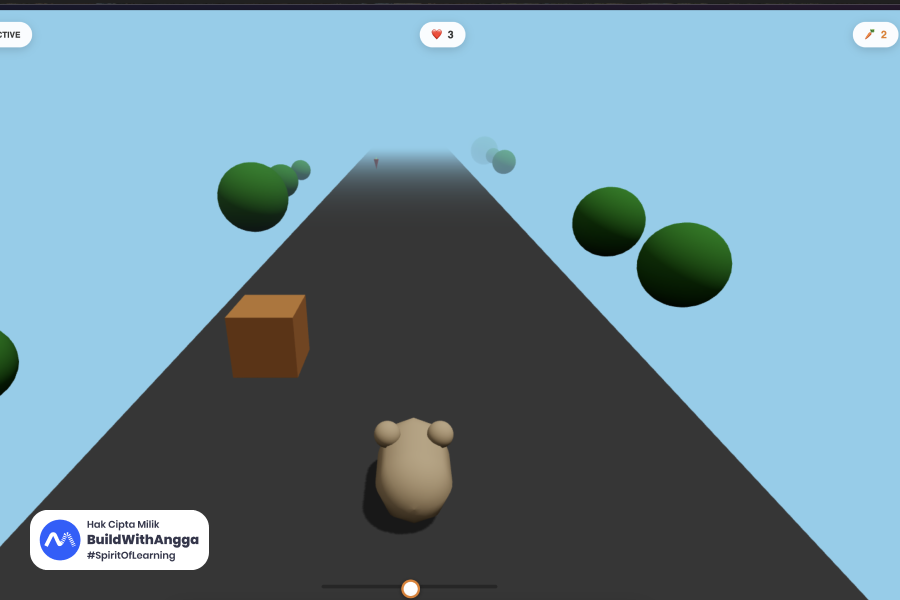
1. Scene: A bright, cartoon-style infinite highway. Sky blue background with distance fog. Procedural scenery (trees/bushes made of simple spheres) passing by on the sides.
2. Player (The Hamster): Do not load external 3D models. Construct a cute 3D Hamster using Three.js primitives:
   * Body: CapsuleGeometry (light brown).
   * Ears/Eyes/Nose: SphereGeometry.
   * Animation: Add a slight bobbing motion (up/down) while running.
3. Enemies (Obstacles): Cardboard Boxes (BoxGeometry) that the player must avoid.
4. Collectibles: Carrots (ConeGeometry for the root, Cylinder/box for the green top) that give points.

Game Logic:
1. Movement: The hamster runs forward automatically (illusion created by moving the road and scenery backward). The player controls lateral movement (Left/Right).
2. Spawning: Randomly spawn Boxes (obstacles) and Carrots (points) in 3 lanes (Left, Center, Right). Increase speed slightly as the game progresses.
3. Collision Detection:
   * Hit a Box: Lose 1 heart/life. Flash the screen red. If lives reach 0, Game Over.
   * Hit a Carrot: Gain +10 points. Remove the carrot.
4. HUD: Display Lives (Hearts), Score (Carrot count), and a Status Indicator for the camera/AI.
5. Game State: Start Screen (Overlay), Playing State, Game Over Screen (with restart capability).

Input System (Crucial):
1. Primary Input (Hand Tracking): Use MediaPipe Hands.
   * Detect the user's hand index finger.
   * Map the X-position of the finger to the X-position of the Hamster.
   * CDN Requirement: Use https://cdn.jsdelivr.net/npm/@mediapipe/[email protected]/hands.js to avoid tflite loading errors found in other CDNs.
   * Set modelComplexity: 1.
2. Fallback Input (Mouse):
   * If the camera is denied or the AI fails to load, automatically switch to Mouse control (tracking mouse X position).
   * Allow the user to click the "Start" overlay to bypass the camera requirement if needed.
3. Safety Check: Ensure video.videoWidth > 0 before sending frames to MediaPipe to prevent "RuntimeError: Aborted" crashes.

Code Structure:
* Initialize Three.js scene, camera, lights, and renderer.
* Create animate() loop for physics and rendering.
* Implement CarFactory or helper functions to build the Hamster and Scenery.
* Implement robust startCamera() and onResults() functions for MediaPipe.

Please generate the complete, working code.
Breakdown Setiap Bagian Prompt
Mari kita breakdown prompt di atas agar kamu paham kenapa setiap bagian penting.
Role Definition
Role: Act as an expert WebGL and Game Developer using Three.js and MediaPipe.
Bagian ini memberitahu AI untuk mengambil persona expert di bidang spesifik. Dengan menyebut Three.js dan MediaPipe secara eksplisit, AI akan fokus pada best practices kedua library tersebut.
Tanpa role definition, AI mungkin memberikan solusi yang terlalu generic atau menggunakan pendekatan yang kurang optimal untuk use case kita.
Task Definition
Task: Create a single-file HTML5 3D infinite runner game called "Hamster Run".
Task harus clear dan concise. Kita menyebutkan format (single-file HTML5), genre (3D infinite runner), dan nama game. Ini memberikan context yang jelas tentang scope project.
Technical Requirements
Technical Requirements:
1. Tech Stack: HTML, CSS, JavaScript (ES6 Modules), Three.js (via module CDN), and MediaPipe Hands (via JSDelivr CDN).
2. Format: Everything must be contained in a single .html file (CSS, JS, and HTML).
3. Stability: Use specific, pinned versions for libraries to prevent loading errors.
Bagian ini crucial untuk memastikan code yang dihasilkan bisa langsung dijalankan.
Single file format memudahkan deployment dan testing. Kamu tinggal save sebagai .html dan buka di browser.
Pinned versions sangat penting. Library yang di-load dari CDN tanpa versi spesifik bisa berubah kapan saja dan merusak code kamu. Dengan menyebut versi spesifik, code akan tetap berjalan meski library di-update.
MediaPipe khususnya tricky karena menggunakan WASM files yang harus di-load dari CDN yang sama. Versi yang kita gunakan (0.4.1646424915) sudah tested dan stable.
Game Design dan Visuals
Game Design & Visuals:
1. Scene: A bright, cartoon-style infinite highway. Sky blue background with distance fog.
2. Player (The Hamster): Construct using Three.js primitives...
3. Enemies (Obstacles): Cardboard Boxes (BoxGeometry)...
4. Collectibles: Carrots (ConeGeometry for the root)...
Bagian ini menjelaskan visual design secara detail.
Kita explicitly menyebut "Do not load external 3D models" karena model external membutuhkan hosting terpisah dan bisa gagal load. Dengan menggunakan primitive geometries (Box, Sphere, Capsule, Cone), semua visual bisa di-generate langsung di code.
Detail seperti warna (light brown untuk body), geometry type untuk setiap bagian, dan animasi (bobbing motion) membantu AI generate visual yang sesuai ekspektasi.
Game Logic
Game Logic:
1. Movement: The hamster runs forward automatically...
2. Spawning: Randomly spawn in 3 lanes...
3. Collision Detection: Hit Box = lose life, Hit Carrot = gain points...
4. HUD: Display Lives, Score, Status Indicator...
5. Game State: Start Screen, Playing, Game Over...
Bagian ini adalah blueprint gameplay.
Movement mechanic menjelaskan bahwa hamster tidak benar-benar bergerak maju, tapi road dan scenery yang bergerak mundur. Ini adalah teknik standar untuk infinite runner yang lebih efficient.
Spawning system dengan 3 lanes (Left, Center, Right) memberikan gameplay yang predictable tapi tetap challenging.
Collision rules yang jelas (Box = damage, Carrot = points) memastikan AI implement logic yang benar.
HUD elements memastikan player mendapat feedback visual yang diperlukan.
Game states memastikan ada flow yang proper dari start sampai game over.
Input System
Input System (Crucial):
1. Primary Input (Hand Tracking): Use MediaPipe Hands...
2. Fallback Input (Mouse): If camera denied...
3. Safety Check: Ensure video.videoWidth > 0...
Bagian ini paling technical dan paling prone to bugs jika tidak di-specify dengan baik.
CDN requirement yang spesifik untuk MediaPipe sangat penting. Versi lain atau CDN lain sering mengalami WASM loading errors.
Fallback to mouse memastikan game tetap playable meski user tidak punya webcam atau deny permission.
Safety check untuk video.videoWidth adalah bug prevention yang specific. Tanpa check ini, game bisa crash dengan "RuntimeError: Aborted" saat MediaPipe mencoba process frame yang belum ready.
Menggunakan Google AI Studio untuk Generate Code
Sekarang mari kita praktekkan menggunakan Google AI Studio.
Buka Google AI Studio dan create new prompt. Copy seluruh prompt di atas dan paste ke input area.
Sebelum submit, ada beberapa setting yang perlu diperhatikan.
Model selection: Pilih Gemini 1.5 Pro atau model terbaru yang tersedia. Model yang lebih capable menghasilkan code yang lebih baik dan lebih sedikit bugs.
Temperature: Set ke 0.3 atau 0.4. Temperature rendah membuat output lebih deterministic, yang bagus untuk code generation. Temperature tinggi bagus untuk creative writing tapi bisa menghasilkan code yang inconsistent.
Max output tokens: Set ke maximum yang tersedia. Game code bisa cukup panjang dan kita tidak mau output terpotong di tengah.
Setelah setting sudah benar, klik Generate atau tombol submit.
AI akan memproses prompt dan generate code. Proses ini bisa memakan waktu 30 detik sampai beberapa menit tergantung complexity dan load server.
Memahami Code yang Dihasilkan
Setelah AI selesai generate, kamu akan mendapat code HTML lengkap. Mari kita pahami struktur dan bagian-bagian pentingnya.
Struktur HTML Dasar
Code dimulai dengan HTML boilerplate standar:
<!DOCTYPE html>
<html lang="en">
<head>
    <meta charset="UTF-8">
    <meta name="viewport" content="width=device-width, initial-scale=1.0">
    <title>Hamster Run</title>
    <style>
        /* CSS styles */
    </style>
</head>
<body>
    <!-- Game elements -->
    <script type="module">
        // JavaScript code
    </script>
</body>
</html>
Perhatikan type="module" di script tag. Ini diperlukan karena kita menggunakan ES6 modules untuk import Three.js.
CSS Styling
CSS yang dihasilkan biasanya mencakup:
* {
    margin: 0;
    padding: 0;
    box-sizing: border-box;
}

body {
    overflow: hidden;
    font-family: 'Arial', sans-serif;
}

#game-container {
    position: fixed;
    top: 0;
    left: 0;
    width: 100%;
    height: 100%;
}

#hud {
    position: absolute;
    top: 20px;
    left: 20px;
    color: white;
    font-size: 24px;
    text-shadow: 2px 2px 4px rgba(0,0,0,0.5);
    z-index: 100;
}

#overlay {
    position: absolute;
    top: 0;
    left: 0;
    width: 100%;
    height: 100%;
    background: rgba(0,0,0,0.8);
    display: flex;
    flex-direction: column;
    justify-content: center;
    align-items: center;
    z-index: 200;
}

#video-container {
    position: absolute;
    bottom: 10px;
    right: 10px;
    width: 160px;
    height: 120px;
    border: 2px solid white;
    border-radius: 8px;
    overflow: hidden;
    z-index: 100;
}

#video-container video {
    width: 100%;
    height: 100%;
    object-fit: cover;
    transform: scaleX(-1);
}
Styling ini membuat game fullscreen, HUD visible di atas game, overlay untuk start/game over screens, dan video preview untuk webcam di pojok.
Import Libraries
JavaScript dimulai dengan import libraries:
import * as THREE from 'https://cdn.jsdelivr.net/npm/[email protected]/build/three.module.js';
Three.js di-import sebagai ES module dari JSDelivr CDN. Versi di-pin ke 0.160.0 untuk stability.
MediaPipe tidak bisa di-import sebagai ES module dengan cara yang sama, jadi biasanya di-load dengan cara berbeda:
const handsScript = document.createElement('script');
handsScript.src = 'https://cdn.jsdelivr.net/npm/@mediapipe/[email protected]/hands.js';
document.head.appendChild(handsScript);
Scene Setup
Setelah import, code akan setup Three.js scene:
// Scene
const scene = new THREE.Scene();
scene.background = new THREE.Color(0x87CEEB); // Sky blue
scene.fog = new THREE.Fog(0x87CEEB, 10, 50);

// Camera
const camera = new THREE.PerspectiveCamera(
    75, // Field of view
    window.innerWidth / window.innerHeight, // Aspect ratio
    0.1, // Near clipping plane
    100 // Far clipping plane
);
camera.position.set(0, 3, 8);
camera.lookAt(0, 1, 0);

// Renderer
const renderer = new THREE.WebGLRenderer({ antialias: true });
renderer.setSize(window.innerWidth, window.innerHeight);
renderer.shadowMap.enabled = true;
document.getElementById('game-container').appendChild(renderer.domElement);

// Lighting
const ambientLight = new THREE.AmbientLight(0xffffff, 0.6);
scene.add(ambientLight);

const directionalLight = new THREE.DirectionalLight(0xffffff, 0.8);
directionalLight.position.set(5, 10, 5);
directionalLight.castShadow = true;
scene.add(directionalLight);
Scene adalah container untuk semua objek 3D. Background color di-set sky blue dan fog ditambahkan untuk efek depth.
Camera adalah viewpoint player. PerspectiveCamera memberikan efek depth yang natural seperti mata manusia.
Renderer adalah yang menggambar scene ke canvas. Antialias membuat edges lebih smooth.
Lighting terdiri dari ambient light (pencahayaan merata) dan directional light (seperti matahari, memberikan shadow).
Membuat Hamster
Hamster dibuat dari primitive geometries:
function createHamster() {
    const hamster = new THREE.Group();

    // Body - Capsule
    const bodyGeometry = new THREE.CapsuleGeometry(0.4, 0.6, 8, 16);
    const bodyMaterial = new THREE.MeshLambertMaterial({ color: 0xD2691E });
    const body = new THREE.Mesh(bodyGeometry, bodyMaterial);
    body.rotation.x = Math.PI / 2;
    hamster.add(body);

    // Head
    const headGeometry = new THREE.SphereGeometry(0.35, 16, 16);
    const head = new THREE.Mesh(headGeometry, bodyMaterial);
    head.position.set(0, 0.1, 0.5);
    hamster.add(head);

    // Ears
    const earGeometry = new THREE.SphereGeometry(0.12, 8, 8);
    const earMaterial = new THREE.MeshLambertMaterial({ color: 0xFFB6C1 });

    const leftEar = new THREE.Mesh(earGeometry, earMaterial);
    leftEar.position.set(-0.2, 0.35, 0.4);
    hamster.add(leftEar);

    const rightEar = new THREE.Mesh(earGeometry, earMaterial);
    rightEar.position.set(0.2, 0.35, 0.4);
    hamster.add(rightEar);

    // Eyes
    const eyeGeometry = new THREE.SphereGeometry(0.08, 8, 8);
    const eyeMaterial = new THREE.MeshLambertMaterial({ color: 0x000000 });

    const leftEye = new THREE.Mesh(eyeGeometry, eyeMaterial);
    leftEye.position.set(-0.12, 0.15, 0.8);
    hamster.add(leftEye);

    const rightEye = new THREE.Mesh(eyeGeometry, eyeMaterial);
    rightEye.position.set(0.12, 0.15, 0.8);
    hamster.add(rightEye);

    // Nose
    const noseGeometry = new THREE.SphereGeometry(0.05, 8, 8);
    const noseMaterial = new THREE.MeshLambertMaterial({ color: 0xFF69B4 });
    const nose = new THREE.Mesh(noseGeometry, noseMaterial);
    nose.position.set(0, 0.05, 0.85);
    hamster.add(nose);

    hamster.position.y = 0.5;

    return hamster;
}
THREE.Group digunakan untuk mengelompokkan semua bagian hamster sehingga bisa di-move sebagai satu unit.
CapsuleGeometry untuk body memberikan bentuk oval yang cute. SphereGeometry untuk head, ears, eyes, dan nose.
Material yang digunakan adalah MeshLambertMaterial yang memberikan shading basic tapi performant.
Membuat Road dan Scenery
Road biasanya dibuat dengan PlaneGeometry:
function createRoad() {
    const roadGeometry = new THREE.PlaneGeometry(6, 100);
    const roadMaterial = new THREE.MeshLambertMaterial({ color: 0x333333 });
    const road = new THREE.Mesh(roadGeometry, roadMaterial);
    road.rotation.x = -Math.PI / 2;
    road.position.y = 0;
    road.receiveShadow = true;

    // Lane markings
    const laneGeometry = new THREE.PlaneGeometry(0.1, 100);
    const laneMaterial = new THREE.MeshBasicMaterial({ color: 0xFFFFFF });

    const leftLane = new THREE.Mesh(laneGeometry, laneMaterial);
    leftLane.rotation.x = -Math.PI / 2;
    leftLane.position.set(-1.5, 0.01, 0);

    const rightLane = new THREE.Mesh(laneGeometry, laneMaterial);
    rightLane.rotation.x = -Math.PI / 2;
    rightLane.position.set(1.5, 0.01, 0);

    const roadGroup = new THREE.Group();
    roadGroup.add(road);
    roadGroup.add(leftLane);
    roadGroup.add(rightLane);

    return roadGroup;
}
Scenery seperti pohon dan semak dibuat dengan sphere dan cylinder:
function createTree(x, z) {
    const tree = new THREE.Group();

    // Trunk
    const trunkGeometry = new THREE.CylinderGeometry(0.1, 0.15, 1, 8);
    const trunkMaterial = new THREE.MeshLambertMaterial({ color: 0x8B4513 });
    const trunk = new THREE.Mesh(trunkGeometry, trunkMaterial);
    trunk.position.y = 0.5;
    tree.add(trunk);

    // Leaves (spheres)
    const leavesGeometry = new THREE.SphereGeometry(0.5, 8, 8);
    const leavesMaterial = new THREE.MeshLambertMaterial({ color: 0x228B22 });
    const leaves = new THREE.Mesh(leavesGeometry, leavesMaterial);
    leaves.position.y = 1.3;
    tree.add(leaves);

    tree.position.set(x, 0, z);

    return tree;
}
Membuat Obstacles dan Collectibles
Boxes sebagai obstacles:
function createBox() {
    const geometry = new THREE.BoxGeometry(0.8, 0.8, 0.8);
    const material = new THREE.MeshLambertMaterial({ color: 0xCD853F });
    const box = new THREE.Mesh(geometry, material);
    box.castShadow = true;
    box.position.y = 0.4;
    return box;
}
Carrots sebagai collectibles:
function createCarrot() {
    const carrot = new THREE.Group();

    // Orange root
    const rootGeometry = new THREE.ConeGeometry(0.15, 0.5, 8);
    const rootMaterial = new THREE.MeshLambertMaterial({ color: 0xFF6600 });
    const root = new THREE.Mesh(rootGeometry, rootMaterial);
    root.rotation.x = Math.PI;
    root.position.y = 0.25;
    carrot.add(root);

    // Green top
    const topGeometry = new THREE.CylinderGeometry(0.02, 0.08, 0.2, 8);
    const topMaterial = new THREE.MeshLambertMaterial({ color: 0x228B22 });
    const top = new THREE.Mesh(topGeometry, topMaterial);
    top.position.y = 0.55;
    carrot.add(top);

    carrot.position.y = 0.3;

    return carrot;
}
Spawning System
Obstacles dan carrots di-spawn secara random:
const lanes = [-1.5, 0, 1.5]; // Left, Center, Right
const obstacles = [];
const collectibles = [];
let spawnTimer = 0;
const spawnInterval = 1500; // milliseconds

function spawnObjects(deltaTime) {
    spawnTimer += deltaTime;

    if (spawnTimer >= spawnInterval) {
        spawnTimer = 0;

        // Random lane
        const lane = lanes[Math.floor(Math.random() * lanes.length)];

        // 70% chance box, 30% chance carrot
        if (Math.random() < 0.7) {
            const box = createBox();
            box.position.set(lane, 0.4, -50);
            scene.add(box);
            obstacles.push(box);
        } else {
            const carrot = createCarrot();
            carrot.position.set(lane, 0.3, -50);
            scene.add(carrot);
            collectibles.push(carrot);
        }
    }
}
Movement dan Animation Loop
Game loop adalah jantung dari game:
let gameSpeed = 5;
let score = 0;
let lives = 3;
let gameState = 'start'; // 'start', 'playing', 'gameover'
let lastTime = 0;

function animate(currentTime) {
    requestAnimationFrame(animate);

    const deltaTime = currentTime - lastTime;
    lastTime = currentTime;

    if (gameState !== 'playing') {
        renderer.render(scene, camera);
        return;
    }

    // Move obstacles and collectibles toward player
    obstacles.forEach((obstacle, index) => {
        obstacle.position.z += gameSpeed * deltaTime / 1000;

        // Remove if passed camera
        if (obstacle.position.z > 10) {
            scene.remove(obstacle);
            obstacles.splice(index, 1);
        }
    });

    collectibles.forEach((collectible, index) => {
        collectible.position.z += gameSpeed * deltaTime / 1000;

        // Rotate carrot for visual effect
        collectible.rotation.y += 0.05;

        if (collectible.position.z > 10) {
            scene.remove(collectible);
            collectibles.splice(index, 1);
        }
    });

    // Move scenery
    sceneryObjects.forEach(obj => {
        obj.position.z += gameSpeed * deltaTime / 1000;
        if (obj.position.z > 10) {
            obj.position.z = -50;
        }
    });

    // Hamster bobbing animation
    hamster.position.y = 0.5 + Math.sin(currentTime / 100) * 0.05;

    // Spawn new objects
    spawnObjects(deltaTime);

    // Collision detection
    checkCollisions();

    // Increase speed over time
    gameSpeed += 0.001 * deltaTime / 1000;

    renderer.render(scene, camera);
}
Collision Detection
Collision detection menggunakan bounding box sederhana:
function checkCollisions() {
    const hamsterBox = new THREE.Box3().setFromObject(hamster);

    // Check obstacle collisions
    obstacles.forEach((obstacle, index) => {
        const obstacleBox = new THREE.Box3().setFromObject(obstacle);

        if (hamsterBox.intersectsBox(obstacleBox)) {
            // Hit obstacle
            lives--;
            updateHUD();
            flashScreen();

            scene.remove(obstacle);
            obstacles.splice(index, 1);

            if (lives <= 0) {
                gameOver();
            }
        }
    });

    // Check collectible collisions
    collectibles.forEach((collectible, index) => {
        const collectibleBox = new THREE.Box3().setFromObject(collectible);

        if (hamsterBox.intersectsBox(collectibleBox)) {
            // Collect carrot
            score += 10;
            updateHUD();

            scene.remove(collectible);
            collectibles.splice(index, 1);
        }
    });
}
Hand Tracking Implementation
Ini adalah bagian paling complex. MediaPipe Hands di-setup seperti ini:
let hands;
let videoElement;
let isHandTrackingReady = false;
let useMouseControl = false;

async function initHandTracking() {
    try {
        // Create video element
        videoElement = document.createElement('video');
        videoElement.setAttribute('playsinline', '');
        document.getElementById('video-container').appendChild(videoElement);

        // Request camera access
        const stream = await navigator.mediaDevices.getUserMedia({
            video: { facingMode: 'user', width: 640, height: 480 }
        });
        videoElement.srcObject = stream;
        await videoElement.play();

        // Wait for video to be ready
        await new Promise((resolve) => {
            const checkVideo = () => {
                if (videoElement.videoWidth > 0) {
                    resolve();
                } else {
                    requestAnimationFrame(checkVideo);
                }
            };
            checkVideo();
        });

        // Initialize MediaPipe Hands
        hands = new Hands({
            locateFile: (file) => {
                return `https://cdn.jsdelivr.net/npm/@mediapipe/[email protected]/${file}`;
            }
        });

        hands.setOptions({
            maxNumHands: 1,
            modelComplexity: 1,
            minDetectionConfidence: 0.7,
            minTrackingConfidence: 0.5
        });

        hands.onResults(onHandResults);

        // Start detection loop
        detectHands();

        isHandTrackingReady = true;
        updateStatus('Hand tracking ready!');

    } catch (error) {
        console.error('Hand tracking failed:', error);
        useMouseControl = true;
        updateStatus('Using mouse control');
    }
}

function detectHands() {
    if (!isHandTrackingReady || gameState !== 'playing') {
        requestAnimationFrame(detectHands);
        return;
    }

    if (videoElement.videoWidth > 0) {
        hands.send({ image: videoElement });
    }

    requestAnimationFrame(detectHands);
}

function onHandResults(results) {
    if (results.multiHandLandmarks && results.multiHandLandmarks.length > 0) {
        // Get index finger tip position (landmark 8)
        const indexFinger = results.multiHandLandmarks[0][8];

        // Map x position (0-1) to game space (-3 to 3)
        // Note: x is mirrored because video is flipped
        const targetX = (1 - indexFinger.x) * 6 - 3;

        // Smooth movement
        hamster.position.x += (targetX - hamster.position.x) * 0.15;

        // Clamp to road bounds
        hamster.position.x = Math.max(-2, Math.min(2, hamster.position.x));
    }
}
Safety check untuk video.videoWidth sangat penting. Tanpa ini, MediaPipe akan crash dengan runtime error saat mencoba process frame dari video yang belum fully loaded.
Mouse Fallback
Jika hand tracking gagal, mouse control sebagai fallback:
function initMouseControl() {
    document.addEventListener('mousemove', onMouseMove);
}

function onMouseMove(event) {
    if (!useMouseControl || gameState !== 'playing') return;

    // Map mouse x (0 to window width) to game space (-2 to 2)
    const targetX = (event.clientX / window.innerWidth) * 4 - 2;

    // Smooth movement
    hamster.position.x += (targetX - hamster.position.x) * 0.1;

    // Clamp to road bounds
    hamster.position.x = Math.max(-2, Math.min(2, hamster.position.x));
}
HUD dan Game States
HUD menampilkan lives dan score:
function updateHUD() {
    const heartsDisplay = '❤️'.repeat(lives) + '🖤'.repeat(3 - lives);
    document.getElementById('lives').textContent = heartsDisplay;
    document.getElementById('score').textContent = `Score: ${score}`;
}

function flashScreen() {
    const flash = document.getElementById('flash');
    flash.style.opacity = '0.5';
    setTimeout(() => {
        flash.style.opacity = '0';
    }, 100);
}

function startGame() {
    gameState = 'playing';
    score = 0;
    lives = 3;
    gameSpeed = 5;
    updateHUD();
    document.getElementById('start-overlay').style.display = 'none';

    // Clear existing objects
    obstacles.forEach(obj => scene.remove(obj));
    collectibles.forEach(obj => scene.remove(obj));
    obstacles.length = 0;
    collectibles.length = 0;
}

function gameOver() {
    gameState = 'gameover';
    document.getElementById('gameover-overlay').style.display = 'flex';
    document.getElementById('final-score').textContent = `Final Score: ${score}`;
}

function restartGame() {
    document.getElementById('gameover-overlay').style.display = 'none';
    startGame();
}
Menjalankan dan Testing Game
Setelah mendapatkan code dari AI, langkah selanjutnya adalah menjalankan dan testing.
Save code sebagai file dengan nama hamster-run.html. Pastikan extension-nya .html bukan .txt.
Buka file tersebut di browser modern seperti Chrome, Firefox, atau Edge. Game membutuhkan browser yang support WebGL dan getUserMedia API untuk webcam.
Saat pertama kali dibuka, browser akan meminta permission untuk mengakses webcam. Klik Allow untuk menggunakan hand tracking. Jika kamu klik Deny atau tidak punya webcam, game akan otomatis switch ke mouse control.
Testing checklist yang perlu diverifikasi:
Scene rendering: Background sky blue terlihat, fog memberikan efek depth, lighting membuat objek visible.
Hamster: Bentuk hamster terlihat cute dengan semua parts (body, head, ears, eyes, nose). Bobbing animation terlihat saat game berjalan.
Road dan scenery: Road terlihat dengan lane markings. Trees atau scenery bergerak ke arah kamera memberikan ilusi movement.
Obstacles dan collectibles: Boxes spawn di random lanes. Carrots spawn dengan frekuensi lebih rendah. Keduanya bergerak ke arah player.
Collision: Hit box mengurangi lives dan flash screen merah. Hit carrot menambah score.
Hand tracking: Webcam preview terlihat di pojok. Hamster mengikuti posisi jari telunjuk.
HUD: Lives (hearts) ter-display. Score ter-update saat collect carrot.
Game states: Start screen muncul di awal. Game over screen muncul saat lives habis dengan final score. Restart berfungsi.
Troubleshooting Common Issues
Beberapa masalah yang mungkin muncul dan cara mengatasinya.
Game Tidak Muncul Sama Sekali
Kemungkinan browser tidak support WebGL atau ada error di console. Buka Developer Tools (F12) dan cek Console tab untuk error messages.
Jika ada error terkait Three.js import, pastikan menggunakan browser modern dan koneksi internet aktif untuk load CDN.
Hand Tracking Tidak Berfungsi
Pastikan sudah allow camera permission. Check apakah webcam terdeteksi di device manager.
Jika ada error "RuntimeError: Aborted", ini biasanya karena video belum ready saat MediaPipe mencoba process. Pastikan code memiliki check untuk video.videoWidth > 0.
Jika MediaPipe WASM files gagal load, error akan muncul di console. Pastikan menggunakan CDN URL yang correct sesuai prompt.
Performance Lambat
Hand tracking cukup resource-intensive. Jika FPS rendah, coba tutup aplikasi lain yang menggunakan webcam atau GPU.
Reduce modelComplexity dari 1 ke 0 untuk performance lebih baik dengan accuracy sedikit lebih rendah.
Collision Tidak Akurat
Bounding box collision kadang tidak perfect untuk complex shapes. Jika collision terasa tidak fair, adjust size factor di Box3 creation.
Customization dan Enhancement
Setelah game basic berjalan, kamu bisa meng-customize dan enhance dengan fitur tambahan.
Menambah Sound Effects
Tambahkan audio untuk collision dan collect:
const hitSound = new Audio('data:audio/wav;base64,...');
const collectSound = new Audio('data:audio/wav;base64,...');

// In collision detection
if (hamsterBox.intersectsBox(obstacleBox)) {
    hitSound.play();
    // ...
}

if (hamsterBox.intersectsBox(collectibleBox)) {
    collectSound.play();
    // ...
}
Kamu bisa generate base64 audio atau link ke audio files.
Menambah Power-ups
Buat power-up seperti shield atau speed boost:
function createPowerUp(type) {
    const powerUp = new THREE.Group();

    if (type === 'shield') {
        const geometry = new THREE.TorusGeometry(0.3, 0.1, 8, 16);
        const material = new THREE.MeshLambertMaterial({
            color: 0x00FFFF,
            transparent: true,
            opacity: 0.8
        });
        const mesh = new THREE.Mesh(geometry, material);
        powerUp.add(mesh);
    }

    powerUp.userData.type = type;
    return powerUp;
}
Menambah Difficulty Levels
Buat difficulty scaling yang lebih sophisticated:
let difficultyLevel = 1;

function updateDifficulty() {
    if (score >= 100 && difficultyLevel === 1) {
        difficultyLevel = 2;
        spawnInterval = 1200;
        gameSpeed = 7;
    } else if (score >= 250 && difficultyLevel === 2) {
        difficultyLevel = 3;
        spawnInterval = 1000;
        gameSpeed = 9;
    }
}
Visual Enhancements
Tambahkan particle effects saat collect carrot:
function createParticles(position) {
    const particles = [];

    for (let i = 0; i < 10; i++) {
        const geometry = new THREE.SphereGeometry(0.05, 4, 4);
        const material = new THREE.MeshBasicMaterial({ color: 0xFF6600 });
        const particle = new THREE.Mesh(geometry, material);

        particle.position.copy(position);
        particle.velocity = new THREE.Vector3(
            (Math.random() - 0.5) * 0.2,
            Math.random() * 0.2,
            (Math.random() - 0.5) * 0.2
        );

        scene.add(particle);
        particles.push(particle);
    }

    // Animate and remove after 500ms
    setTimeout(() => {
        particles.forEach(p => scene.remove(p));
    }, 500);
}
Optimasi Performance untuk Game Hand Tracking
Game dengan hand tracking membutuhkan resources lebih banyak dibanding game biasa. Berikut cara mengoptimasi performance.
Reduce Render Load
Three.js renderer bisa di-optimize dengan beberapa setting:
// Optimize renderer
renderer.setPixelRatio(Math.min(window.devicePixelRatio, 2));
renderer.powerPreference = 'high-performance';

// Use lower resolution for mobile
if (window.innerWidth < 768) {
    renderer.setSize(window.innerWidth * 0.8, window.innerHeight * 0.8);
}
Pixel ratio yang terlalu tinggi membuat render lebih berat. Clamp ke maksimal 2 untuk balance antara visual quality dan performance.
Optimize Geometry
Gunakan geometry dengan vertex count yang minimal:
// Sebelum - high poly sphere
const sphereGeometry = new THREE.SphereGeometry(0.5, 32, 32);

// Sesudah - low poly sphere (cukup untuk cartoon style)
const sphereGeometry = new THREE.SphereGeometry(0.5, 8, 8);
Untuk cartoon style seperti game kita, low poly geometry justru terlihat lebih baik dan jauh lebih performant.
Object Pooling
Daripada create dan destroy objek terus-menerus, gunakan object pooling:
class ObjectPool {
    constructor(createFunc, initialSize = 10) {
        this.createFunc = createFunc;
        this.pool = [];

        for (let i = 0; i < initialSize; i++) {
            this.pool.push(this.createFunc());
        }
    }

    get() {
        if (this.pool.length > 0) {
            return this.pool.pop();
        }
        return this.createFunc();
    }

    release(obj) {
        obj.visible = false;
        this.pool.push(obj);
    }
}

// Usage
const boxPool = new ObjectPool(createBox, 20);

function spawnObstacle() {
    const box = boxPool.get();
    box.visible = true;
    box.position.set(lane, 0.4, -50);
    scene.add(box);
}

function removeObstacle(box) {
    boxPool.release(box);
    scene.remove(box);
}
Object pooling menghindari garbage collection stutters yang bisa menyebabkan frame drops.
Hand Tracking Optimization
MediaPipe bisa di-optimize dengan mengurangi detection frequency:
let lastDetectionTime = 0;
const detectionInterval = 50; // 20 FPS untuk hand tracking

function detectHands(currentTime) {
    if (currentTime - lastDetectionTime < detectionInterval) {
        requestAnimationFrame(detectHands);
        return;
    }

    lastDetectionTime = currentTime;

    if (videoElement.videoWidth > 0) {
        hands.send({ image: videoElement });
    }

    requestAnimationFrame(detectHands);
}
Hand tracking tidak perlu berjalan di 60 FPS. 20 FPS sudah cukup smooth untuk kontrol game.
Use Simpler Materials
Material yang kompleks seperti MeshStandardMaterial lebih berat dari MeshLambertMaterial:
// Heavy - physically based rendering
const material = new THREE.MeshStandardMaterial({
    color: 0xD2691E,
    roughness: 0.5,
    metalness: 0.1
});

// Light - simple lighting model
const material = new THREE.MeshLambertMaterial({
    color: 0xD2691E
});

// Lightest - no lighting calculation
const material = new THREE.MeshBasicMaterial({
    color: 0xD2691E
});
Untuk cartoon style, MeshLambertMaterial atau bahkan MeshBasicMaterial sudah cukup.
Deployment Options untuk Game HTML5
Setelah game selesai, kamu pasti ingin share dengan orang lain. Berikut beberapa opsi deployment.
GitHub Pages (Gratis)
GitHub Pages adalah cara termudah untuk deploy static HTML:
- Buat repository baru di GitHub
- Upload file hamster-run.html dan rename ke index.html
- Go to Settings → Pages
- Pilih source branch (biasanya main)
- Save dan tunggu beberapa menit
Game kamu akan available di https://username.github.io/repository-name
Netlify (Gratis)
Netlify menawarkan deployment yang lebih powerful:
- Sign up di netlify.com
- Drag and drop folder berisi index.html ke dashboard
- Done! Netlify akan generate URL otomatis
Netlify juga support custom domain dan HTTPS otomatis.
Vercel (Gratis)
Vercel mirip dengan Netlify:
- Sign up di vercel.com
- Import dari GitHub atau upload langsung
- Deploy dengan satu klik
Vercel memiliki edge network yang membuat loading lebih cepat di berbagai lokasi.
Itch.io (Gratis, Gaming Platform)
Untuk game, itch.io adalah platform yang ideal:
- Create account di itch.io
- Create new project
- Upload HTML file sebagai "HTML" type
- Set embed dimensions dan publish
Itch.io memiliki komunitas gamer yang bisa discover game kamu. Ini bagus untuk mendapat feedback dan exposure.
Self-Hosting dengan Nginx
Jika kamu punya VPS sendiri:
server {
    listen 80;
    server_name game.yourdomain.com;

    root /var/www/hamster-run;
    index index.html;

    location / {
        try_files $uri $uri/ =404;
    }

    # Cache static assets
    location ~* \.(js|css|png|jpg|jpeg|gif|ico|woff2)$ {
        expires 30d;
        add_header Cache-Control "public, immutable";
    }
}
Self-hosting memberikan kontrol penuh tapi membutuhkan maintenance.
Extending Game dengan Fitur Multiplayer
Untuk mengambil game ke level berikutnya, kamu bisa menambahkan fitur multiplayer sederhana.
Leaderboard dengan Firebase
Firebase Realtime Database bisa digunakan untuk leaderboard:
import { initializeApp } from 'https://www.gstatic.com/firebasejs/10.7.0/firebase-app.js';
import { getDatabase, ref, push, query, orderByChild, limitToLast, get }
    from 'https://www.gstatic.com/firebasejs/10.7.0/firebase-database.js';

const firebaseConfig = {
    apiKey: "your-api-key",
    databaseURL: "https://your-project.firebaseio.com",
    projectId: "your-project"
};

const app = initializeApp(firebaseConfig);
const database = getDatabase(app);

async function submitScore(playerName, score) {
    const scoresRef = ref(database, 'scores');
    await push(scoresRef, {
        name: playerName,
        score: score,
        timestamp: Date.now()
    });
}

async function getLeaderboard() {
    const scoresRef = ref(database, 'scores');
    const topScoresQuery = query(scoresRef, orderByChild('score'), limitToLast(10));
    const snapshot = await get(topScoresQuery);

    const scores = [];
    snapshot.forEach(child => {
        scores.push(child.val());
    });

    return scores.reverse();
}
Dengan leaderboard, player akan lebih termotivasi untuk bermain dan improve score mereka.
Share Score ke Social Media
Tambahkan tombol share:
function shareScore() {
    const text = `I scored ${score} points in Hamster Run! Can you beat me? 🐹🥕`;
    const url = window.location.href;

    if (navigator.share) {
        // Native share (mobile)
        navigator.share({
            title: 'Hamster Run',
            text: text,
            url: url
        });
    } else {
        // Fallback to Twitter
        const twitterUrl = `https://twitter.com/intent/tweet?text=${encodeURIComponent(text)}&url=${encodeURIComponent(url)}`;
        window.open(twitterUrl, '_blank');
    }
}
Social sharing membantu game kamu viral dan mendapat lebih banyak player.
Membuat Variasi Game dengan Prompt Modification
Salah satu keuntungan vibe coding adalah kemudahan membuat variasi. Dengan memodifikasi prompt, kamu bisa membuat game yang berbeda dengan effort minimal.
Variasi 1: Space Runner
Ubah theme dari hamster ke spaceship:
Game Design & Visuals:
1. Scene: Dark space background with stars. Add nebula effects using particle systems.
2. Player (Spaceship): Construct using primitives - ConeGeometry for body, BoxGeometry for wings.
3. Enemies: Asteroids (IcosahedronGeometry with rocky texture)
4. Collectibles: Energy orbs (SphereGeometry with glow effect)
Variasi 2: Underwater Runner
Theme underwater dengan ikan:
Game Design & Visuals:
1. Scene: Deep blue underwater. Add caustic lighting effect. Bubble particles floating up.
2. Player (Fish): Construct using primitives - ellipsoid body, triangle fins and tail.
3. Enemies: Jellyfish (hemisphere body with cylinder tentacles)
4. Collectibles: Pearls (white spheres with shimmer)
Variasi 3: Winter Runner
Theme musim dingin dengan penguin:
Game Design & Visuals:
1. Scene: Snowy landscape with white ground. Add falling snow particles.
2. Player (Penguin): Black and white capsule body, orange cone beak, flipper arms.
3. Enemies: Snowballs (white spheres) and ice blocks (transparent blue boxes)
4. Collectibles: Fish (orange cones)
Dengan mengubah bagian Game Design & Visuals saja, kamu sudah bisa membuat game dengan feel yang sangat berbeda.
Debugging Tips untuk Game Development
Saat develop game, debugging bisa tricky karena banyak moving parts. Berikut tips yang membantu.
Visual Debugging dengan Helpers
Three.js menyediakan helpers untuk visualisasi:
// Visualize bounding boxes
const boxHelper = new THREE.BoxHelper(hamster, 0xff0000);
scene.add(boxHelper);

// Update in animation loop
boxHelper.update();

// Visualize axes
const axesHelper = new THREE.AxesHelper(5);
scene.add(axesHelper);

// Visualize light direction
const lightHelper = new THREE.DirectionalLightHelper(directionalLight, 1);
scene.add(lightHelper);
Helpers ini membuat geometry invisible menjadi visible, memudahkan debugging collision dan positioning.
Console Logging Strategy
Gunakan console.log strategically:
// Tag logs untuk easy filtering
console.log('[SPAWN]', 'New obstacle at lane', lane);
console.log('[COLLISION]', 'Hit obstacle, lives:', lives);
console.log('[HAND]', 'Index finger X:', indexFinger.x);

// Use console.table for arrays
console.table(obstacles.map(o => ({
    x: o.position.x.toFixed(2),
    z: o.position.z.toFixed(2)
})));
Tags memudahkan filtering di console saat banyak logs.
Performance Monitoring
Monitor FPS dan memory:
// Simple FPS counter
let frameCount = 0;
let lastFpsUpdate = 0;

function animate(currentTime) {
    frameCount++;

    if (currentTime - lastFpsUpdate >= 1000) {
        console.log('[PERF]', 'FPS:', frameCount);
        frameCount = 0;
        lastFpsUpdate = currentTime;
    }

    // ... rest of animation
}

// Three.js built-in
console.log('[MEMORY]', 'Geometries:', renderer.info.memory.geometries);
console.log('[MEMORY]', 'Textures:', renderer.info.memory.textures);
console.log('[RENDER]', 'Draw calls:', renderer.info.render.calls);
Monitoring ini membantu identify performance bottlenecks.
Pause dan Step Through
Tambahkan kemampuan pause untuk debugging:
let isPaused = false;

document.addEventListener('keydown', (e) => {
    if (e.key === 'p') {
        isPaused = !isPaused;
        console.log('[DEBUG]', isPaused ? 'Paused' : 'Resumed');
    }

    if (e.key === 'n' && isPaused) {
        // Step one frame
        updateGame(16.67); // ~60fps
        renderer.render(scene, camera);
        console.log('[DEBUG]', 'Stepped one frame');
    }
});

function animate(currentTime) {
    requestAnimationFrame(animate);

    if (isPaused) {
        return;
    }

    // ... rest of animation
}
Pause mode memungkinkan kamu inspect state game tanpa semuanya bergerak.
Accessibility Considerations
Game yang baik harus accessible untuk sebanyak mungkin orang. Berikut cara membuat game lebih accessible.
Alternative Input Methods
Tidak semua orang bisa menggunakan hand tracking. Pastikan ada alternatif:
// Keyboard control sebagai tambahan
document.addEventListener('keydown', (e) => {
    if (gameState !== 'playing') return;

    switch(e.key) {
        case 'ArrowLeft':
        case 'a':
            targetLane = Math.max(targetLane - 1, 0);
            break;
        case 'ArrowRight':
        case 'd':
            targetLane = Math.min(targetLane + 1, 2);
            break;
    }
});

// Smooth movement ke lane
function updateHamsterPosition() {
    const lanePositions = [-1.5, 0, 1.5];
    const targetX = lanePositions[targetLane];
    hamster.position.x += (targetX - hamster.position.x) * 0.15;
}
Keyboard control dengan arrow keys atau WASD adalah standard untuk accessibility.
Touch Controls untuk Mobile
Tambahkan touch support untuk mobile devices:
let touchStartX = 0;

document.addEventListener('touchstart', (e) => {
    touchStartX = e.touches[0].clientX;
});

document.addEventListener('touchmove', (e) => {
    if (gameState !== 'playing') return;

    const touchX = e.touches[0].clientX;
    const deltaX = touchX - touchStartX;

    // Map touch movement ke hamster position
    const targetX = hamster.position.x + deltaX * 0.01;
    hamster.position.x = Math.max(-2, Math.min(2, targetX));

    touchStartX = touchX;
});

// Swipe gestures untuk lane change
let swipeStartX = 0;

document.addEventListener('touchstart', (e) => {
    swipeStartX = e.touches[0].clientX;
});

document.addEventListener('touchend', (e) => {
    const swipeEndX = e.changedTouches[0].clientX;
    const swipeDistance = swipeEndX - swipeStartX;

    if (Math.abs(swipeDistance) > 50) {
        if (swipeDistance > 0) {
            // Swipe right
            targetLane = Math.min(targetLane + 1, 2);
        } else {
            // Swipe left
            targetLane = Math.max(targetLane - 1, 0);
        }
    }
});
Visual Accessibility
Pertimbangkan pemain dengan color blindness:
// Gunakan shapes berbeda selain warna
// Obstacles: boxes (square shape)
// Collectibles: carrots (elongated shape)
// Ini sudah built-in di design kita

// Tambahkan outline untuk contrast lebih baik
function addOutline(mesh, color = 0x000000) {
    const edges = new THREE.EdgesGeometry(mesh.geometry);
    const line = new THREE.LineSegments(
        edges,
        new THREE.LineBasicMaterial({ color: color, linewidth: 2 })
    );
    mesh.add(line);
}
Audio Cues
Tambahkan audio feedback untuk accessibility:
// Berbagai sound untuk berbagai events
const sounds = {
    collect: createTone(800, 0.1),  // High pitch untuk positive
    hit: createTone(200, 0.2),      // Low pitch untuk negative
    gameOver: createTone(150, 0.5), // Very low untuk game over
    start: createTone(600, 0.15)    // Medium untuk start
};

function createTone(frequency, duration) {
    return () => {
        const audioContext = new (window.AudioContext || window.webkitAudioContext)();
        const oscillator = audioContext.createOscillator();
        const gainNode = audioContext.createGain();

        oscillator.connect(gainNode);
        gainNode.connect(audioContext.destination);

        oscillator.frequency.value = frequency;
        oscillator.type = 'sine';

        gainNode.gain.setValueAtTime(0.3, audioContext.currentTime);
        gainNode.gain.exponentialRampToValueAtTime(0.01, audioContext.currentTime + duration);

        oscillator.start(audioContext.currentTime);
        oscillator.stop(audioContext.currentTime + duration);
    };
}
Audio cues membantu pemain dengan visual impairments dan juga membuat game lebih engaging untuk semua pemain.
Mobile Optimization
Banyak user akan memainkan game di mobile devices. Berikut cara optimize untuk mobile.
Responsive Canvas
Pastikan canvas resize properly:
function handleResize() {
    const width = window.innerWidth;
    const height = window.innerHeight;

    camera.aspect = width / height;
    camera.updateProjectionMatrix();

    renderer.setSize(width, height);
    renderer.setPixelRatio(Math.min(window.devicePixelRatio, 2));
}

window.addEventListener('resize', handleResize);
window.addEventListener('orientationchange', () => {
    setTimeout(handleResize, 100);
});
Orientation change membutuhkan slight delay karena dimensions belum update immediately.
Mobile-Friendly UI
Buat UI yang mudah di-tap:
/* Larger touch targets */
.button {
    min-width: 48px;
    min-height: 48px;
    padding: 16px 32px;
    font-size: 18px;
}

/* Prevent zoom on double tap */
* {
    touch-action: manipulation;
}

/* Prevent text selection during gameplay */
#game-container {
    user-select: none;
    -webkit-user-select: none;
}

/* Safe areas untuk notched phones */
#hud {
    padding-top: env(safe-area-inset-top, 20px);
    padding-left: env(safe-area-inset-left, 20px);
}
Battery Optimization
Mobile devices punya battery life terbatas:
// Reduce frame rate saat tab tidak visible
document.addEventListener('visibilitychange', () => {
    if (document.hidden) {
        // Pause game atau reduce update frequency
        isPaused = true;
    } else {
        // Resume
        isPaused = false;
    }
});

// Option untuk low power mode
let lowPowerMode = false;

function toggleLowPower() {
    lowPowerMode = !lowPowerMode;

    if (lowPowerMode) {
        // Reduce shadow quality
        renderer.shadowMap.enabled = false;

        // Reduce particles
        maxParticles = 5;

        // Lower hand tracking frequency
        detectionInterval = 100; // 10 FPS
    } else {
        renderer.shadowMap.enabled = true;
        maxParticles = 20;
        detectionInterval = 50; // 20 FPS
    }
}
Progressive Web App (PWA)
Jadikan game installable sebagai PWA:
// Di dalam HTML, tambahkan manifest
// <link rel="manifest" href="manifest.json">

// manifest.json
{
    "name": "Hamster Run",
    "short_name": "Hamster Run",
    "description": "Hand tracking infinite runner game",
    "start_url": "/",
    "display": "fullscreen",
    "orientation": "landscape",
    "background_color": "#87CEEB",
    "theme_color": "#87CEEB",
    "icons": [
        {
            "src": "icon-192.png",
            "sizes": "192x192",
            "type": "image/png"
        },
        {
            "src": "icon-512.png",
            "sizes": "512x512",
            "type": "image/png"
        }
    ]
}
Dengan PWA, user bisa "install" game ke home screen dan main offline (jika kamu implement service worker untuk caching).
Analytics dan Player Insights
Untuk improve game, kamu perlu tahu bagaimana player bermain.
Basic Analytics
Track metrics penting:
const analytics = {
    gamesPlayed: 0,
    totalScore: 0,
    highScore: 0,
    averageScore: 0,
    totalPlayTime: 0,
    obstaclesHit: 0,
    carrotsCollected: 0,
    inputMethod: 'unknown' // 'hand', 'mouse', 'keyboard', 'touch'
};

function trackGameStart() {
    analytics.gamesPlayed++;
    analytics.gameStartTime = Date.now();
    analytics.inputMethod = useMouseControl ? 'mouse' :
                            isHandTrackingReady ? 'hand' : 'keyboard';
}

function trackGameEnd() {
    const playTime = (Date.now() - analytics.gameStartTime) / 1000;
    analytics.totalPlayTime += playTime;
    analytics.totalScore += score;
    analytics.averageScore = analytics.totalScore / analytics.gamesPlayed;

    if (score > analytics.highScore) {
        analytics.highScore = score;
    }

    // Save to localStorage
    localStorage.setItem('hamsterRunAnalytics', JSON.stringify(analytics));

    // Optional: Send to analytics service
    sendAnalytics(analytics);
}

function sendAnalytics(data) {
    // Send to Google Analytics, Mixpanel, or custom backend
    if (typeof gtag !== 'undefined') {
        gtag('event', 'game_end', {
            'score': score,
            'play_time': analytics.totalPlayTime,
            'input_method': analytics.inputMethod
        });
    }
}
Heatmap untuk Collision
Track dimana player sering hit obstacles:
const collisionHeatmap = {};

function trackCollision(position) {
    const key = `${Math.round(position.x)}_${Math.round(position.z)}`;
    collisionHeatmap[key] = (collisionHeatmap[key] || 0) + 1;
}

// Visualize heatmap (debug mode)
function showHeatmap() {
    Object.entries(collisionHeatmap).forEach(([key, count]) => {
        const [x, z] = key.split('_').map(Number);
        const intensity = Math.min(count / 10, 1);

        const marker = new THREE.Mesh(
            new THREE.SphereGeometry(0.2),
            new THREE.MeshBasicMaterial({
                color: new THREE.Color(intensity, 0, 0),
                transparent: true,
                opacity: 0.5
            })
        );
        marker.position.set(x, 0.5, z);
        scene.add(marker);
    });
}
Data ini membantu kamu identify apakah ada spawn pattern yang unfair atau difficulty spike tertentu.
Common Mistakes dan Cara Menghindarinya
Saat membuat game dengan vibe coding, ada beberapa mistakes yang sering terjadi.
Mistake 1: Prompt Terlalu Vague
Prompt seperti "buatkan game hamster" tidak akan menghasilkan hasil yang baik. AI butuh detail tentang visual, mechanics, dan technical requirements.
Solusi: Selalu include role, task, technical requirements, design specs, dan logic specs dalam prompt.
Mistake 2: Tidak Specify Library Versions
Tanpa version pinning, code bisa break kapan saja saat library di-update.
Solusi: Selalu gunakan versioned CDN URLs seperti [email protected] bukan just three.
Mistake 3: Tidak Handle Edge Cases
AI sering generate happy path code tanpa error handling. Misalnya tidak handle case saat camera permission denied.
Solusi: Explicitly minta AI untuk include error handling dan fallbacks dalam prompt.
Mistake 4: Copy-Paste Tanpa Memahami
Jika kamu tidak memahami code yang di-generate, kamu tidak akan bisa debug atau extend.
Solusi: Luangkan waktu untuk membaca dan memahami setiap bagian code. Tanya AI untuk penjelasan jika ada yang tidak jelas.
Mistake 5: Tidak Test di Berbagai Devices
Game yang work di desktop belum tentu work di mobile atau browser lain.
Solusi: Test di minimal 2-3 browsers berbeda dan di mobile device sebelum publish.
Mistake 6: Ignore Performance
Hand tracking dan 3D rendering bisa berat. Game yang lag tidak fun untuk dimainkan.
Solusi: Monitor FPS dan optimize sesuai section optimization di atas.
Mistake 7: Tidak Iterate
Jarang sekali first attempt menghasilkan exactly apa yang kamu mau.
Solusi: Treat initial output sebagai starting point. Iterate dengan follow-up prompts atau manual edits.
FAQ - Pertanyaan yang Sering Diajukan
Q: Apakah perlu bayar untuk menggunakan Google AI Studio?
A: Google AI Studio menyediakan free tier yang cukup generous untuk learning dan small projects. Untuk production atau heavy usage, mungkin perlu upgrade ke paid tier.
Q: Bisakah game ini dimainkan di mobile?
A: Ya, tapi dengan beberapa catatan. Hand tracking di mobile browsers masih experimental. Lebih reliable menggunakan touch controls sebagai primary input di mobile.
Q: Kenapa hand tracking saya tidak akurat?
A: Beberapa faktor yang mempengaruhi accuracy:
- Pencahayaan yang cukup
- Background yang kontras dengan tangan
- Posisi tangan yang tidak terlalu jauh dari kamera
- WebGL dan camera permission yang properly granted
Q: Bagaimana cara menambah level atau stages?
A: Kamu bisa implement level system dengan mengubah spawn patterns, speed, dan visual sesuai level. Contoh prompt follow-up: "Add a level system where every 100 points advances to the next level with increased speed and new obstacle types."
Q: Apakah bisa export game ini ke mobile app?
A: Ya, kamu bisa wrap HTML5 game dengan tools seperti Cordova, Capacitor, atau Electron untuk desktop. Tapi perlu adjustment terutama untuk camera permissions dan performance.
Q: Kenapa Three.js dan bukan game engine seperti Unity?
A: Three.js dipilih karena:
- Bisa run langsung di browser tanpa plugin
- Output adalah single HTML file yang mudah di-share
- Lebih lightweight untuk simple games
- Easier untuk learn dan debug
Untuk game yang lebih complex, dedicated game engine memang lebih appropriate.
Q: Bagaimana cara menambah multiplayer?
A: Untuk real-time multiplayer, kamu perlu backend server menggunakan WebSocket atau WebRTC. Firebase Realtime Database bisa untuk simpler use cases seperti leaderboard. Ini membutuhkan prompt terpisah dan architecture yang lebih complex.
Q: Bisakah menggunakan AI lain selain Google AI Studio?
A: Tentu! Prompt yang sama bisa digunakan di ChatGPT, Claude, atau AI coding assistant lainnya. Results mungkin sedikit berbeda tapi structure prompt tetap applicable.
Resources dan Learning Path
Untuk melanjutkan learning journey setelah tutorial ini, berikut resources yang recommended.
Three.js
- Three.js Journey (threejs-journey.com) - Course comprehensive untuk Three.js dari basics sampai advanced
- Three.js Documentation (threejs.org/docs) - Official docs yang sangat well-written
- Discover Three.js (discoverthreejs.com) - Free book online dengan examples interactive
MediaPipe
- MediaPipe Solutions Guide (developers.google.com/mediapipe) - Official documentation dari Google
- MediaPipe Samples (github.com/google/mediapipe) - Repository dengan banyak sample implementations
Game Development
- Game Programming Patterns (gameprogrammingpatterns.com) - Free book tentang patterns untuk game dev
- Game Maker's Toolkit (YouTube) - Excellent channel tentang game design principles
Prompt Engineering
- Anthropic's Prompt Engineering Guide - Best practices untuk prompting AI
- OpenAI Cookbook (github.com/openai/openai-cookbook) - Collection of examples dan techniques
Best Practices untuk Vibe Coding
Berdasarkan pengalaman membuat game ini, berikut best practices untuk vibe coding yang efektif.
Be Specific in Your Prompts
Semakin detail prompt, semakin baik hasilnya. Jangan hanya bilang "buat game hamster", tapi jelaskan visual, mechanics, technical requirements, dan edge cases.
Pin Library Versions
Selalu specify versi exact untuk libraries. Ini mencegah breaking changes di kemudian hari.
Include Error Handling
Minta AI untuk include error handling dan fallbacks. Dalam kasus kita, fallback dari hand tracking ke mouse sangat penting untuk accessibility.
Test Incrementally
Jangan tunggu sampai semua selesai untuk test. Test setiap komponen secara incremental.
Understand the Generated Code
Jangan treat AI output sebagai black box. Pahami code yang dihasilkan agar kamu bisa debug dan enhance.
Iterate and Refine
Jarang sekali prompt pertama menghasilkan exactly apa yang kamu mau. Iterate dengan follow-up prompts untuk refine hasil.
Penutup
Kita sudah berhasil membuat game 3D hand tracking "Hamster Run" menggunakan vibe coding dengan Google AI Studio.
Game ini menggunakan Three.js untuk rendering 3D dan MediaPipe untuk hand tracking. Semuanya dalam satu file HTML yang bisa langsung dibuka di browser.
Apa yang Sudah Kita Pelajari
Sepanjang tutorial ini, kita sudah mempelajari banyak hal penting.
Pertama, kita belajar tentang vibe coding dan bagaimana menggunakan AI untuk generate code kompleks dari prompt yang terstruktur. Ini adalah skill yang sangat valuable di era modern development.
Kedua, kita memahami struktur prompt yang efektif untuk code generation. Role definition, task description, technical requirements, design specifications, dan logic specifications semuanya penting untuk hasil yang optimal.
Ketiga, kita belajar tentang Three.js dan bagaimana membuat scene 3D, geometries, materials, lighting, dan animation loop. Three.js membuka dunia 3D graphics di browser tanpa perlu plugin apapun.
Keempat, kita mengimplementasikan MediaPipe Hands untuk hand tracking. Teknologi computer vision yang dulu membutuhkan setup rumit sekarang bisa diakses dengan beberapa baris code.
Kelima, kita membahas optimization, debugging, deployment, dan bahkan fitur tambahan seperti leaderboard dan social sharing.
Potential Next Steps
Setelah menguasai dasar ini, ada banyak arah yang bisa kamu explore.
Kamu bisa membuat game dengan genre berbeda. Puzzle game, shooting game, atau strategy game. Three.js dan hand tracking bisa diaplikasikan ke berbagai jenis game.
Kamu bisa explore input methods lain seperti pose detection untuk full body tracking, atau face mesh untuk facial expression control.
Kamu bisa integrate dengan AR menggunakan WebXR untuk augmented reality experience langsung di browser.
Kamu bisa membuat multiplayer games menggunakan WebSocket atau WebRTC untuk real-time communication.
Possibility-nya endless. Yang kamu pelajari hari ini adalah fondasi yang solid untuk explore lebih jauh.
Vibe Coding sebagai Future of Development
Vibe coding dengan AI adalah skill yang sangat valuable di era sekarang. Dengan prompt yang terstruktur dengan baik, kamu bisa membuat aplikasi kompleks dalam waktu singkat.
Yang penting adalah memahami konsep dasar dan bisa menjelaskan dengan detail apa yang kamu mau. AI yang generate code, tapi vision dan quality control tetap di tangan kamu.
Ini bukan tentang menggantikan skill programming traditional. Ini tentang augmenting kemampuan kamu dengan tools yang powerful. Developer yang bisa leverage AI akan jauh lebih produktif dibanding yang tidak.
Resources untuk Belajar Lebih Lanjut
Untuk memperdalam skill development game dan web interaktif, BuildWithAngga menyediakan berbagai kelas yang bisa membantu.
Berikut benefit yang akan kamu dapatkan:
- Akses selamanya ke semua materi termasuk tutorial Three.js dan interactive web development
- Project-based learning dengan studi kasus real yang bisa langsung dipraktekkan
- Belajar dari praktisi yang sudah berpengalaman di industri game dan creative technology
- Source code lengkap sebagai referensi dan starting point untuk project kamu sendiri
- Komunitas developer Indonesia untuk diskusi, sharing, dan kolaborasi
- Mentorship untuk konsultasi langsung tentang project spesifik
Call to Action
Coba eksperimen dengan prompt di atas. Modify sesuai keinginan kamu. Tambah fitur baru. Buat game dengan tema berbeda.
Semakin banyak kamu practice, semakin baik kemampuan prompt engineering kamu, dan semakin impressive hasil yang bisa kamu buat.
Share hasil kamu di social media dan tag BuildWithAngga. Saya senang melihat kreasi yang dibuat oleh komunitas.
Selamat mencoba dan happy coding!
Angga Risky Setiawan Founder BuildWithAngga