Laravel terus berkembang dengan fitur-fitur baru yang memudahkan pengembang dalam membangun aplikasi. Dengan dirilisnya Laravel 12, framework ini semakin optimal untuk membangun sistem informasi berbasis web dan API backend.
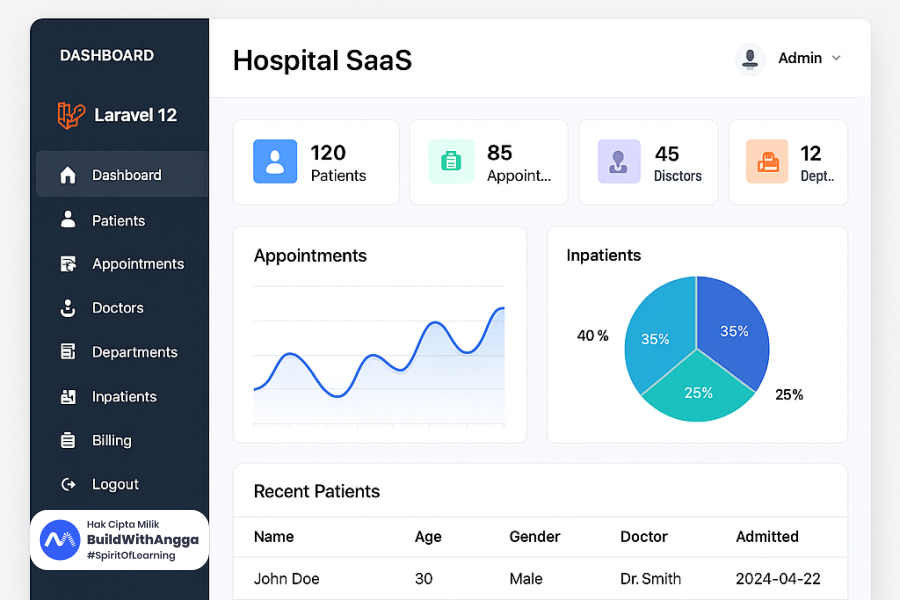
Paada tutorial ini, kita akan membangun Sistem Informasi Rumah Sakit yang mencakup pengelolaan data dokter, pasien, dan poli (departemen).
Sistem ini akan memiliki fitur-fitur berikut:
- Manajemen data Poli (Departemen Rumah Sakit)
- Manajemen data Dokter (terhubung dengan Poli)
- Manajemen data Pasien
- Autentikasi API menggunakan Laravel Sanctum
- Pengujian API menggunakan Postman
Bagian 1: Membuat Proyek Laravel 12 dan Konfigurasi Database
1.1 Membuat Proyek Laravel 12
Pastikan Anda sudah menginstal Composer dan memiliki PHP versi terbaru. Jalankan perintah berikut di terminal:
composer create-project laravel/laravel sistem-rumah-sakit
Masuk ke dalam direktori proyek:
cd sistem-rumah-sakit
1.2 Mengatur File .env untuk Koneksi Database
Buka file .env yang ada di root proyek dan ubah konfigurasi database sesuai dengan MySQL Anda:
DB_CONNECTION=mysql
DB_HOST=127.0.0.1
DB_PORT=3306
DB_DATABASE=db_rumah_sakit
DB_USERNAME=root
DB_PASSWORD=yourpassword
Buat database baru di MySQL:
CREATE DATABASE db_rumah_sakit;
1.3 Menjalankan Migrasi Awal
Jalankan perintah berikut untuk membuat tabel-tabel default Laravel:
php artisan migrate
1.4 Menjalankan Server Development
php artisan serve
Aplikasi dapat diakses melalui browser di alamat: http://127.0.0.1:8000
Bagian 2: Membuat Model dan Migration
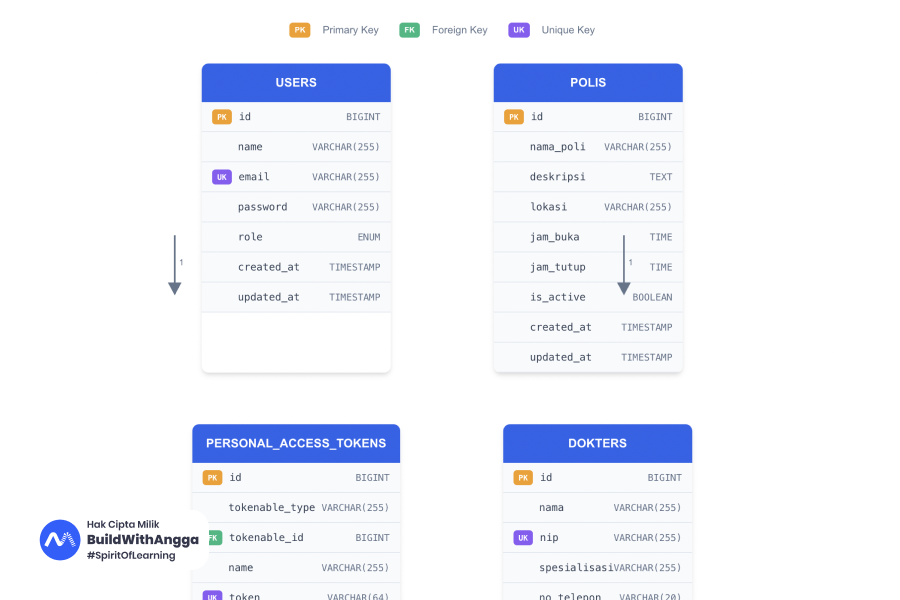
Dalam sistem rumah sakit ini, kita membutuhkan tiga entitas utama:
- Poli - Departemen/unit layanan rumah sakit (contoh: Poli Umum, Poli Gigi, Poli Anak)
- Dokter - Tenaga medis yang bertugas di poli tertentu
- Pasien - Orang yang berobat di rumah sakit
2.1 Membuat Model dan Migration
Jalankan perintah berikut untuk membuat model beserta file migration:
php artisan make:model Poli -m
php artisan make:model Dokter -m
php artisan make:model Pasien -m
Opsi -m akan membuat file migration secara otomatis untuk setiap model.
2.2 Migration untuk Tabel Poli
Buka file migration di folder database/migrations dengan nama yang mengandung create_polis_table dan ubah menjadi:
<?php

use Illuminate\\Database\\Migrations\\Migration;
use Illuminate\\Database\\Schema\\Blueprint;
use Illuminate\\Support\\Facades\\Schema;

return new class extends Migration
{
    public function up(): void
    {
        Schema::create('polis', function (Blueprint $table) {
            $table->id();
            $table->string('nama_poli');
            $table->text('deskripsi')->nullable();
            $table->string('lokasi')->nullable();
            $table->time('jam_buka')->nullable();
            $table->time('jam_tutup')->nullable();
            $table->boolean('is_active')->default(true);
            $table->timestamps();
        });
    }

    public function down(): void
    {
        Schema::dropIfExists('polis');
    }
};
2.3 Migration untuk Tabel Dokter
Buka file migration dengan nama yang mengandung create_dokters_table dan ubah menjadi:
<?php

use Illuminate\\Database\\Migrations\\Migration;
use Illuminate\\Database\\Schema\\Blueprint;
use Illuminate\\Support\\Facades\\Schema;

return new class extends Migration
{
    public function up(): void
    {
        Schema::create('dokters', function (Blueprint $table) {
            $table->id();
            $table->string('nama');
            $table->string('nip')->unique();
            $table->string('spesialisasi');
            $table->string('no_telepon')->nullable();
            $table->string('email')->unique();
            $table->text('alamat')->nullable();
            $table->enum('jenis_kelamin', ['L', 'P']);
            $table->date('tanggal_lahir')->nullable();
            $table->unsignedBigInteger('poli_id');
            $table->boolean('is_active')->default(true);
            $table->timestamps();

            $table->foreign('poli_id')
                  ->references('id')
                  ->on('polis')
                  ->onDelete('cascade');
        });
    }

    public function down(): void
    {
        Schema::dropIfExists('dokters');
    }
};
2.4 Migration untuk Tabel Pasien
Buka file migration dengan nama yang mengandung create_pasiens_table dan ubah menjadi:
<?php

use Illuminate\\Database\\Migrations\\Migration;
use Illuminate\\Database\\Schema\\Blueprint;
use Illuminate\\Support\\Facades\\Schema;

return new class extends Migration
{
    public function up(): void
    {
        Schema::create('pasiens', function (Blueprint $table) {
            $table->id();
            $table->string('nama');
            $table->string('no_rm')->unique(); // Nomor Rekam Medis
            $table->string('nik')->unique();
            $table->text('alamat')->nullable();
            $table->string('no_telepon')->nullable();
            $table->enum('jenis_kelamin', ['L', 'P']);
            $table->date('tanggal_lahir');
            $table->enum('golongan_darah', ['A', 'B', 'AB', 'O'])->nullable();
            $table->text('riwayat_alergi')->nullable();
            $table->timestamps();
        });
    }

    public function down(): void
    {
        Schema::dropIfExists('pasiens');
    }
};
2.5 Migration untuk Tabel User (Admin/Staff)
Buka file migration dengan nama yang mengandung create_users_table dan sesuaikan:
<?php

use Illuminate\\Database\\Migrations\\Migration;
use Illuminate\\Database\\Schema\\Blueprint;
use Illuminate\\Support\\Facades\\Schema;

return new class extends Migration
{
    public function up(): void
    {
        Schema::create('users', function (Blueprint $table) {
            $table->id();
            $table->string('name');
            $table->string('email')->unique();
            $table->string('password');
            $table->enum('role', ['admin', 'staff', 'dokter'])->default('staff');
            $table->timestamps();
        });
    }

    public function down(): void
    {
        Schema::dropIfExists('users');
    }
};
2.6 Menjalankan Migration
Setelah semua file migration selesai diedit, jalankan perintah berikut:
php artisan migrate
Jika berhasil, tabel polis, dokters, pasiens, dan users akan dibuat dalam database.
Bagian 3: Menyesuaikan Model dengan Eloquent Relationships
3.1 Model Poli
Buka file app/Models/Poli.php dan ubah isinya menjadi:
<?php

namespace App\\Models;

use Illuminate\\Database\\Eloquent\\Factories\\HasFactory;
use Illuminate\\Database\\Eloquent\\Model;

class Poli extends Model
{
    use HasFactory;

    protected $table = 'polis';

    protected $fillable = [
        'nama_poli',
        'deskripsi',
        'lokasi',
        'jam_buka',
        'jam_tutup',
        'is_active'
    ];

    protected $casts = [
        'is_active' => 'boolean',
        'jam_buka' => 'datetime:H:i',
        'jam_tutup' => 'datetime:H:i',
    ];

    // Relasi: Satu Poli memiliki banyak Dokter
    public function dokters()
    {
        return $this->hasMany(Dokter::class);
    }
}
3.2 Model Dokter
Buka file app/Models/Dokter.php dan ubah isinya menjadi:
<?php

namespace App\\Models;

use Illuminate\\Database\\Eloquent\\Factories\\HasFactory;
use Illuminate\\Database\\Eloquent\\Model;

class Dokter extends Model
{
    use HasFactory;

    protected $table = 'dokters';

    protected $fillable = [
        'nama',
        'nip',
        'spesialisasi',
        'no_telepon',
        'email',
        'alamat',
        'jenis_kelamin',
        'tanggal_lahir',
        'poli_id',
        'is_active'
    ];

    protected $casts = [
        'tanggal_lahir' => 'date',
        'is_active' => 'boolean',
    ];

    // Relasi: Dokter milik satu Poli
    public function poli()
    {
        return $this->belongsTo(Poli::class);
    }
}
3.3 Model Pasien
Buka file app/Models/Pasien.php dan ubah isinya menjadi:
<?php

namespace App\\Models;

use Illuminate\\Database\\Eloquent\\Factories\\HasFactory;
use Illuminate\\Database\\Eloquent\\Model;

class Pasien extends Model
{
    use HasFactory;

    protected $table = 'pasiens';

    protected $fillable = [
        'nama',
        'no_rm',
        'nik',
        'alamat',
        'no_telepon',
        'jenis_kelamin',
        'tanggal_lahir',
        'golongan_darah',
        'riwayat_alergi'
    ];

    protected $casts = [
        'tanggal_lahir' => 'date',
    ];

    // Method untuk generate nomor rekam medis otomatis
    public static function generateNoRM()
    {
        $lastPasien = self::orderBy('id', 'desc')->first();
        $lastNumber = $lastPasien ? intval(substr($lastPasien->no_rm, 3)) : 0;
        return 'RM-' . str_pad($lastNumber + 1, 6, '0', STR_PAD_LEFT);
    }
}
3.4 Model User
Buka file app/Models/User.php dan sesuaikan isinya:
<?php

namespace App\\Models;

use Illuminate\\Database\\Eloquent\\Factories\\HasFactory;
use Illuminate\\Foundation\\Auth\\User as Authenticatable;
use Illuminate\\Notifications\\Notifiable;
use Laravel\\Sanctum\\HasApiTokens;

class User extends Authenticatable
{
    use HasApiTokens, HasFactory, Notifiable;

    protected $fillable = [
        'name',
        'email',
        'password',
        'role'
    ];

    protected $hidden = [
        'password',
    ];

    protected $casts = [
        'password' => 'hashed',
    ];
}
Bagian 4: Membuat Factory untuk Data Dummy
Factory digunakan untuk menghasilkan data dummy secara otomatis untuk keperluan testing dan development.
4.1 Membuat Factory
Jalankan perintah berikut:
php artisan make:factory PoliFactory --model=Poli
php artisan make:factory DokterFactory --model=Dokter
php artisan make:factory PasienFactory --model=Pasien
php artisan make:factory UserFactory --model=User
4.2 PoliFactory
Buka file database/factories/PoliFactory.php dan isi dengan:
<?php

namespace Database\\Factories;

use App\\Models\\Poli;
use Illuminate\\Database\\Eloquent\\Factories\\Factory;

class PoliFactory extends Factory
{
    protected $model = Poli::class;

    public function definition(): array
    {
        $polis = [
            ['nama' => 'Poli Umum', 'deskripsi' => 'Layanan kesehatan umum untuk pasien dewasa'],
            ['nama' => 'Poli Gigi', 'deskripsi' => 'Layanan kesehatan gigi dan mulut'],
            ['nama' => 'Poli Anak', 'deskripsi' => 'Layanan kesehatan untuk pasien anak-anak'],
            ['nama' => 'Poli Mata', 'deskripsi' => 'Layanan kesehatan mata'],
            ['nama' => 'Poli Jantung', 'deskripsi' => 'Layanan kesehatan jantung dan pembuluh darah'],
            ['nama' => 'Poli Kulit', 'deskripsi' => 'Layanan kesehatan kulit dan kelamin'],
            ['nama' => 'Poli Saraf', 'deskripsi' => 'Layanan kesehatan sistem saraf'],
            ['nama' => 'Poli Bedah', 'deskripsi' => 'Layanan konsultasi dan tindakan bedah'],
            ['nama' => 'Poli Kandungan', 'deskripsi' => 'Layanan kesehatan ibu dan kandungan'],
            ['nama' => 'Poli THT', 'deskripsi' => 'Layanan kesehatan telinga, hidung, dan tenggorokan'],
        ];

        $poli = $this->faker->unique()->randomElement($polis);

        return [
            'nama_poli' => $poli['nama'],
            'deskripsi' => $poli['deskripsi'],
            'lokasi' => 'Gedung ' . $this->faker->randomElement(['A', 'B', 'C']) . ' Lantai ' . $this->faker->numberBetween(1, 3),
            'jam_buka' => '08:00',
            'jam_tutup' => '16:00',
            'is_active' => true,
        ];
    }
}
4.3 DokterFactory
Buka file database/factories/DokterFactory.php dan isi dengan:
<?php

namespace Database\\Factories;

use App\\Models\\Dokter;
use App\\Models\\Poli;
use Illuminate\\Database\\Eloquent\\Factories\\Factory;

class DokterFactory extends Factory
{
    protected $model = Dokter::class;

    public function definition(): array
    {
        $spesialisasi = [
            'Dokter Umum',
            'Dokter Gigi',
            'Dokter Spesialis Anak',
            'Dokter Spesialis Mata',
            'Dokter Spesialis Jantung',
            'Dokter Spesialis Kulit',
            'Dokter Spesialis Saraf',
            'Dokter Spesialis Bedah',
            'Dokter Spesialis Kandungan',
            'Dokter Spesialis THT',
        ];

        $gender = $this->faker->randomElement(['L', 'P']);
        $firstName = $gender === 'L'
            ? $this->faker->firstNameMale()
            : $this->faker->firstNameFemale();

        return [
            'nama' => 'dr. ' . $firstName . ' ' . $this->faker->lastName(),
            'nip' => $this->faker->unique()->numerify('NIP##########'),
            'spesialisasi' => $this->faker->randomElement($spesialisasi),
            'no_telepon' => $this->faker->phoneNumber(),
            'email' => $this->faker->unique()->safeEmail(),
            'alamat' => $this->faker->address(),
            'jenis_kelamin' => $gender,
            'tanggal_lahir' => $this->faker->dateTimeBetween('-60 years', '-30 years'),
            'poli_id' => Poli::factory(),
            'is_active' => true,
        ];
    }
}
4.4 PasienFactory
Buka file database/factories/PasienFactory.php dan isi dengan:
<?php

namespace Database\\Factories;

use App\\Models\\Pasien;
use Illuminate\\Database\\Eloquent\\Factories\\Factory;

class PasienFactory extends Factory
{
    protected $model = Pasien::class;

    private static $rmCounter = 1;

    public function definition(): array
    {
        $gender = $this->faker->randomElement(['L', 'P']);
        $firstName = $gender === 'L'
            ? $this->faker->firstNameMale()
            : $this->faker->firstNameFemale();

        $noRM = 'RM-' . str_pad(self::$rmCounter++, 6, '0', STR_PAD_LEFT);

        return [
            'nama' => $firstName . ' ' . $this->faker->lastName(),
            'no_rm' => $noRM,
            'nik' => $this->faker->unique()->numerify('################'),
            'alamat' => $this->faker->address(),
            'no_telepon' => $this->faker->phoneNumber(),
            'jenis_kelamin' => $gender,
            'tanggal_lahir' => $this->faker->dateTimeBetween('-80 years', '-1 years'),
            'golongan_darah' => $this->faker->randomElement(['A', 'B', 'AB', 'O']),
            'riwayat_alergi' => $this->faker->optional(0.3)->randomElement([
                'Penisilin',
                'Sulfa',
                'Aspirin',
                'Seafood',
                'Kacang-kacangan',
                null
            ]),
        ];
    }
}
4.5 UserFactory
Buka file database/factories/UserFactory.php dan isi dengan:
<?php

namespace Database\\Factories;

use App\\Models\\User;
use Illuminate\\Database\\Eloquent\\Factories\\Factory;
use Illuminate\\Support\\Str;

class UserFactory extends Factory
{
    protected $model = User::class;

    public function definition(): array
    {
        return [
            'name' => $this->faker->name(),
            'email' => $this->faker->unique()->safeEmail(),
            'password' => bcrypt('password123'),
            'role' => $this->faker->randomElement(['admin', 'staff', 'dokter']),
        ];
    }

    // State untuk membuat admin
    public function admin(): static
    {
        return $this->state(fn (array $attributes) => [
            'role' => 'admin',
        ]);
    }

    // State untuk membuat staff
    public function staff(): static
    {
        return $this->state(fn (array $attributes) => [
            'role' => 'staff',
        ]);
    }
}
Struktur Folder Proyek
sistem-rumah-sakit/
├── app/
│   ├── Http/
│   │   └── Controllers/
│   │       └── API/
│   │           ├── AuthController.php
│   │           ├── PoliController.php
│   │           ├── DokterController.php
│   │           └── PasienController.php
│   ├── Models/
│   │   ├── User.php
│   │   ├── Poli.php
│   │   ├── Dokter.php
│   │   └── Pasien.php
│   ├── Repositories/
│   │   ├── PoliRepository.php
│   │   ├── DokterRepository.php
│   │   └── PasienRepository.php
│   └── Services/
│       ├── PoliService.php
│       ├── DokterService.php
│       └── PasienService.php
├── database/
│   ├── factories/
│   │   ├── UserFactory.php
│   │   ├── PoliFactory.php
│   │   ├── DokterFactory.php
│   │   └── PasienFactory.php
│   ├── migrations/
│   │   ├── create_users_table.php
│   │   ├── create_polis_table.php
│   │   ├── create_dokters_table.php
│   │   └── create_pasiens_table.php
│   └── seeders/
│       ├── DatabaseSeeder.php
│       ├── UserSeeder.php
│       ├── PoliSeeder.php
│       ├── DokterSeeder.php
│       └── PasienSeeder.php
└── routes/
    └── api.php
Bagian 5: Membuat Seeder
Seeder digunakan untuk mengisi database dengan data awal atau data dummy.
5.1 Membuat Seeder
Jalankan perintah berikut:
php artisan make:seeder PoliSeeder
php artisan make:seeder DokterSeeder
php artisan make:seeder PasienSeeder
php artisan make:seeder UserSeeder
5.2 PoliSeeder
Buka file database/seeders/PoliSeeder.php dan isi dengan:
<?php

namespace Database\\Seeders;

use Illuminate\\Database\\Seeder;
use App\\Models\\Poli;

class PoliSeeder extends Seeder
{
    public function run(): void
    {
        $polis = [
            [
                'nama_poli' => 'Poli Umum',
                'deskripsi' => 'Layanan kesehatan umum untuk pasien dewasa',
                'lokasi' => 'Gedung A Lantai 1',
                'jam_buka' => '08:00',
                'jam_tutup' => '16:00',
                'is_active' => true,
            ],
            [
                'nama_poli' => 'Poli Gigi',
                'deskripsi' => 'Layanan kesehatan gigi dan mulut',
                'lokasi' => 'Gedung A Lantai 2',
                'jam_buka' => '08:00',
                'jam_tutup' => '14:00',
                'is_active' => true,
            ],
            [
                'nama_poli' => 'Poli Anak',
                'deskripsi' => 'Layanan kesehatan untuk pasien anak-anak',
                'lokasi' => 'Gedung B Lantai 1',
                'jam_buka' => '08:00',
                'jam_tutup' => '16:00',
                'is_active' => true,
            ],
            [
                'nama_poli' => 'Poli Mata',
                'deskripsi' => 'Layanan kesehatan mata',
                'lokasi' => 'Gedung B Lantai 2',
                'jam_buka' => '09:00',
                'jam_tutup' => '15:00',
                'is_active' => true,
            ],
            [
                'nama_poli' => 'Poli Jantung',
                'deskripsi' => 'Layanan kesehatan jantung dan pembuluh darah',
                'lokasi' => 'Gedung C Lantai 1',
                'jam_buka' => '08:00',
                'jam_tutup' => '14:00',
                'is_active' => true,
            ],
        ];

        foreach ($polis as $poli) {
            Poli::create($poli);
        }
    }
}
5.3 DokterSeeder
Buka file database/seeders/DokterSeeder.php dan isi dengan:
<?php

namespace Database\\Seeders;

use Illuminate\\Database\\Seeder;
use App\\Models\\Dokter;
use App\\Models\\Poli;

class DokterSeeder extends Seeder
{
    public function run(): void
    {
        $polis = Poli::all();

        foreach ($polis as $poli) {
            // Buat 2-3 dokter untuk setiap poli
            Dokter::factory()
                ->count(rand(2, 3))
                ->create(['poli_id' => $poli->id]);
        }
    }
}
5.4 PasienSeeder
Buka file database/seeders/PasienSeeder.php dan isi dengan:
<?php

namespace Database\\Seeders;

use Illuminate\\Database\\Seeder;
use App\\Models\\Pasien;

class PasienSeeder extends Seeder
{
    public function run(): void
    {
        Pasien::factory()->count(50)->create();
    }
}
5.5 UserSeeder
Buka file database/seeders/UserSeeder.php dan isi dengan:
<?php

namespace Database\\Seeders;

use Illuminate\\Database\\Seeder;
use App\\Models\\User;

class UserSeeder extends Seeder
{
    public function run(): void
    {
        // Buat admin default
        User::create([
            'name' => 'Administrator',
            'email' => '[email protected]',
            'password' => bcrypt('admin123'),
            'role' => 'admin',
        ]);

        // Buat staff default
        User::create([
            'name' => 'Staff Pendaftaran',
            'email' => '[email protected]',
            'password' => bcrypt('staff123'),
            'role' => 'staff',
        ]);

        // Buat beberapa user tambahan
        User::factory()->count(5)->create();
    }
}
5.6 DatabaseSeeder
Buka file database/seeders/DatabaseSeeder.php dan ubah menjadi:
<?php

namespace Database\\Seeders;

use Illuminate\\Database\\Seeder;

class DatabaseSeeder extends Seeder
{
    public function run(): void
    {
        $this->call([
            UserSeeder::class,
            PoliSeeder::class,
            DokterSeeder::class,
            PasienSeeder::class,
        ]);
    }
}
5.7 Menjalankan Seeder
Jalankan perintah berikut untuk mengisi database dengan data dummy:
php artisan db:seed
Atau untuk mengosongkan database dan menjalankan ulang migration + seeder:
php artisan migrate:fresh --seed
Bagian 6: Menerapkan Service Repository Pattern
Service Repository Pattern membantu memisahkan logika bisnis dari controller, sehingga kode lebih bersih, terstruktur, dan mudah dipelihara.
6.1 Membuat Repository untuk Poli
Buat folder app/Repositories, lalu buat file PoliRepository.php:
<?php

namespace App\\Repositories;

use App\\Models\\Poli;

class PoliRepository
{
    public function getAll()
    {
        return Poli::with('dokters')->get();
    }

    public function getActive()
    {
        return Poli::where('is_active', true)->with('dokters')->get();
    }

    public function findById($id)
    {
        return Poli::with('dokters')->findOrFail($id);
    }

    public function create(array $data)
    {
        return Poli::create($data);
    }

    public function update($id, array $data)
    {
        $poli = Poli::findOrFail($id);
        $poli->update($data);
        return $poli;
    }

    public function delete($id)
    {
        $poli = Poli::findOrFail($id);
        return $poli->delete();
    }
}
6.2 Membuat Service untuk Poli
Buat folder app/Services, lalu buat file PoliService.php:
<?php

namespace App\\Services;

use App\\Repositories\\PoliRepository;

class PoliService
{
    protected $poliRepository;

    public function __construct(PoliRepository $poliRepository)
    {
        $this->poliRepository = $poliRepository;
    }

    public function getAllPoli()
    {
        return $this->poliRepository->getAll();
    }

    public function getActivePoli()
    {
        return $this->poliRepository->getActive();
    }

    public function getPoliById($id)
    {
        return $this->poliRepository->findById($id);
    }

    public function createPoli(array $data)
    {
        return $this->poliRepository->create($data);
    }

    public function updatePoli($id, array $data)
    {
        return $this->poliRepository->update($id, $data);
    }

    public function deletePoli($id)
    {
        return $this->poliRepository->delete($id);
    }
}
6.3 Membuat Repository untuk Dokter
Buat file app/Repositories/DokterRepository.php:
<?php

namespace App\\Repositories;

use App\\Models\\Dokter;

class DokterRepository
{
    public function getAll()
    {
        return Dokter::with('poli')->get();
    }

    public function getByPoli($poliId)
    {
        return Dokter::where('poli_id', $poliId)
                     ->where('is_active', true)
                     ->get();
    }

    public function findById($id)
    {
        return Dokter::with('poli')->findOrFail($id);
    }

    public function create(array $data)
    {
        return Dokter::create($data);
    }

    public function update($id, array $data)
    {
        $dokter = Dokter::findOrFail($id);
        $dokter->update($data);
        return $dokter;
    }

    public function delete($id)
    {
        $dokter = Dokter::findOrFail($id);
        return $dokter->delete();
    }
}
6.4 Membuat Service untuk Dokter
Buat file app/Services/DokterService.php:
<?php

namespace App\\Services;

use App\\Repositories\\DokterRepository;

class DokterService
{
    protected $dokterRepository;

    public function __construct(DokterRepository $dokterRepository)
    {
        $this->dokterRepository = $dokterRepository;
    }

    public function getAllDokter()
    {
        return $this->dokterRepository->getAll();
    }

    public function getDokterByPoli($poliId)
    {
        return $this->dokterRepository->getByPoli($poliId);
    }

    public function getDokterById($id)
    {
        return $this->dokterRepository->findById($id);
    }

    public function createDokter(array $data)
    {
        return $this->dokterRepository->create($data);
    }

    public function updateDokter($id, array $data)
    {
        return $this->dokterRepository->update($id, $data);
    }

    public function deleteDokter($id)
    {
        return $this->dokterRepository->delete($id);
    }
}
6.5 Membuat Repository untuk Pasien
Buat file app/Repositories/PasienRepository.php:
<?php

namespace App\\Repositories;

use App\\Models\\Pasien;

class PasienRepository
{
    public function getAll()
    {
        return Pasien::orderBy('created_at', 'desc')->get();
    }

    public function findById($id)
    {
        return Pasien::findOrFail($id);
    }

    public function findByNoRM($noRM)
    {
        return Pasien::where('no_rm', $noRM)->first();
    }

    public function findByNIK($nik)
    {
        return Pasien::where('nik', $nik)->first();
    }

    public function search($keyword)
    {
        return Pasien::where('nama', 'like', "%{$keyword}%")
                     ->orWhere('no_rm', 'like', "%{$keyword}%")
                     ->orWhere('nik', 'like', "%{$keyword}%")
                     ->get();
    }

    public function create(array $data)
    {
        // Generate nomor rekam medis jika tidak ada
        if (!isset($data['no_rm'])) {
            $data['no_rm'] = Pasien::generateNoRM();
        }
        return Pasien::create($data);
    }

    public function update($id, array $data)
    {
        $pasien = Pasien::findOrFail($id);
        $pasien->update($data);
        return $pasien;
    }

    public function delete($id)
    {
        $pasien = Pasien::findOrFail($id);
        return $pasien->delete();
    }
}
6.6 Membuat Service untuk Pasien
Buat file app/Services/PasienService.php:
<?php

namespace App\\Services;

use App\\Repositories\\PasienRepository;

class PasienService
{
    protected $pasienRepository;

    public function __construct(PasienRepository $pasienRepository)
    {
        $this->pasienRepository = $pasienRepository;
    }

    public function getAllPasien()
    {
        return $this->pasienRepository->getAll();
    }

    public function getPasienById($id)
    {
        return $this->pasienRepository->findById($id);
    }

    public function getPasienByNoRM($noRM)
    {
        return $this->pasienRepository->findByNoRM($noRM);
    }

    public function searchPasien($keyword)
    {
        return $this->pasienRepository->search($keyword);
    }

    public function createPasien(array $data)
    {
        return $this->pasienRepository->create($data);
    }

    public function updatePasien($id, array $data)
    {
        return $this->pasienRepository->update($id, $data);
    }

    public function deletePasien($id)
    {
        return $this->pasienRepository->delete($id);
    }
}
Bagian 7: Membuat API Controller
7.1 Membuat PoliController
Jalankan perintah:
php artisan make:controller API/PoliController
Buka file app/Http/Controllers/API/PoliController.php dan isi dengan:
<?php

namespace App\\Http\\Controllers\\API;

use App\\Http\\Controllers\\Controller;
use App\\Services\\PoliService;
use Illuminate\\Http\\Request;
use Illuminate\\Http\\JsonResponse;

class PoliController extends Controller
{
    protected $poliService;

    public function __construct(PoliService $poliService)
    {
        $this->poliService = $poliService;
    }

    public function index(): JsonResponse
    {
        $polis = $this->poliService->getAllPoli();
        return response()->json([
            'success' => true,
            'message' => 'Daftar semua poli',
            'data' => $polis
        ]);
    }

    public function store(Request $request): JsonResponse
    {
        $validated = $request->validate([
            'nama_poli' => 'required|string|max:255',
            'deskripsi' => 'nullable|string',
            'lokasi' => 'nullable|string|max:255',
            'jam_buka' => 'nullable|date_format:H:i',
            'jam_tutup' => 'nullable|date_format:H:i',
            'is_active' => 'boolean'
        ]);

        $poli = $this->poliService->createPoli($validated);

        return response()->json([
            'success' => true,
            'message' => 'Poli berhasil ditambahkan',
            'data' => $poli
        ], 201);
    }

    public function show($id): JsonResponse
    {
        $poli = $this->poliService->getPoliById($id);
        return response()->json([
            'success' => true,
            'message' => 'Detail poli',
            'data' => $poli
        ]);
    }

    public function update(Request $request, $id): JsonResponse
    {
        $validated = $request->validate([
            'nama_poli' => 'required|string|max:255',
            'deskripsi' => 'nullable|string',
            'lokasi' => 'nullable|string|max:255',
            'jam_buka' => 'nullable|date_format:H:i',
            'jam_tutup' => 'nullable|date_format:H:i',
            'is_active' => 'boolean'
        ]);

        $poli = $this->poliService->updatePoli($id, $validated);

        return response()->json([
            'success' => true,
            'message' => 'Poli berhasil diperbarui',
            'data' => $poli
        ]);
    }

    public function destroy($id): JsonResponse
    {
        $this->poliService->deletePoli($id);

        return response()->json([
            'success' => true,
            'message' => 'Poli berhasil dihapus'
        ]);
    }
}
7.2 Membuat DokterController
Jalankan perintah:
php artisan make:controller API/DokterController
Buka file app/Http/Controllers/API/DokterController.php dan isi dengan:
<?php

namespace App\\Http\\Controllers\\API;

use App\\Http\\Controllers\\Controller;
use App\\Services\\DokterService;
use Illuminate\\Http\\Request;
use Illuminate\\Http\\JsonResponse;

class DokterController extends Controller
{
    protected $dokterService;

    public function __construct(DokterService $dokterService)
    {
        $this->dokterService = $dokterService;
    }

    public function index(): JsonResponse
    {
        $dokters = $this->dokterService->getAllDokter();
        return response()->json([
            'success' => true,
            'message' => 'Daftar semua dokter',
            'data' => $dokters
        ]);
    }

    public function byPoli($poliId): JsonResponse
    {
        $dokters = $this->dokterService->getDokterByPoli($poliId);
        return response()->json([
            'success' => true,
            'message' => 'Daftar dokter berdasarkan poli',
            'data' => $dokters
        ]);
    }

    public function store(Request $request): JsonResponse
    {
        $validated = $request->validate([
            'nama' => 'required|string|max:255',
            'nip' => 'required|string|unique:dokters,nip',
            'spesialisasi' => 'required|string|max:255',
            'no_telepon' => 'nullable|string|max:20',
            'email' => 'required|email|unique:dokters,email',
            'alamat' => 'nullable|string',
            'jenis_kelamin' => 'required|in:L,P',
            'tanggal_lahir' => 'nullable|date',
            'poli_id' => 'required|exists:polis,id',
            'is_active' => 'boolean'
        ]);

        $dokter = $this->dokterService->createDokter($validated);

        return response()->json([
            'success' => true,
            'message' => 'Dokter berhasil ditambahkan',
            'data' => $dokter
        ], 201);
    }

    public function show($id): JsonResponse
    {
        $dokter = $this->dokterService->getDokterById($id);
        return response()->json([
            'success' => true,
            'message' => 'Detail dokter',
            'data' => $dokter
        ]);
    }

    public function update(Request $request, $id): JsonResponse
    {
        $validated = $request->validate([
            'nama' => 'required|string|max:255',
            'nip' => 'required|string|unique:dokters,nip,' . $id,
            'spesialisasi' => 'required|string|max:255',
            'no_telepon' => 'nullable|string|max:20',
            'email' => 'required|email|unique:dokters,email,' . $id,
            'alamat' => 'nullable|string',
            'jenis_kelamin' => 'required|in:L,P',
            'tanggal_lahir' => 'nullable|date',
            'poli_id' => 'required|exists:polis,id',
            'is_active' => 'boolean'
        ]);

        $dokter = $this->dokterService->updateDokter($id, $validated);

        return response()->json([
            'success' => true,
            'message' => 'Dokter berhasil diperbarui',
            'data' => $dokter
        ]);
    }

    public function destroy($id): JsonResponse
    {
        $this->dokterService->deleteDokter($id);

        return response()->json([
            'success' => true,
            'message' => 'Dokter berhasil dihapus'
        ]);
    }
}
7.3 Membuat PasienController
Jalankan perintah:
php artisan make:controller API/PasienController
Buka file app/Http/Controllers/API/PasienController.php dan isi dengan:
<?php

namespace App\\Http\\Controllers\\API;

use App\\Http\\Controllers\\Controller;
use App\\Services\\PasienService;
use Illuminate\\Http\\Request;
use Illuminate\\Http\\JsonResponse;

class PasienController extends Controller
{
    protected $pasienService;

    public function __construct(PasienService $pasienService)
    {
        $this->pasienService = $pasienService;
    }

    public function index(): JsonResponse
    {
        $pasiens = $this->pasienService->getAllPasien();
        return response()->json([
            'success' => true,
            'message' => 'Daftar semua pasien',
            'data' => $pasiens
        ]);
    }

    public function search(Request $request): JsonResponse
    {
        $keyword = $request->query('q');
        $pasiens = $this->pasienService->searchPasien($keyword);
        return response()->json([
            'success' => true,
            'message' => 'Hasil pencarian pasien',
            'data' => $pasiens
        ]);
    }

    public function store(Request $request): JsonResponse
    {
        $validated = $request->validate([
            'nama' => 'required|string|max:255',
            'nik' => 'required|string|size:16|unique:pasiens,nik',
            'alamat' => 'nullable|string',
            'no_telepon' => 'nullable|string|max:20',
            'jenis_kelamin' => 'required|in:L,P',
            'tanggal_lahir' => 'required|date',
            'golongan_darah' => 'nullable|in:A,B,AB,O',
            'riwayat_alergi' => 'nullable|string'
        ]);

        $pasien = $this->pasienService->createPasien($validated);

        return response()->json([
            'success' => true,
            'message' => 'Pasien berhasil didaftarkan',
            'data' => $pasien
        ], 201);
    }

    public function show($id): JsonResponse
    {
        $pasien = $this->pasienService->getPasienById($id);
        return response()->json([
            'success' => true,
            'message' => 'Detail pasien',
            'data' => $pasien
        ]);
    }

    public function showByNoRM($noRM): JsonResponse
    {
        $pasien = $this->pasienService->getPasienByNoRM($noRM);

        if (!$pasien) {
            return response()->json([
                'success' => false,
                'message' => 'Pasien tidak ditemukan'
            ], 404);
        }

        return response()->json([
            'success' => true,
            'message' => 'Detail pasien',
            'data' => $pasien
        ]);
    }

    public function update(Request $request, $id): JsonResponse
    {
        $validated = $request->validate([
            'nama' => 'required|string|max:255',
            'nik' => 'required|string|size:16|unique:pasiens,nik,' . $id,
            'alamat' => 'nullable|string',
            'no_telepon' => 'nullable|string|max:20',
            'jenis_kelamin' => 'required|in:L,P',
            'tanggal_lahir' => 'required|date',
            'golongan_darah' => 'nullable|in:A,B,AB,O',
            'riwayat_alergi' => 'nullable|string'
        ]);

        $pasien = $this->pasienService->updatePasien($id, $validated);

        return response()->json([
            'success' => true,
            'message' => 'Data pasien berhasil diperbarui',
            'data' => $pasien
        ]);
    }

    public function destroy($id): JsonResponse
    {
        $this->pasienService->deletePasien($id);

        return response()->json([
            'success' => true,
            'message' => 'Data pasien berhasil dihapus'
        ]);
    }
}
Bagian 8: Menerapkan Authentication dengan Laravel Sanctum
Laravel Sanctum menyediakan sistem autentikasi yang ringan untuk SPA (Single Page Applications), mobile applications, dan API berbasis token.
8.1 Instalasi Laravel Sanctum
Jalankan perintah berikut:
composer require laravel/sanctum
Publikasikan konfigurasi Sanctum:
php artisan vendor:publish --provider="Laravel\\Sanctum\\SanctumServiceProvider"
Jalankan migrasi untuk membuat tabel personal_access_tokens:
php artisan migrate
8.2 Konfigurasi Middleware
Pastikan model User sudah menggunakan trait HasApiTokens (sudah dilakukan di Bagian 3.4).
Buka file bootstrap/app.php dan pastikan konfigurasi untuk API:
<?php

use Illuminate\\Foundation\\Application;
use Illuminate\\Foundation\\Configuration\\Exceptions;
use Illuminate\\Foundation\\Configuration\\Middleware;

return Application::configure(basePath: dirname(__DIR__))
    ->withRouting(
        web: __DIR__.'/../routes/web.php',
        api: __DIR__.'/../routes/api.php',
        commands: __DIR__.'/../routes/console.php',
        health: '/up',
    )
    ->withMiddleware(function (Middleware $middleware) {
        $middleware->api(prepend: [
            \\Laravel\\Sanctum\\Http\\Middleware\\EnsureFrontendRequestsAreStateful::class,
        ]);
    })
    ->withExceptions(function (Exceptions $exceptions) {
        //
    })->create();
8.3 Membuat AuthController
Jalankan perintah:
php artisan make:controller API/AuthController
Buka file app/Http/Controllers/API/AuthController.php dan isi dengan:
<?php

namespace App\\Http\\Controllers\\API;

use App\\Http\\Controllers\\Controller;
use App\\Models\\User;
use Illuminate\\Http\\Request;
use Illuminate\\Http\\JsonResponse;
use Illuminate\\Support\\Facades\\Hash;
use Illuminate\\Validation\\ValidationException;

class AuthController extends Controller
{
    public function register(Request $request): JsonResponse
    {
        $validated = $request->validate([
            'name' => 'required|string|max:255',
            'email' => 'required|string|email|unique:users,email',
            'password' => 'required|string|min:8|confirmed',
            'role' => 'in:admin,staff,dokter'
        ]);

        $user = User::create([
            'name' => $validated['name'],
            'email' => $validated['email'],
            'password' => Hash::make($validated['password']),
            'role' => $validated['role'] ?? 'staff',
        ]);

        $token = $user->createToken('auth_token')->plainTextToken;

        return response()->json([
            'success' => true,
            'message' => 'Registrasi berhasil',
            'data' => [
                'user' => $user,
                'token' => $token,
                'token_type' => 'Bearer'
            ]
        ], 201);
    }

    public function login(Request $request): JsonResponse
    {
        $validated = $request->validate([
            'email' => 'required|string|email',
            'password' => 'required|string',
        ]);

        $user = User::where('email', $validated['email'])->first();

        if (!$user || !Hash::check($validated['password'], $user->password)) {
            throw ValidationException::withMessages([
                'email' => ['Email atau password salah.'],
            ]);
        }

        $token = $user->createToken('auth_token')->plainTextToken;

        return response()->json([
            'success' => true,
            'message' => 'Login berhasil',
            'data' => [
                'user' => $user,
                'token' => $token,
                'token_type' => 'Bearer'
            ]
        ]);
    }

    public function logout(Request $request): JsonResponse
    {
        $request->user()->currentAccessToken()->delete();

        return response()->json([
            'success' => true,
            'message' => 'Logout berhasil'
        ]);
    }

    public function me(Request $request): JsonResponse
    {
        return response()->json([
            'success' => true,
            'message' => 'Data user',
            'data' => $request->user()
        ]);
    }
}
Bagian 9: Mengatur Routes API
Buka file routes/api.php dan ubah isinya menjadi:
<?php

use App\\Http\\Controllers\\API\\AuthController;
use App\\Http\\Controllers\\API\\PoliController;
use App\\Http\\Controllers\\API\\DokterController;
use App\\Http\\Controllers\\API\\PasienController;
use Illuminate\\Support\\Facades\\Route;

// Routes Publik (tanpa autentikasi)
Route::post('/register', [AuthController::class, 'register']);
Route::post('/login', [AuthController::class, 'login']);

// Routes yang Memerlukan Autentikasi
Route::middleware('auth:sanctum')->group(function () {

    // Auth Routes
    Route::post('/logout', [AuthController::class, 'logout']);
    Route::get('/me', [AuthController::class, 'me']);

    // Poli Routes
    Route::get('/poli', [PoliController::class, 'index']);
    Route::post('/poli', [PoliController::class, 'store']);
    Route::get('/poli/{id}', [PoliController::class, 'show']);
    Route::put('/poli/{id}', [PoliController::class, 'update']);
    Route::delete('/poli/{id}', [PoliController::class, 'destroy']);

    // Dokter Routes
    Route::get('/dokter', [DokterController::class, 'index']);
    Route::get('/dokter/poli/{poliId}', [DokterController::class, 'byPoli']);
    Route::post('/dokter', [DokterController::class, 'store']);
    Route::get('/dokter/{id}', [DokterController::class, 'show']);
    Route::put('/dokter/{id}', [DokterController::class, 'update']);
    Route::delete('/dokter/{id}', [DokterController::class, 'destroy']);

    // Pasien Routes
    Route::get('/pasien', [PasienController::class, 'index']);
    Route::get('/pasien/search', [PasienController::class, 'search']);
    Route::get('/pasien/rm/{noRM}', [PasienController::class, 'showByNoRM']);
    Route::post('/pasien', [PasienController::class, 'store']);
    Route::get('/pasien/{id}', [PasienController::class, 'show']);
    Route::put('/pasien/{id}', [PasienController::class, 'update']);
    Route::delete('/pasien/{id}', [PasienController::class, 'destroy']);
});
Bagian 10: Pengujian API dengan Postman
10.1 Register User
Request:
- Method:
POST - URL:
http://127.0.0.1:8000/api/register - Headers:
Content-Type: application/json - Body (JSON):
{
    "name": "Admin Rumah Sakit",
    "email": "[email protected]",
    "password": "password123",
    "password_confirmation": "password123",
    "role": "admin"
}
Response:
{
    "success": true,
    "message": "Registrasi berhasil",
    "data": {
        "user": {
            "id": 1,
            "name": "Admin Rumah Sakit",
            "email": "[email protected]",
            "role": "admin"
        },
        "token": "1|abcdefghijklmnopqrstuvwxyz...",
        "token_type": "Bearer"
    }
}
10.2 Login User
Request:
- Method:
POST - URL:
http://127.0.0.1:8000/api/login - Headers:
Content-Type: application/json - Body (JSON):
{
    "email": "[email protected]",
    "password": "password123"
}
Response:
{
    "success": true,
    "message": "Login berhasil",
    "data": {
        "user": {...},
        "token": "2|xyz123...",
        "token_type": "Bearer"
    }
}
10.3 Akses API Tanpa Token (Unauthenticated)
Request:
- Method:
GET - URL:
http://127.0.0.1:8000/api/poli
Response:
{
    "message": "Unauthenticated."
}
10.4 Akses API dengan Token
Untuk semua request berikutnya, tambahkan header:
Authorization: Bearer {token_yang_didapat_saat_login}
10.5 CRUD Poli
Mendapatkan Semua Poli:
- Method:
GET - URL:
http://127.0.0.1:8000/api/poli - Headers:
Authorization: Bearer {token}
Menambahkan Poli Baru:
- Method:
POST - URL:
http://127.0.0.1:8000/api/poli - Headers:
Authorization: Bearer {token}Content-Type: application/json
- Body:
{
    "nama_poli": "Poli Paru",
    "deskripsi": "Layanan kesehatan paru-paru dan pernapasan",
    "lokasi": "Gedung D Lantai 1",
    "jam_buka": "08:00",
    "jam_tutup": "15:00",
    "is_active": true
}
Mengupdate Poli:
- Method:
PUT - URL:
http://127.0.0.1:8000/api/poli/1 - Body:
{
    "nama_poli": "Poli Umum (Updated)",
    "deskripsi": "Layanan kesehatan umum untuk semua usia",
    "lokasi": "Gedung A Lantai 1",
    "jam_buka": "07:30",
    "jam_tutup": "17:00",
    "is_active": true
}
Menghapus Poli:
- Method:
DELETE - URL:
http://127.0.0.1:8000/api/poli/1
10.6 CRUD Dokter
Mendapatkan Semua Dokter:
- Method:
GET - URL:
http://127.0.0.1:8000/api/dokter
Mendapatkan Dokter Berdasarkan Poli:
- Method:
GET - URL:
http://127.0.0.1:8000/api/dokter/poli/1
Menambahkan Dokter Baru:
- Method:
POST - URL:
http://127.0.0.1:8000/api/dokter - Body:
{
    "nama": "dr. Ahmad Wijaya, Sp.PD",
    "nip": "NIP198501012010",
    "spesialisasi": "Dokter Spesialis Penyakit Dalam",
    "no_telepon": "081234567890",
    "email": "[email protected]",
    "alamat": "Jl. Kesehatan No. 123",
    "jenis_kelamin": "L",
    "tanggal_lahir": "1985-01-01",
    "poli_id": 1,
    "is_active": true
}
10.7 CRUD Pasien
Mendapatkan Semua Pasien:
- Method:
GET - URL:
http://127.0.0.1:8000/api/pasien
Mencari Pasien:
- Method:
GET - URL:
http://127.0.0.1:8000/api/pasien/search?q=Ahmad
Mendaftarkan Pasien Baru:
- Method:
POST - URL:
http://127.0.0.1:8000/api/pasien - Body:
{
    "nama": "Budi Santoso",
    "nik": "3201234567890123",
    "alamat": "Jl. Melati No. 45, Jakarta",
    "no_telepon": "081298765432",
    "jenis_kelamin": "L",
    "tanggal_lahir": "1990-05-15",
    "golongan_darah": "O",
    "riwayat_alergi": "Tidak ada"
}
Mencari Pasien Berdasarkan No. Rekam Medis:
- Method:
GET - URL:
http://127.0.0.1:8000/api/pasien/rm/RM-000001
10.8 Logout
Request:
- Method:
POST - URL:
http://127.0.0.1:8000/api/logout - Headers:
Authorization: Bearer {token}
Response:
{
    "success": true,
    "message": "Logout berhasil"
}
Setelah logout, token tidak bisa digunakan lagi dan API akan mengembalikan pesan "Unauthenticated."
Kesimpulan
Pada tutorial ini, kita telah mempelajari:
- Pembuatan Proyek Laravel 12 - Setup proyek dari awal dengan konfigurasi database MySQL untuk sistem informasi rumah sakit.
- Model dan Migration - Membuat struktur database untuk entitas Poli, Dokter, dan Pasien dengan relasi yang tepat menggunakan Eloquent ORM.
- Factory dan Seeder - Menghasilkan data dummy yang realistis untuk testing dan development sistem rumah sakit.
- Service Repository Pattern - Memisahkan logika bisnis dari controller untuk kode yang lebih bersih, terstruktur, dan mudah dipelihara.
- Laravel Sanctum Authentication - Mengimplementasikan sistem autentikasi berbasis token untuk mengamankan API.
- RESTful API - Membuat endpoint API untuk operasi CRUD pada data poli, dokter, dan pasien.
- Pengujian dengan Postman - Menguji semua endpoint API termasuk autentikasi dan operasi CRUD.
Dengan penerapan arsitektur yang baik dan penggunaan Laravel Sanctum, sistem informasi rumah sakit ini siap dikembangkan lebih lanjut dengan fitur-fitur tambahan seperti pendaftaran kunjungan, rekam medis elektronik, jadwal dokter, dan lainnya.
Penutup dan Saran
Membangun Sistem Informasi Rumah Sakit dengan Laravel 12 merupakan langkah awal yang sangat baik untuk memahami bagaimana framework ini bekerja dalam menangani proyek nyata. Melalui tutorial ini, kita telah mempelajari berbagai konsep penting seperti Model & Migration, Eloquent Relationships, Service Repository Pattern, hingga API Authentication dengan Sanctum.
Namun, perjalanan belajar Laravel tidak berhenti di sini. Masih banyak fitur-fitur powerful yang perlu dikuasai untuk menjadi backend developer yang handal, seperti:
- Queue & Job untuk menangani proses berat di background
- Event & Listener untuk arsitektur yang lebih scalable
- Laravel Websocket untuk fitur real-time
- Payment Gateway Integration untuk sistem pembayaran
- Multi-tenancy untuk aplikasi SaaS
- Testing dengan PHPUnit dan Pest
- CI/CD & Deployment ke production server
Belajar Lebih Dalam Bersama BuildWithAngga
Belajar secara otodidak memang bisa dilakukan, namun seringkali memakan waktu lebih lama dan rentan mengalami kebingungan tanpa arahan yang jelas. Untuk itu, bagi Anda yang ingin mempercepat proses belajar dan menguasai Laravel 12 secara mendalam, belajar bersama mentor expert di BuildWithAngga adalah pilihan yang tepat.
Mengapa Harus Belajar di BuildWithAngga?
BuildWithAngga adalah platform belajar online terbaik di Indonesia yang menyediakan kelas-kelas berkualitas tinggi dengan kurikulum yang dirancang langsung oleh praktisi industri. Berikut adalah benefit kelas online paling menarik se-Indonesia yang bisa Anda dapatkan:
✅ Akses Materi Seumur Hidup
Sekali mendaftar, Anda bisa mengakses seluruh materi kelas kapan saja dan di mana saja tanpa batasan waktu. Materi akan terus di-update mengikuti perkembangan teknologi terbaru, termasuk Laravel 12 dan versi-versi selanjutnya.
✅ Belajar Langsung dari Mentor Expert
Semua materi disusun dan diajarkan oleh mentor berpengalaman yang sudah bekerja di industri teknologi. Anda tidak hanya belajar teori, tetapi juga best practice dan tips & tricks yang digunakan di dunia kerja nyata.
✅ Sertifikat Kelulusan Resmi
Setelah menyelesaikan kelas, Anda akan mendapatkan sertifikat kelulusan yang bisa digunakan untuk meningkatkan kredibilitas dan memperkuat CV Anda saat melamar pekerjaan.
✅ Portfolio Project Berkualitas
Setiap kelas dilengkapi dengan studi kasus proyek nyata yang bisa langsung Anda masukkan ke dalam portfolio. Ini sangat penting karena recruiter dan perusahaan lebih tertarik melihat hasil karya nyata dibandingkan hanya ijazah atau sertifikat.
✅ Grup Diskusi & Komunitas Aktif
Bergabung dengan komunitas learner yang aktif dan supportive. Anda bisa berdiskusi, bertanya, dan berbagi pengalaman dengan sesama developer dari seluruh Indonesia.
✅ Konsultasi dengan Mentor
Mendapatkan kesempatan untuk konsultasi langsung dengan mentor terkait materi pembelajaran, career path, atau bahkan review code project Anda.
✅ Update Materi Gratis
Teknologi terus berkembang, dan BuildWithAngga memastikan materi kelas selalu up-to-date. Setiap ada update besar seperti rilis Laravel versi baru, materi akan diperbaharui dan Anda bisa mengaksesnya secara gratis.
Kelas Laravel yang Direkomendasikan
Di BuildWithAngga, tersedia berbagai kelas Laravel dari level pemula hingga mahir yang akan membantu Anda menguasai framework ini secara komprehensif:
- Laravel untuk Pemula - Fondasi dasar Laravel
- Laravel API Development - Membangun RESTful API profesional
- Laravel Livewire - Membangun UI interaktif tanpa JavaScript
- Laravel Multi-tenant SaaS - Arsitektur aplikasi SaaS
- Laravel E-commerce - Membangun toko online lengkap
- Laravel dengan Vue.js/React - Full-stack development
Investasi Terbaik untuk Karir Anda
Waktu adalah aset paling berharga. Dengan belajar di BuildWithAngga, Anda bisa:
🚀 Menghemat waktu dengan kurikulum yang terstruktur dan terarah
💼 Siap kerja lebih cepat dengan portfolio project yang menarik
💰 Meningkatkan value sebagai developer di mata perusahaan
🌟 Membangun network dengan sesama developer Indonesia
Mulai Perjalanan Anda Sekarang!
Jangan tunda lagi untuk mengembangkan skill Anda. Kunjungi BuildWithAngga sekarang dan temukan kelas yang sesuai dengan kebutuhan belajar Anda.
"Investasi terbaik adalah investasi untuk ilmu pengetahuan. Skill yang Anda pelajari hari ini akan menentukan kesuksesan karir Anda di masa depan."
Selamat belajar dan semoga sukses menjadi Laravel Developer yang handal! 🚀